Package: Invicti AppSec Enterprise (on-premise, on-demand)
OpenAI Integration (AI Recommendation)
OpenAI is an AI research and deployment company that provides large language models (LLMs) via API. Invicti AppSec integrates with OpenAI as an AI Recommendation tool, enabling the platform to generate AI-powered remediation guidance for discovered vulnerabilities by sending vulnerability details to the OpenAI API and presenting structured fix recommendations to your security and development teams.
Overview
| Attribute | Value |
|---|---|
| Integration Type | AI Recommendation |
| Auth Method | Bearer Token (OpenAI API Key) |
| Protocol | OpenAI REST API (HTTPS) |
| Hosting | Cloud (OpenAI-managed) |
Where It Is Used in Invicti AppSec
| Page / Feature | Path | Purpose |
|---|---|---|
| AI Recommendation Settings | Integrations → AI Recommendation | Activate and configure the OpenAI connection |
| Vulnerability Detail — OpenAI Tab | Projects → Vulnerabilities → [Vulnerability] → OpenAI tab | View AI-generated remediation guidance for each individual vulnerability |
1. Integrations — AI Recommendation
Path: Integrations → AI Recommendation
This is the configuration entry point. Before OpenAI is usable anywhere in the platform, a team admin must activate it here by providing an API key. Once activated, the integration is enabled platform-wide and the OpenAI tab becomes visible on vulnerability detail pages.
2. Vulnerability Detail Page — OpenAI Tab
Path: Projects → [Project] → Vulnerabilities → [Vulnerability detail]
This is the primary place where the OpenAI integration adds value for day-to-day users.
When the integration is active, a dedicated OpenAI tab appears in the vulnerability detail panel alongside other tabs (Standards, SecureCodeWarrior, SecureFlag, Threat Intelligence, Collaboration). The tab is only rendered when the backend confirms that an AI recommendation is available for the specific vulnerability (aiRecommendation.tool === 'openai').
What the tab shows:
When the user opens the OpenAI tab on a vulnerability detail page, Invicti AppSec sends the vulnerability's data to OpenAI in the background (GET /core/vulns/{id}/recommendation/openai) and displays the response:
- OpenAI icon — visually identifies the content as AI-generated
- Remediation message — a plain-language explanation of how to fix the vulnerability, generated by OpenAI based on the vulnerability type, description, and (if enabled) the vulnerable code snippet
The content is fetched on-demand: it loads when the user clicks the tab or opens a vulnerability that had the OpenAI tab previously active.
What OpenAI receives to generate the recommendation:
Invicti sends the vulnerability's details to OpenAI to produce the remediation text. What is shared depends on the Share Code Snippets setting configured during activation:
| Share Code Snippets | What Is Sent to OpenAI |
|---|---|
| Off | Vulnerability type, severity level, URL/endpoint, and description |
| On | All of the above, plus the vulnerable source code snippet identified during scanning |
Enabling code snippet sharing allows OpenAI to produce more specific, context-aware recommendations (e.g., pointing to the exact line of code to change), rather than general guidance based only on the vulnerability type.
Example use case:
A developer reviewing a Cross-Site Scripting (XSS) vulnerability in the project's vulnerability list opens the finding. On the vulnerability detail page, they click the OpenAI tab. Invicti fetches an AI-generated explanation showing not just that the output should be escaped, but specifically which encoding function to use in their framework and where in the code the fix should be applied (if code snippets are shared).
- Data Privacy Notice: Each time a user views the OpenAI tab for a vulnerability, the vulnerability's data is sent to OpenAI's API. The recommendation is not cached client-side. Review your organization's data handling policies before enabling this integration.
Prerequisites
| Requirement | Description |
|---|---|
| OpenAI Account | An active account at platform.openai.com |
| OpenAI API Key | A secret API key generated from the OpenAI dashboard (starts with sk-) |
| API Credits | Sufficient OpenAI API usage credits or an active billing plan on your OpenAI account |
| Network Access | Invicti AppSec must be able to reach the OpenAI API (api.openai.com) over HTTPS |
Obtain an OpenAI API Key
- Log in to https://platform.openai.com.
- Click your profile name or organization name in the upper-right corner.
- Select View API keys (or navigate to API Keys from the left sidebar).
- Click Create new secret key.
- Enter an optional name for the key to identify its purpose (e.g.,
invicti-aspm). - Click Create secret key.
- Copy the key immediately. The key is shown only once. If you close the dialog without copying it, you must generate a new key.
- Store the key in a secure secret manager. Do not share it or commit it to version control.
OpenAI API keys are scoped to your account or organization. Each API call is billed based on token usage. Set usage limits in the OpenAI dashboard to prevent unexpected charges.
Step 1: Navigate to AI Recommendation Integrations
From the left sidebar, go to Integrations.
On the Integrations page, select the AI Recommendation tab to view available AI recommendation providers.
Step 2: Find and Open OpenAI
Locate the OpenAI card in the AI Recommendation integrations list.
Click the Activate button on the OpenAI card to open the configuration drawer.
Step 3: Fill In the Configuration Drawer
The OpenAI configuration drawer opens on the right side of the screen.
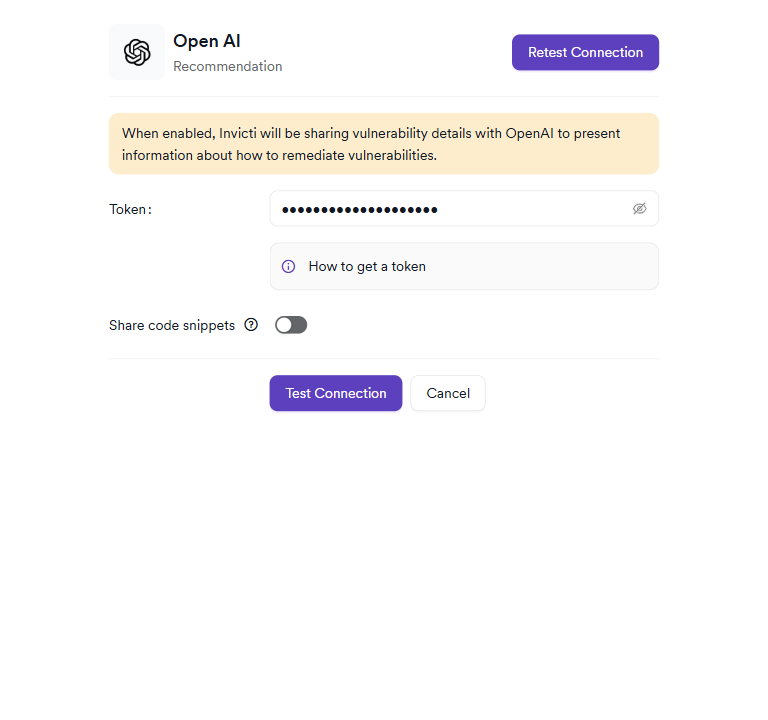
Fill in the required field:
| Field | Type | Required | Description |
|---|---|---|---|
| Token | Password input (masked) | Yes | Your OpenAI secret API key (e.g., sk-proj-...). The value is masked after entry and cannot be retrieved after saving. |
Share Code Snippets (Optional)
Below the token field, a Share Code Snippets toggle allows you to control whether Invicti sends code context along with vulnerability details to OpenAI.
| Setting | Behavior |
|---|---|
| Off (default) | Only vulnerability metadata (type, severity, URL, description) is shared with OpenAI |
| On | Vulnerable code snippets are also shared with OpenAI, enabling more targeted and accurate remediation suggestions |
- Privacy consideration: Enabling Share Code Snippets sends source code fragments to OpenAI. Ensure this complies with your organization's data handling and privacy policies before enabling.
Step 4: Test the Connection
After entering the API key, click Test Connection.
- If the API key is valid, a green "Connection successful" message appears in the drawer.
- If the test fails, verify your API key is correct and has not expired or been revoked. See the Troubleshooting section below.
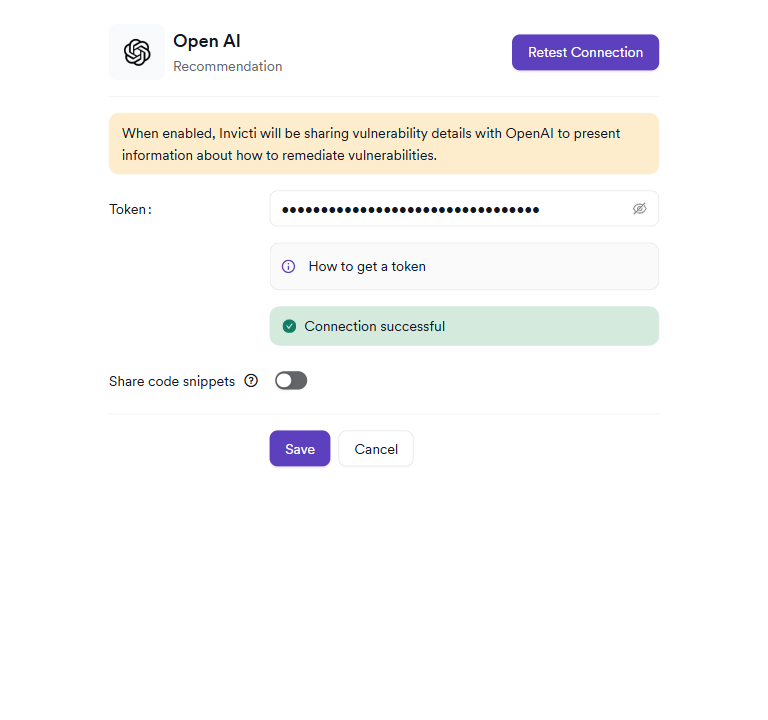
Step 5: Save the Integration
Once the connection test is successful, click Save. A confirmation dialog appears reminding you that vulnerability details will be shared with OpenAI. Click Yes to confirm and save.
After saving, the OpenAI card on the AI Recommendation integrations page will display a green active badge.
Summary
| Step | Action |
|---|---|
| 1 | Navigate to Settings → Integrations → AI Recommendation |
| 2 | Locate the OpenAI card and click Activate |
| 3 | Enter your OpenAI API Key in the Token field |
| 4 | (Optional) Enable Share Code Snippets |
| 5 | Click Test Connection and verify the success message |
| 6 | Click Save and confirm the data-sharing prompt |
Troubleshooting
Connection Fails
| Problem | Possible Cause | Solution |
|---|---|---|
| Invalid API key | The key was entered incorrectly, has expired, or was revoked | Re-enter the correct key or generate a new one from the OpenAI dashboard |
| Insufficient permissions | The API key does not have access to the required model | Check key permissions in the OpenAI dashboard under API Keys |
| Quota exceeded | Your OpenAI account has exhausted its usage limit | Add billing credits or increase your usage limit in the OpenAI billing settings |
| Network unreachable | Invicti AppSec cannot reach api.openai.com | Verify firewall and proxy rules allow HTTPS outbound traffic to api.openai.com |
| Token format invalid | The value entered contains unsupported characters | OpenAI keys use alphanumeric characters and hyphens only (e.g., sk-proj-...). Ensure no extra spaces or special characters are present |
Recommendations Not Appearing
| Problem | Possible Cause | Solution |
|---|---|---|
| No recommendation shown for a vulnerability | The vulnerability type may not have enough context for AI remediation | Some vulnerability types generate recommendations only when sufficient contextual data is available |
| Recommendation is generic | Share Code Snippets is disabled | Enable Share Code Snippets to provide OpenAI with code context for more specific recommendations |
| Stale recommendations | Vulnerability data changed after the recommendation was generated | Recommendations are generated on-demand. Navigate away and back to the vulnerability to request a fresh recommendation |
Best Practices
-
Use a dedicated API key: Create a separate OpenAI API key for Invicti AppSec rather than reusing a personal or shared key. This allows you to revoke access independently without affecting other tools.
-
Set usage limits: Configure monthly spending limits on your OpenAI account to prevent unexpected billing in case of high vulnerability scan volumes.
-
Review data before enabling: Before activating the integration, confirm with your legal and security teams that sharing vulnerability details (and optionally code) with a third-party AI service is permitted under your data handling policies.
-
Rotate keys periodically: Regenerate your OpenAI API key on a regular schedule and update the Invicti AppSec integration settings to maintain security hygiene.
-
Disable when not in use: If remediation recommendations are not actively used, deactivate the integration to prevent unnecessary API calls and associated costs.
Limitations
-
Third-party data processing: Vulnerability details are sent to OpenAI's API. Invicti AppSec does not control OpenAI's data handling practices. Review OpenAI's privacy policy before enabling.
-
Internet connectivity required: The OpenAI integration requires outbound HTTPS access to
api.openai.com. Air-gapped or network-restricted environments cannot use this integration. -
Cost per usage: Each recommendation request incurs OpenAI API token usage charges. High scan volumes with many vulnerabilities will generate proportional API costs.
-
Model availability: The integration depends on the OpenAI model availability. OpenAI service outages or model deprecations may temporarily affect recommendation availability.
-
Language support: Recommendations are generated in English based on the vulnerability data provided. Multi-language output is not natively supported.
Need help?
Invicti Support team is ready to provide you with technical help. Go to Help Center