Package: Invicti AppSec Core (on-demand)
Trivy IaC
Trivy is an open-source security scanner developed by Aqua Security that detects misconfigurations in Infrastructure as Code files including Terraform, Kubernetes YAML, Dockerfile, Helm charts, and CloudFormation templates. In Invicti AppSec, Trivy IaC runs as a Docker container on the Invicti agent, clones your repository, and scans IaC files for security issues.
Trivy IaC is an Agent/KDT-based scanner. It runs as a Docker container on the Invicti AppSec agent. Docker must be installed and running on the agent host. No external credentials are required.
Prerequisites
| Requirement | Description |
|---|---|
| Invicti AppSec Agent | An Invicti AppSec agent must be installed and running on the target host |
| Docker | Docker must be installed and the Docker daemon must be running on the agent host |
| IaC Repository | The project must have a Git repository containing IaC files (Terraform, Kubernetes YAML, Helm, Dockerfile, etc.) |
Step 1: Navigate to Integrations
From the left sidebar menu, click on Integrations.

Step 2: Select the IaC Tab
On the Integrations > Scanners page, click on the IaC tab.

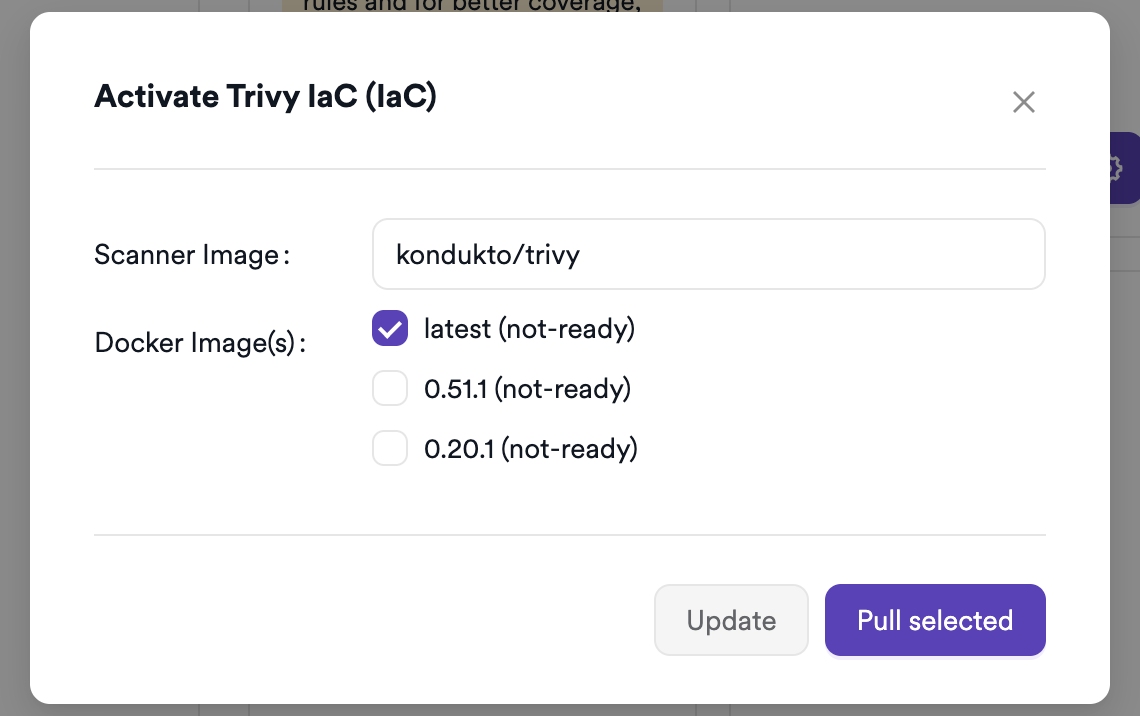
Step 3: Find and Activate Trivy IaC
Scroll through the list of IaC scanners to find Trivy IaC.
- If Trivy IaC is not activated, click the Activate button to enable the integration.
The scan method badge on the Trivy IaC card shows KDT, indicating scans are triggered through the Kondukto CLI tool.
Step 4: Configure Connection Settings
Click the gear icon on the Trivy IaC card to open the settings panel.
Trivy IaC does not require external API credentials. No additional configuration is needed at the integration level.
Summary
| Step | Action |
|---|---|
| 1 | Navigate to Integrations from the sidebar |
| 2 | Select the IaC tab |
| 3 | Activate Trivy IaC |
| 4 | No credentials required — agent-based scanner |
Create a Scan
Navigate to Project Scanners
- Open a project in Invicti AppSec.
- Go to Settings > Scanners.
- Click Add Scanner.
Add Trivy IaC Scanner
- Select IaC as the scanner type.
- Choose Trivy IaC from the scanner list.
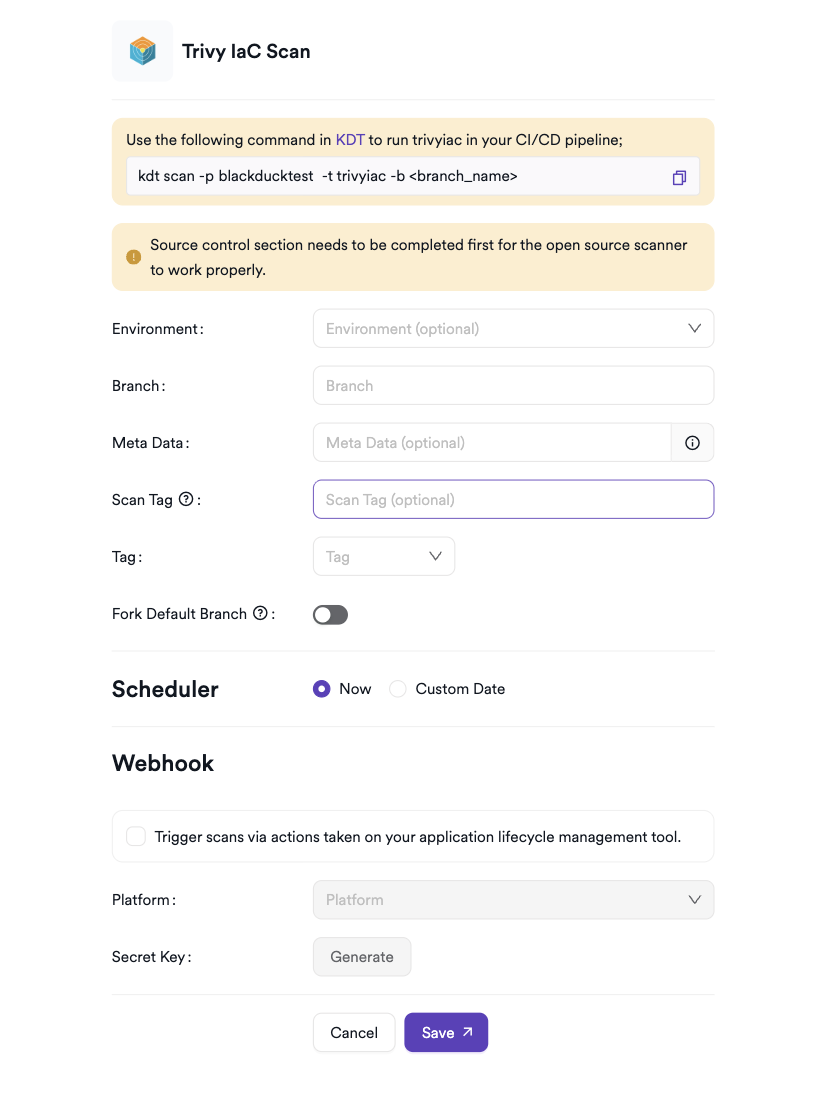
- Click Add to open the scan configuration drawer.
Scan Configuration Fields
| Field | Description | Required |
|---|---|---|
| Environment | Associate the scan with a feature environment | No |
| Branch | The source code branch to scan | Yes |
| Meta Data | Additional metadata to tag the scan | No |
| Scan Tag | Free-text tag to identify or group scans | No |
| Tag | Docker image tag for the Trivy IaC container | Yes |
| Fork Scan | Findings in the scanned branch are compared against findings in the default branch to remove pre-existing vulnerabilities (not available for management scans) | No |
Note: Trivy IaC requires a Git repository to be connected to the project in Invicti AppSec. The agent will clone the repository and run Trivy against all IaC files found.
Scheduler
Enable the Scheduler toggle to automatically re-run the Trivy IaC scan on a recurring schedule.
Webhook (Optional)
Add a webhook URL to receive scan completion notifications.
KDT Command
kdt scan -p <project_name> -t trivyiac -b <branch_name>
Troubleshooting
Scan Issues
| Issue | Resolution |
|---|---|
| Docker not found | Install Docker on the agent host and ensure the Docker daemon is running (systemctl start docker). |
| Image pull failed | Ensure the agent host has internet access to pull the Trivy Docker image from Docker Hub. Check proxy settings if needed. |
| Repository not reachable | Verify that the project has a Git repository configured and the agent can clone it. |
| No findings returned | Confirm the repository contains IaC files supported by Trivy (Terraform, Kubernetes YAML, Helm, Dockerfile, CloudFormation). |
| Scan not starting | Verify the scanner is activated and the Docker tag is correctly selected in the scan configuration. |
Best Practices
- Pin the Trivy Docker image to a specific version tag to ensure reproducible scan results across agent restarts.
- Use the Scheduler to scan IaC files on every commit cycle to catch misconfigurations early.
- Ensure the agent host has sufficient CPU and memory resources to run the Trivy Docker container alongside other scans.
- Scope IaC repositories to individual projects in Invicti AppSec so findings are associated with the correct team and service.
Limitations
- Trivy IaC requires Docker to be available on the Invicti AppSec agent host — it cannot run in environments where Docker is unavailable.
- Only IaC file formats supported by Trivy are scanned; application source code vulnerabilities are out of scope for this scanner.
- Trivy IaC scans the repository as-is — it does not deploy or apply the IaC configurations.
- Requires a Git repository to be connected to the project.
Need help?
Invicti Support team is ready to provide you with technical help. Go to Help Center