Add or remove users from teams
This document is for Invicti Platform
In Invicti Platform, you can assign a user to more than one team.
This document describes how to assign a team to an existing user as well as how to remove a user from a team.
Add users to teams
- Select Users, teams & roles > Manage users from the left-side menu.
- Click the three-dot menu (⋮) next to the relevant user and choose Add to team.
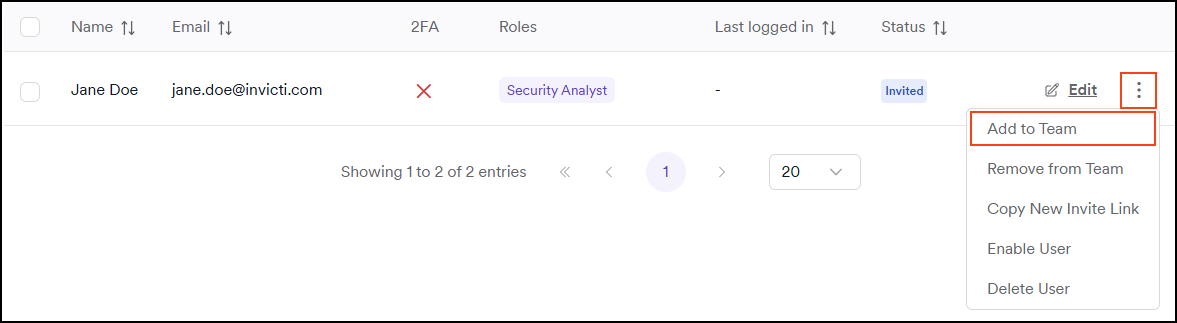
- In the dialog, use the drop-down menu to choose one or more teams.
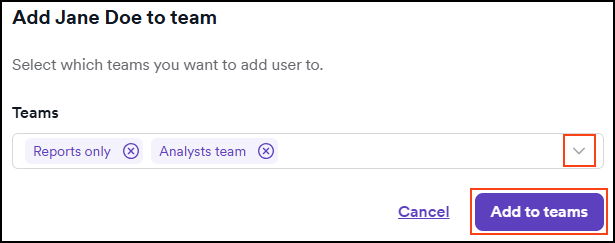
- Click Add to teams to confirm.
Remove users from a team
- Select Users, teams & roles > Manage users from the left-side menu.
- Click the three-dot menu (⋮) next to the relevant user and choose Remove from team.
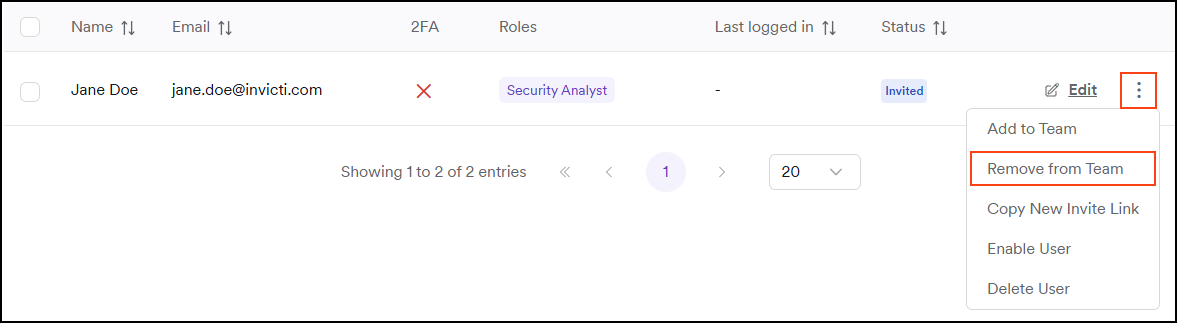
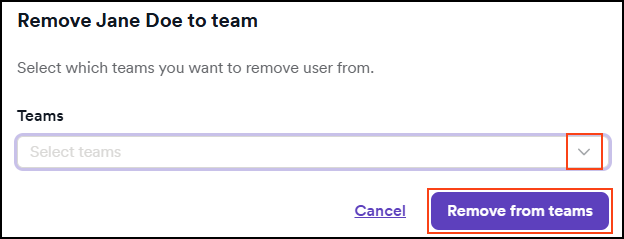
- Use the drop-down menu to open the list of teams. Here, every team created in the system is displayed.
- Choose the checkboxes of the teams you would like to remove the user from.
- Confirm the selection by pressing Remove from teams.
info
This action ensures the user is removed from the selected teams. It doesn't indicate whether the user is currently a member of those teams—selecting a team simply removes the user from it if they're a member.
Need help?
Invicti Support team is ready to provide you with technical help. Go to Help Center
Was this page useful?