Package: Invicti API Security Standalone or Bundle
NTA in Docker with NGINX in Docker
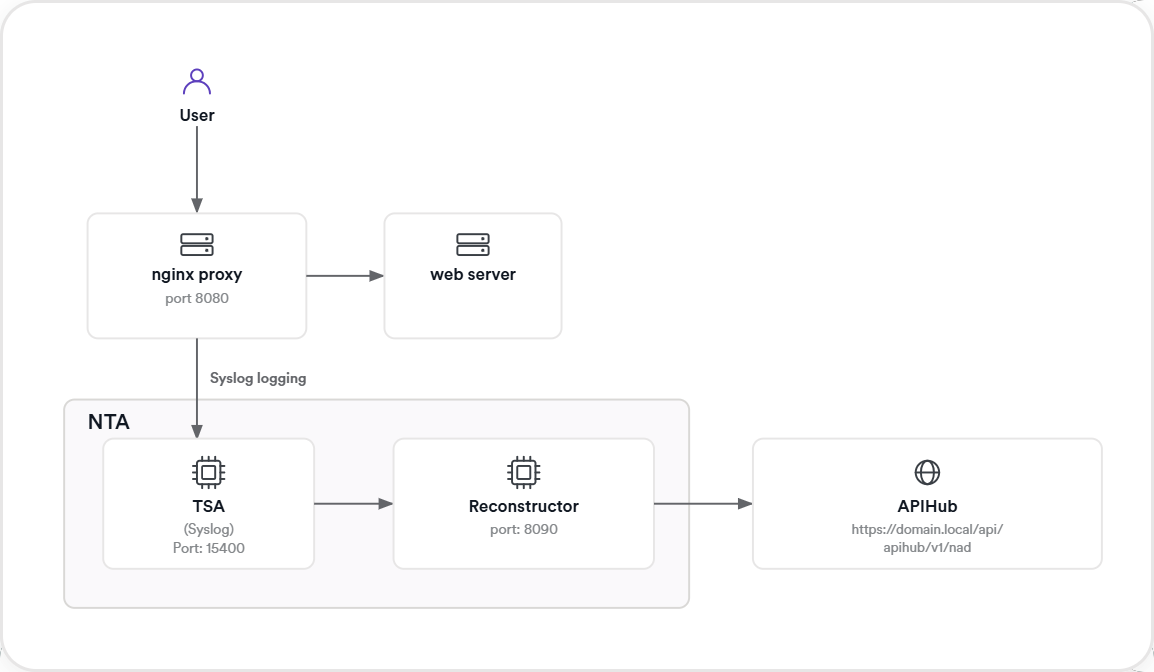
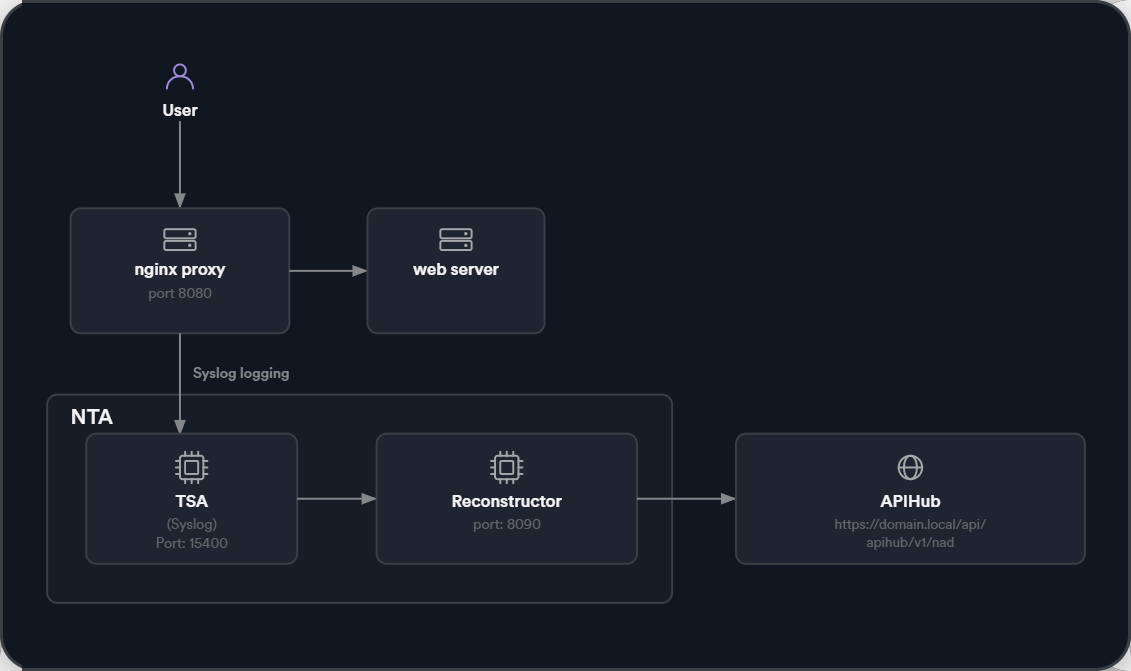
To collect access logs from NGINX, you can configure it to forward logs using the Syslog protocol. In this setup, NGINX acts as a reverse proxy and sends access logs to the Traffic Signal Aggregator (TSA), which is part of Invicti's Network Traffic Analyzer (NTA).
The TSA receives these logs over UDP and passes them to the Reconstructor service, which analyzes the data to reconstruct API activity for security analysis.
Both NTA and NGINX run on Docker:
- NTA (TSA + Reconstructor): Runs as containers defined in a
docker-compose.ymlfile. - NGINX: Runs as a separate Docker container, with the NGINX configuration pointing to the TSA for Syslog forwarding.
This document explains how to install the NTA stack (TSA + Reconstructor) and configure NGINX to forward its access logs using Syslog with minimal changes to your existing setup.
You can:
- Deploy NTA components (Traffic Signal Aggregator and Reconstructor) using Docker Compose
- Configure NGINX (also in Docker) to send access logs via Syslog
- Validate the integration with test traffic and log inspection
Step 1: Prerequisites
Before you begin, ensure the following:
- You have NGINX v1.9.11 or later installed (either natively or via Docker). For optimal performance and compatibility, it's advisable to use the latest stable version.
- You have access to an ApiHub token from Invicti (found under APIs > Sources).
- The machine running NGINX can reach the TSA service over UDP port 15400.
Step 2: Install nta via docker compose
The NTA consists of two components: the Reconstructor, which reconstructs HTTP traffic, and the Traffic Signal Aggregator (TSA), which collects and forwards Syslog logs for analysis.
-
Create a project folder.
In your terminal (for example, Bash, Command Prompt, PowerShell, or Terminal), create a new directory for the project and move into it:
mkdir nta-setup
cd nta-setup
-
Create the docker-compose.yml file.
In the same folder (nta-setup), create a file called
docker-compose.ymlwith the following content:
services:
  reconstructor:
    image: registry.invicti.com/api-discovery/reconstructor:latest
    container_name: reconst
    restart: always
    expose:
      - 8090
    ports:
      - 8090:8090
    environment:
      APIHUB_CONFIG: YOUR_APIHUB_TOKEN_HERE

  traffic-signal-aggregator:
    depends_on:
      reconstructor:
        condition: service_started
    image: registry.invicti.com/api-discovery/tsa:latest
    container_name: tsa
    restart: always
    expose:
      - 15400/udp
    ports:
      - 15400:15400/udp
    environment:
      - TSA_SOURCE_SYSLOG_ENABLED=true
      - TSA_SOURCE_SYSLOG_ADDR=:15400
      - TSA_SINK_RECONSTRUCTOR_ENABLED=true
      - TSA_SINK_RECONSTRUCTOR_URL=http://reconstructor:8090
Replace YOUR_APIHUB_TOKEN_HERE with your actual ApiHub token from Invicti. This can be found under APIs > Sources > New source > copy the Registration token > click Save.
-
Run the services.
In the same terminal, run:
cd nta-setup
docker-compose up -d
-
Verify TSA is running.
Check Docker containers:
docker ps
Expected output:
CONTAINER ID   IMAGE                                            ...   NAMES
xxxxxxx        registry.invicti.com/api-discovery/tsa:latest     ...   tsa
yyyyyyy        registry.invicti.com/api-discovery/reconstructor:latest ...   reconst
Step 3: Configure NGINX to forward logs
-
Create a project folder.
In your terminal, create a new directory for the NGINX setup and move into it:
mkdir nginx-setup
cd nginx-setup
-
Locate or create the NGINX configuration file.
- If you have an existing NGINX installation, the configuration file is typically at
/etc/nginx/nginx.confor inside/etc/nginx/conf.d/. - If you're starting fresh (for example, running NGINX in Docker for the first time), create a new file called
nginx.confin thenginx-setupfolder by runningnotepad nginx.confin your terminal. When prompted to create the file, click Yes.
- If you have an existing NGINX installation, the configuration file is typically at
-
Add a custom log format.
Copy this custom log format and paste it BEFORE the
access_log syslogentry under thehttpblock:
log_format tsalogformat
'@@@http_x_request_id=$http_x_request_id'
'@@@request_scheme=$scheme'
'@@@request_host=$host'
'@@@remote_addr=$remote_addr'
'@@@request_method=$request_method'
'@@@request_uri=$request_uri'
'@@@server_protocol=$server_protocol'
'@@@response_status=$status'
'@@@request_body=$request_body'
'@@@header_referer=$http_referer'
'@@@header_accept=$http_accept'
'@@@header_content_type=$http_content_type'
'@@@server_port=$server_port';
-
Configure NGINX to send logs to the Syslog server.
In the same
nginx.conffile, locate theaccess_logpath. Replace the existingaccess_logpath with the following path instead:
access_log syslog:server={{TSA_ADDRESS}}:15400,facility=local7,tag=nginx,severity=info tsalogformat;
Replace {{TSA_ADDRESS}} with the IP address or hostname of the server running the Network Traffic Analyzer and Traffic Signal Aggregator. The port number should match the port configured in the NTA. 15400 is the default port.
If you're creating a new nginx.conf from scratch (not modifying an existing one), use this complete example:
events {}

http {
    log_format tsalogformat
    '@@@http_x_request_id=$http_x_request_id'
    '@@@request_scheme=$scheme'
    '@@@request_host=$host'
    '@@@remote_addr=$remote_addr'
    '@@@request_method=$request_method'
    '@@@request_uri=$request_uri'
    '@@@server_protocol=$server_protocol'
    '@@@response_status=$status'
    '@@@request_body=$request_body'
    '@@@header_referer=$http_referer'
    '@@@header_accept=$http_accept'
    '@@@header_content_type=$http_content_type'
    '@@@server_port=$server_port';

    access_log syslog:server={{TSA_ADDRESS}}:15400,facility=local7,tag=nginx,severity=info tsalogformat;

    server {
        listen 8080;

        location / {
            return 200 'Hello from NGINX';
            add_header Content-Type text/plain;
        }
    }
}
Replace {{TSA_ADDRESS}} with the hostname or IP address of the TSA.
-
Run NGINX in Docker.
Navigate to your NGINX setup directory and run the following command:
cd nginx-setup
docker run --name nginx-test -v $(pwd)/nginx.conf:/etc/nginx/nginx.conf:ro \
  -p 8080:8080 -d nginx
If $(pwd) doesn't work, use the actual nginx.conf path. Note: if you're using PowerShell on Windows, replace $(pwd) with ${PWD}.
-
Validate the NGINX configuration.
To verify if the NGINX configuration is valid, run:
docker exec -it nginx-test nginx -t
-
Reload NGINX to apply the changes.
After validating the configuration, reload NGINX:
docker exec -it nginx-test nginx -s reload
Step 4: Test the setup
-
Send a request to NGINX.
Test if NGINX is working correctly by sending a request:
curl http://localhost:8080
-
Check TSA logs.
Verify that the TSA is receiving logs:
docker logs tsa
You should see structured logs representing the forwarded request.
Notes
- NGINX must be able to reach the TSA over UDP port 15400.
- Reconstructor must be accessible via the internal Docker network (or hostname).
- TSA must be started before NGINX starts logging to it.
Need help?
Invicti Support team is ready to provide you with technical help. Go to Help Center