Package: Invicti API Security Standalone or Bundle
NTA with Kong API Gateway in Docker
The Docker installation method is perfect for testing or running the Kong API Gateway in isolated environments. It offers a fast and flexible setup, allowing you to easily deploy and manage Kong and the plugin within separate containers. This makes it an ideal solution for development and small-scale production environments, where NTA runs in its own Docker container alongside Kong Gateway, which also runs in a separate container.
The support team provides the Docker images upon request.
This document navigates you through the configuration process of Kong into your development environment.
Prerequisites
- Kong API Gateway: Ensure Kong API Gateway v 3.0 or newer is installed and configured.
- Docker: Have Docker installed and running.
Step 1: Download nta.zip and copy the plugin
-
Download the nta file and extract its contents. Copy the executable in the file.
-
To add the plugin to your environment, copy it into the Docker container using the following command:
docker cp ./nta kong-gateway:nta
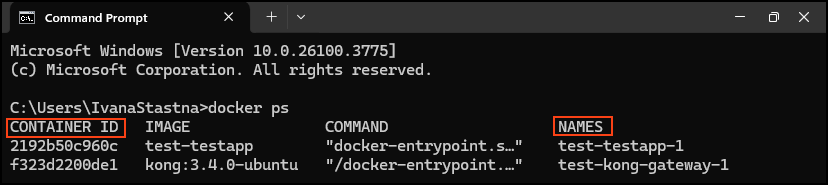
Replace kong-gateway with the actual container name or container ID used in your Docker setup.
- To locate the container ID navigate to your container and use the copy button to copy the ID.

- To find the container name and ID in the terminal, run
docker ps.
-
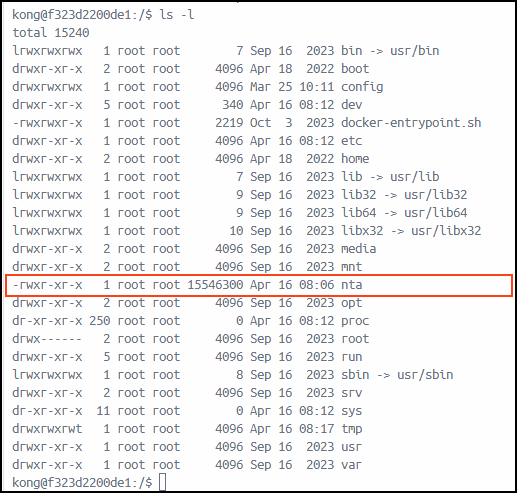
The terminal confirms that the operation was successful. You can also verify this in Docker Desktop under Containers > Files.
- In Container > Exec, run
bashfollowed byls -l, to display the nta executable in the root directory.
- In Container > Exec, run
Step 2: Set environment variables
After copying the plugin to the Kong container, set the required environment variables to enable it by navigating to Containers > Exec in Docker Desktop and pasting the following commands one by one.
- It is recommended to run
bash, first.
export KONG_PLUGINS="bundled,nta"
export KONG_PLUGINSERVER_NAMES="nta"
export KONG_PLUGINSERVER_NTA_START_CMD="/nta"
export KONG_PLUGINSERVER_NTA_QUERY_CMD="/nta -dump"
-
For the first command—
export KONG_PLUGINS="bundled,nta"—be sure to include all your existing plugins in the list. Since the current plugins you have are unknown, you need to modify the command to include them all, separated by commas, and then addntato the list. -
The remaining commands are to be used as they are.
Step 3: Restart kong
To apply the changes, restart Kong using one of the following commands:
kong reload
or
kong restart
Need help?
Invicti Support team is ready to provide you with technical help. Go to Help Center