Package: Invicti AppSec Core (on-demand)
Mandiant Threat Intelligence Integration
Invicti AppSec integrates with Mandiant Advantage to enrich vulnerability data with commercial-grade threat intelligence. Mandiant (now part of Google) is a leading cybersecurity company whose Advantage platform provides deep context on CVEs including real-world exploitation data, M-Score threat prioritization, and detailed analysis by Mandiant researchers.
This integration allows security teams to see exactly which vulnerabilities are being actively exploited by threat actors tracked by Mandiant, and to prioritize remediation accordingly using Mandiant's proprietary M-Score alongside CVSS and EPSS data.
On-premises and private cloud only. The Mandiant integration is available exclusively for on-premises and private cloud deployments of Invicti AppSec. SaaS (cloud-hosted) deployments cannot use this integration. Contact support@invicti.com if you require this feature.
Overview
| Attribute | Value |
|---|---|
| Integration Type | Threat Intelligence |
| Auth Method | Basic Auth (Mandiant Advantage API key + secret) |
| Data Source | Mandiant Advantage threat intelligence platform |
| Hosting | On-premises and private cloud only |
| Requires Paid Account | Yes — Mandiant Advantage subscription required |
Where It Is Used in Invicti AppSec
| Page / Feature | Path | Purpose |
|---|---|---|
| Threat Intelligence Settings | Integrations → Threat Intelligence | Activate and configure the Mandiant integration with API credentials and M-Score options |
| Vulnerability Detail — Threat Intelligence Tab | Projects → [Project] → Vulnerabilities → [Vulnerability] → Threat Intelligence tab | View Mandiant-enriched data per vulnerability: M-Score, exploit analysis, Mandiant link, known exploitation status |
| Vulnerability List | Projects → [Project] → Vulnerabilities | M-Score column appears in vulnerability tables when the M-Score option is enabled during integration setup |
1. Integrations — Threat Intelligence
Path: Integrations → Threat Intelligence
This is where a team admin activates the Mandiant integration. The configuration drawer requires Mandiant Advantage API credentials and lets you optionally enable M-Score enrichment on vulnerability tables.
Once activated, the integration begins pulling threat intelligence data for CVEs in your vulnerability inventory, surfacing Mandiant's analysis on each relevant vulnerability detail page.
2. Vulnerability Detail Page — Threat Intelligence Tab
Path: Projects → [Project] → Vulnerabilities → [Vulnerability detail] → Threat Intelligence tab
After the Mandiant integration is active, the Threat Intelligence tab on every vulnerability detail page is enriched with Mandiant data for the specific CVE.
What the tab shows (Mandiant-specific fields):
| Field | Description |
|---|---|
| Mandiant Link | Deep link to the CVE detail page in Mandiant Advantage (https://advantage.mandiant.com/vulnerabilities/{id}), allowing analysts to view the full Mandiant record directly. |
| M-Score | Mandiant's proprietary exploit risk score (shown when M-Score is enabled). A higher score indicates greater likelihood of exploitation based on Mandiant's research. |
| Risk Rating | Invicti's calculated risk level based on threat intelligence data, shown color-coded by severity (Critical, High, Medium, Low, Info). |
| Analysis | Human-readable threat analysis for the CVE provided by Mandiant researchers. |
| Observed in the Wild | Yes/No — whether exploitation of this CVE has been observed in real attacks. |
| Known Exploit | Yes/No — whether a working exploit is publicly known for this CVE. |
| Description | CVE description from Mandiant's threat intelligence source. |
| Executive Summary | High-level summary of the threat as assessed by Mandiant. |
| Exploitation Consequence | What an attacker can achieve by exploiting this vulnerability. |
| Exploitation State | Current state of exploitation activity tracked by Mandiant. |
| Exploitation Vectors | List of attack vectors used to exploit this CVE. |
| Available Mitigations | Known mitigations or workarounds documented by Mandiant. |
| Was Zero Day | Whether this CVE was ever a zero-day vulnerability. |
| Last Checked On | The date when the threat intelligence data was last refreshed from Mandiant. |
How the data helps prioritize work:
A vulnerability with a high M-Score and "Observed in the Wild" status from Mandiant means it is both statistically likely to be exploited and confirmed as actively targeted by real threat actors. This combination — particularly when the CVE affects a critical or internet-facing asset — should be treated as the highest remediation priority regardless of CVSS score.
3. Vulnerability List — M-Score Column
Path: Projects → [Project] → Vulnerabilities
When M-Score enrichment is enabled during Mandiant integration setup, an M-Score column becomes available in the vulnerability list. Security engineers can sort and filter by M-Score to quickly identify the findings most likely to be exploited according to Mandiant's data, complementing CVSS and EPSS-based prioritization.
Prerequisites
| Requirement | Description |
|---|---|
| Mandiant Advantage subscription | An active paid Mandiant Advantage (formerly FireEye Helix / Mandiant Threat Intelligence) subscription is required. |
| API credentials | From the Mandiant Advantage portal, generate API credentials: a Public Key (used as username) and a Private Key (used as password). |
| On-premises or private cloud deployment | The Mandiant integration is only available for on-prem and private cloud deployments. SaaS deployments cannot activate it. |
| Network access | Invicti AppSec must be able to reach the Mandiant Advantage API endpoints over HTTPS. |
| Team Admin role | Only users with the Team Admin role can activate integrations in Settings. |
How to Obtain Mandiant API Credentials
- Log in to your Mandiant Advantage portal at advantage.mandiant.com.
- Navigate to Settings → API (or your account's API management section).
- Generate or copy your Public Key — this is your API username.
- Copy your Private Key (API secret) — this is your API password.
- Store these credentials securely. The private key is shown only once.
Step 1: Navigate to Threat Intelligence Integrations
From the left sidebar, go to Integrations.
On the Integrations page, select the Threat Intelligence tab to view available threat intelligence providers.
Step 2: Find the Mandiant Card
Locate the Mandiant card in the Threat Intelligence integrations list.
If your deployment is not on-premises or private cloud, the Activate button will be disabled and a warning message will appear: Mandiant integration is only available for on-prem and private cloud deployments.
Click the Activate button on the Mandiant card to open the configuration drawer.
Step 3: Configure the Mandiant Drawer
The Mandiant configuration drawer opens on the right side of the screen.
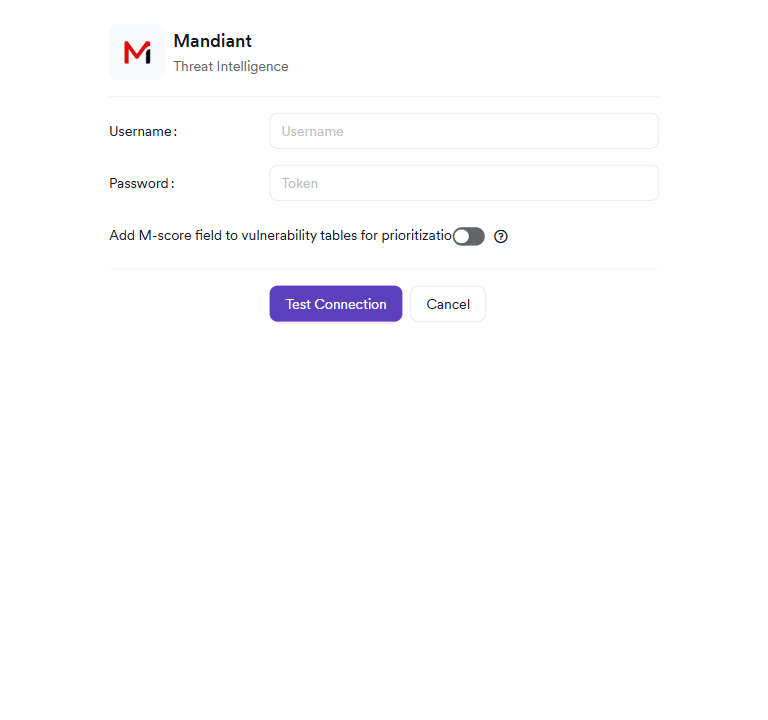
The drawer contains the following fields:
Credentials (Required)
| Field | Description |
|---|---|
| Username | Your Mandiant Advantage API Public Key. This is the key identifier generated from the Mandiant Advantage API settings page. |
| Password | Your Mandiant Advantage API Private Key. This is the API secret associated with your Public Key. |
M-Score (Optional)
| Setting | Description |
|---|---|
| Add M-score field to vulnerability tables for prioritization | When enabled, Invicti will add an M-Score column to the vulnerability list, allowing teams to sort and filter by Mandiant's proprietary exploit risk score. A tooltip links to Mandiant M-Score documentation explaining how M-Score is calculated. |
Step 4: Test the Connection
After filling in the Username and Password fields, click the Test Connection button to verify that Invicti can reach the Mandiant Advantage API with the provided credentials.
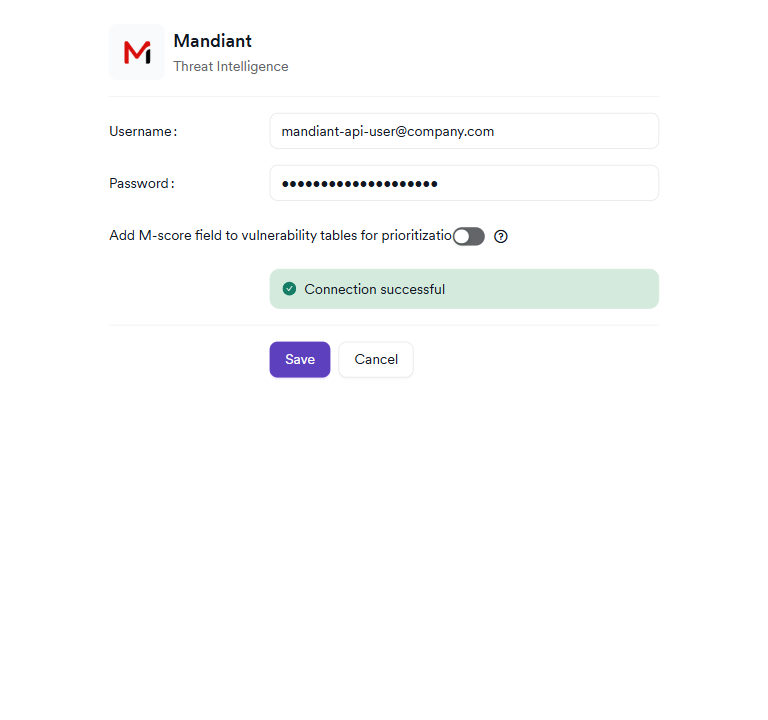
A green Connection Successful alert will appear in the drawer if the credentials are valid and Invicti can reach Mandiant's API. If the connection fails, verify that:
- The Public Key and Private Key are copied correctly (no extra whitespace or truncation).
- Outbound HTTPS traffic from Invicti AppSec to Mandiant's API endpoints is not blocked by firewall or proxy rules.
Step 5: Save the Configuration
After a successful test connection, click Save to activate the Mandiant integration.
The Mandiant card on the Threat Intelligence settings page will display a green active badge, confirming the integration is running.
Summary
| Step | Action |
|---|---|
| 1 | Navigate to Integrations → Threat Intelligence |
| 2 | Locate the Mandiant card and click Activate |
| 3 | Enter your Mandiant Advantage API Public Key (username) and Private Key (password) |
| 4 | (Optional) Enable the M-Score toggle to add M-Score columns to vulnerability tables |
| 5 | Click Test Connection and verify the green "Connection Successful" alert appears |
| 6 | Click Save to activate the integration |
| 7 | Verify the green active badge appears on the Mandiant card |
Troubleshooting
| Problem | Possible Cause | Solution |
|---|---|---|
| Activate button is disabled | Your Invicti AppSec deployment is SaaS (cloud-hosted), not on-premises or private cloud | Mandiant is not available on SaaS deployments. Contact support@invicti.com |
| Connection failed on Test Connection | Invalid API credentials | Verify the Public Key (username) and Private Key (password) from the Mandiant Advantage portal |
| Connection failed — network error | Outbound HTTPS blocked | Verify that Invicti AppSec can reach Mandiant Advantage API endpoints over HTTPS. Check firewall and proxy rules. |
| Threat Intelligence tab shows no Mandiant data | The CVE may not have Mandiant coverage | Not all CVEs are tracked by Mandiant. Only CVEs in Mandiant's database will have enrichment data. |
| M-Score column not visible in vulnerability list | M-Score was not enabled during activation | Edit the Mandiant integration and enable the M-Score toggle, then save. |
| Data is stale or not updating | Mandiant data sync lag | Threat intelligence data is refreshed periodically. Allow time for the initial sync to complete after activation. |
Best Practices
-
Test the connection before saving: Always use the Test Connection button before saving to confirm your API credentials are valid. Credentials cannot be verified after saving without re-entering the password.
-
Enable M-Score for high-volume vulnerability inventories: If your team manages a large number of CVEs, the M-Score column in the vulnerability list provides a quick, additional signal for triage — particularly for vulnerabilities where CVSS alone is insufficient for prioritization.
-
Use the Mandiant Link on high-severity findings: The deep link on the Threat Intelligence tab takes analysts directly to the Mandiant Advantage CVE record. For critical findings, reviewing the full Mandiant analysis — including their exploitation timeline, affected sectors, and threat actor tracking — provides context that goes beyond what is shown in Invicti.
-
Cross-reference with CISA KEV: If you also have the CISA KEV + EPSS integration active, compare the two sources on the Threat Intelligence tab. A CVE that is both in the CISA KEV catalog and has a high Mandiant M-Score is a definitive critical priority.
-
Protect your API credentials: Mandiant API credentials provide access to commercial threat intelligence. Store them in a password manager and rotate them periodically according to your organization's credential management policy.
Limitations
-
On-premises / private cloud only: The Mandiant integration cannot be activated on SaaS deployments. This restriction is enforced at the platform level.
-
Paid subscription required: A Mandiant Advantage subscription is a commercial product. Organizations without an active subscription cannot use this integration.
-
CVE-only enrichment: Mandiant data only exists for CVEs (Common Vulnerabilities and Exposures). Application-specific vulnerabilities without a CVE identifier will not receive Mandiant threat enrichment.
-
Coverage gaps: Not all CVEs are tracked by Mandiant. Less common or recently disclosed CVEs may not yet have Mandiant analysis. In these cases, the Threat Intelligence tab will show limited or no Mandiant data.
Need help?
Invicti Support team is ready to provide you with technical help. Go to Help Center