Package: Invicti AppSec Core (on-demand)
CISA KEV + EPSS Integration (Threat Intelligence)
Invicti AppSec integrates with two complementary public threat intelligence sources — CISA KEV and EPSS — under a single Threat Intelligence integration. This integration enriches every vulnerability in the platform with real-world exploitability data, helping security teams prioritize remediation based on whether a vulnerability is actively being exploited and how likely it is to be exploited in the near future.
-
CISA KEV (Known Exploited Vulnerabilities): A catalog maintained by the U.S. Cybersecurity and Infrastructure Security Agency (CISA) listing CVEs that are confirmed to be actively exploited in the wild by threat actors. Inclusion in the KEV catalog is a strong signal that a vulnerability demands urgent attention.
-
EPSS (Exploit Prediction Scoring System): A data-driven model developed by FIRST.org that produces a daily probability score (0–1) estimating the likelihood that a CVE will be exploited in the wild within the next 30 days, along with a percentile ranking relative to all scored CVEs. Invicti uses these scores to calculate an EPSS Risk Rating.
-
No API key required. Both CISA KEV and EPSS are free, publicly available data sources. Activating this integration requires no credentials — only optional behavior configuration.
Overview
| Attribute | Value |
|---|---|
| Integration Type | Threat Intelligence |
| Auth Method | None (public data sources, no API key required) |
| Data Sources | CISA KEV catalog + EPSS model (FIRST.org) |
| Data Refresh | Daily (EPSS scores and KEV catalog are updated daily) |
| Hosting | Cloud (public endpoints, no on-premises requirement) |
Where It Is Used in Invicti AppSec
| Page / Feature | Path | Purpose |
|---|---|---|
| Threat Intelligence Settings | Integrations → Threat Intelligence | Activate and configure CISA KEV + EPSS behavior |
| Vulnerability Detail — Threat Intelligence Tab | Projects → [Project] → Vulnerabilities → [Vulnerability] → Threat Intelligence tab | View enrichment data (EPSS score, risk rating, known exploit status) per vulnerability |
| Vulnerability List | Projects → [Project] → Vulnerabilities | EPSS risk rating and CISA KEV status can surface in vulnerability columns for sorting and filtering |
1. Integrations — Threat Intelligence
Path: Integrations → Threat Intelligence
This is where a team admin activates the CISA KEV + EPSS integration. The configuration modal lets you control whether Invicti should automatically adjust vulnerability severity levels based on EPSS risk ratings. Once activated, the integration runs in the background, enriching all vulnerabilities with daily-updated threat data.
2. Vulnerability Detail Page — Threat Intelligence Tab
Path: Projects → [Project] → Vulnerabilities → [Vulnerability detail] → Threat Intelligence tab
After the integration is active, a Threat Intelligence tab appears on every vulnerability detail page. This tab consolidates all threat enrichment data for the specific CVE associated with the vulnerability.
What the tab shows (EPSS data):
| Field | Description |
|---|---|
| EPSS | The exploit probability score and percentile. Displayed as X.XX th percentile Y%, where the percentile measures the vulnerability's EPSS probability relative to all known CVE scores. A tooltip links to the FIRST.org EPSS documentation. |
| Risk Rating | Invicti's calculated risk level based on EPSS probability and percentile, shown color-coded by severity (Critical, High, Medium, Low, Info). |
| Known Exploit | Yes/No — whether a working exploit is publicly known for this CVE. |
| Analysis | Human-readable threat analysis for the CVE, if available. |
| Was Zero Day | Whether this CVE was ever a zero-day vulnerability. |
| Last Checked On | The date when the threat intelligence data was last refreshed. |
What the tab shows (CISA KEV data, when available):
| Field | Description |
|---|---|
| Observed in the Wild | Yes/No — whether exploitation of this CVE has been observed in real attacks (from the CISA KEV catalog). |
| Description | CVE description from the threat intelligence source. |
| Executive Summary | High-level summary of the threat. |
| Exploitation Consequence | What an attacker can achieve by exploiting this vulnerability. |
| Exploitation State | Current state of exploitation activity. |
| Exploitation Vectors | List of attack vectors used to exploit this CVE. |
| Available Mitigations | Known mitigations or workarounds for this CVE. |
How the data helps prioritize work:
A vulnerability with a high EPSS percentile (e.g., 97th percentile) and a CISA KEV listing means it is both statistically likely to be exploited and already confirmed as actively exploited — making it the highest-priority finding regardless of its CVSS severity score. The Threat Intelligence tab puts this context directly on the vulnerability detail page where developers and security engineers can see it when triaging findings.
Prerequisites
| Requirement | Description |
|---|---|
| No credentials needed | CISA KEV and EPSS are public data sources. No API key, token, or account is required. |
| Network Access | Invicti AppSec must be able to reach the CISA KEV and EPSS public APIs over HTTPS to sync daily updates. |
| Team Admin role | Only users with the Team Admin role (role 5) can activate integrations in Settings. |
Step 1: Navigate to Threat Intelligence Integrations
From the left sidebar, go to Integrations.
On the Integrations page, select the Threat Intelligence tab to view available threat intelligence providers.
Step 2: Find the CISA KEV + EPSS Card
Locate the CISA Kev + EPSS card in the Threat Intelligence integrations list.
Click the Activate button on the card to open the configuration modal.
Step 3: Configure the Activation Modal
The CISA KEV + EPSS configuration modal opens in the center of the screen.
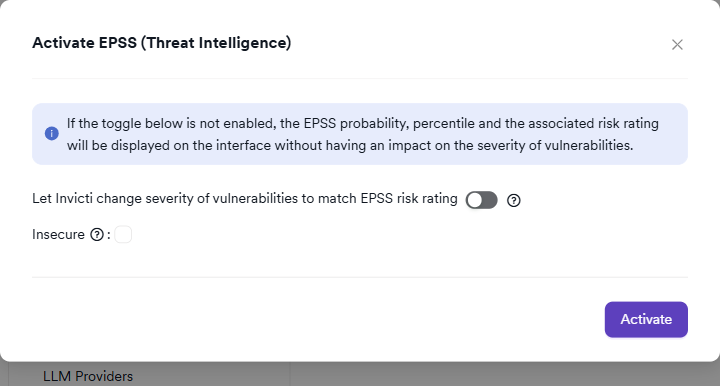
The modal displays the following notice:
If the toggle below is not enabled, the EPSS probability, percentile and the associated risk rating will be displayed on the interface without having an impact on the severity of vulnerabilities.
This means the integration is always useful even without enabling severity adjustment — you get the full EPSS enrichment data in the Threat Intelligence tab regardless. The toggle only controls whether EPSS data is also used to override scanner-reported severity levels.
It includes the following configuration options:
Severity Adjustment (Optional)
| Setting | Description |
|---|---|
| Let Invicti change severity of vulnerabilities to match EPSS risk rating | When enabled, Invicti will override the scanner-reported severity of vulnerabilities to match the EPSS-derived risk rating calculated by the platform. This is an irreversible action — severities will not be automatically reverted if this setting is later disabled. |
| Only upgrade severity to match EPSS | (Shown when severity adjustment is enabled) Invicti will only raise the severity of a vulnerability if the EPSS risk rating is higher than the scanner-reported severity. It will never lower it. |
| Only downgrade severity to match EPSS | (Shown when severity adjustment is enabled) Invicti will only lower the severity of a vulnerability if the EPSS risk rating is lower than the scanner-reported severity. It will never raise it. Note: the "Only upgrade" and "Only downgrade" toggles are mutually exclusive. |
Enabling severity adjustment is an irreversible behavioral change. Once severities are changed to match EPSS, they will not be automatically restored if the integration is deactivated. Review the impact carefully before enabling this option.
Insecure (Optional)
| Setting | Description |
|---|---|
| Insecure | Disables SSL/TLS certificate verification when fetching threat intelligence data. Enable only if your network environment uses self-signed or untrusted certificates and you accept the associated risk. Not recommended for production environments. |
Step 4: Activate the Integration
Click Activate to save the configuration and enable the CISA KEV + EPSS integration.
If severity adjustment is enabled, a confirmation dialog appears warning that vulnerability severities will be changed and cannot be automatically reverted. Click Yes to confirm.
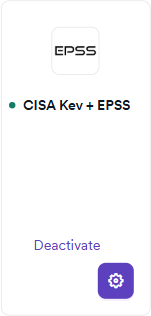
After activation, the CISA Kev + EPSS card displays a green active badge, confirming the integration is running.
Summary
| Step | Action |
|---|---|
| 1 | Navigate to Integrations → Threat Intelligence |
| 2 | Locate the CISA Kev + EPSS card and click Activate |
| 3 | (Optional) Enable severity adjustment and configure upgrade/downgrade behavior |
| 4 | (Optional) Enable the Insecure option if required by your network |
| 5 | Click Activate (and confirm if severity adjustment is enabled) |
| 6 | Verify the green active badge appears on the card |
How EPSS Risk Rating Is Calculated
Invicti calculates the EPSS Risk Rating from the raw EPSS probability and percentile values using the following scale:
| Risk Rating | Criteria |
|---|---|
| Critical | Very high EPSS probability (top percentile range) |
| High | High EPSS probability |
| Medium | Moderate EPSS probability |
| Low | Low EPSS probability |
| Info | Negligible EPSS probability |
For the precise calculation methodology, refer to the Invicti EPSS documentation.
Troubleshooting
| Problem | Possible Cause | Solution |
|---|---|---|
| Threat Intelligence tab not appearing on vulnerability detail | The integration is not yet active | Verify the CISA Kev + EPSS card shows a green active badge on the Threat Intelligence settings page |
| EPSS data showing as "No data available" | The CVE associated with the vulnerability has not been scored by EPSS | Not all CVEs receive EPSS scores. Only CVEs in the National Vulnerability Database (NVD) with enough public data are scored. |
| Risk Rating not matching expectations | EPSS scores are updated daily | Allow up to 24 hours after activation for threat data to be fully populated across all vulnerabilities |
| Severity not changing after enabling severity adjustment | The EPSS risk rating may already match the current severity | Severity adjustment only changes severities when the EPSS risk rating differs from the scanner-reported value |
| Network connectivity error during activation | Invicti cannot reach the CISA KEV or EPSS public APIs | Verify that outbound HTTPS traffic from Invicti AppSec is not blocked by firewalls or proxy rules |
Best Practices
-
Enable EPSS enrichment without severity adjustment first: Activate the integration initially without enabling severity adjustment. This lets your team review EPSS data in the Threat Intelligence tab and understand the risk ratings before committing to automated severity changes.
-
Use "Only upgrade" for conservative severity management: If you decide to enable severity adjustment, "Only upgrade" is the safer option — it can raise the priority of underrated vulnerabilities without ever reducing the severity of findings your scanner flagged as high.
-
Cross-reference CISA KEV status with your asset inventory: A vulnerability in the CISA KEV catalog affecting an internet-facing asset should be treated as a critical priority regardless of CVSS or EPSS scores. Use the Threat Intelligence tab to identify these cases quickly.
-
Combine with SLA policies: Use the EPSS risk rating as an additional input for SLA configuration in Invicti AppSec. Vulnerabilities with a high EPSS percentile can be assigned tighter SLA deadlines.
Limitations
-
CVE-only enrichment: EPSS and CISA KEV data only exists for CVEs (Common Vulnerabilities and Exposures). Vulnerabilities without a CVE identifier (e.g., custom application vulnerabilities) will not have threat intelligence data and the Threat Intelligence tab will show an empty state.
-
Daily data updates: EPSS scores and the CISA KEV catalog are updated once per day. There is an inherent delay between when a new exploit is discovered and when the data appears in Invicti AppSec.
-
Irreversible severity changes: If severity adjustment is enabled and then disabled, vulnerability severities already changed by EPSS will not be reverted. Manual review is required to restore original severities.
-
No on-premises data source: This integration relies on publicly accessible CISA and FIRST.org APIs. Fully air-gapped environments cannot use it unless a network path to these public endpoints is available.
Need help?
Invicti Support team is ready to provide you with technical help. Go to Help Center