Package: Invicti AppSec Enterprise (on-premise, on-demand)
Scan agent
KONDA acts as an agent between Invicti AppSec and application security scanners to build projects, start scans and fetch scan results to Invicti AppSec. It helps you to orchestrate some scanners that don't have an API.
Supported tools
Supported tools
- Fortify SCA
- Sonarqube-cli
Supported environments
You can install KONDA on all major operating systems (Linux, Windows, and Mac). The package contains the following binaries:
konda(for Linux)konda.exe(for Windows)konda.darwin(for Mac OS)
How to install
- Download the package:
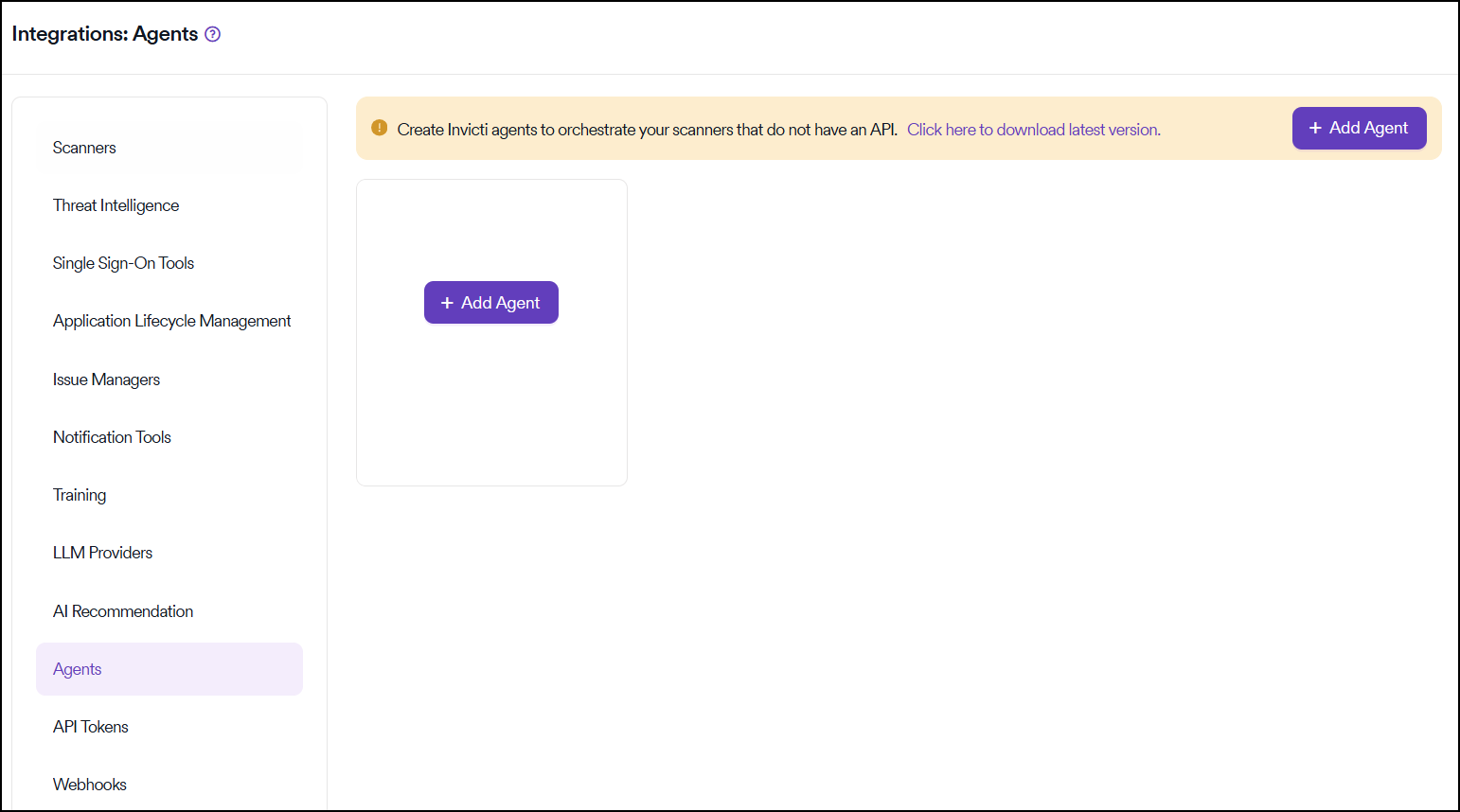
Select Integrations from the left-side menu, then select Agents. Click Click here to download latest version info to download the package. OR you can download directly from URL.
wget https://download.kondukto.io/konda/konda.zip
-
Extract the package:
unzip konda.zip -
Copy agent to host machine and run:
konda --config kondukto.yaml start
Configuration
Configuration is divided into three blocks: Agent, Server, and tool.
At the first run, KONDA generates the configuration file automatically (konda.yaml).
Agent configuration
Agent configuration contains agent-specific data like id, key, and directory locations.
The id and key are unique identifiers used to register the agent to Invicti AppSec.
You can use multiple agents to trigger scans in different environments.
- id: An autogenerated UUID (should not be changed)
- key: Agent key (should not be changed)
- log: Log file location
- temp: Temporary file(s) location
- db: KONDA's internal database location
Server configuration
Specifies HTTP server configurations.
- host: HTTP server bind address/host
- port: HTTP server bind port (default is 8099)
- ssl: Organization's SSL certificate location
Tool-specific configuration
Custom tool-specific configurations. It's possible to use multiple tools in one agent. Each tool may require a different setup.
Fortify
- args: If you're using additional build parameters on your pipeline, supply it from here
- exec: Fortify SCA's executable path
- interval: Scan status interval (default 5 minutes)
Example configuration file (kondukto.yaml):
agent:
    id: 71fdf4be-1f4c-425e-b178-2824030ab2d2
    key: Vz2BZnLM3OZc4RTyGPQqlENWRN6psctO
    log: /Users/baris/Downloads/_release/konda_log
    loglevel: 0
    rotation:
        age: 0
        period: 0
    temp: /var/folders/9h/9cbb862n30q72qqjlyqs20sm0000gn/T/konda
db:
    path: konda.db
fortify:
    args: []
    exec: /usr/bin/fortify
    interval: 5
    maxconcurrent: 3
server:
    host: agent01.internal.local
    port: 8099
    sslcert: ""
    sslkey: ""
SonarQube
- exec: Binary location that will be used for the build process
- msbuild: Sonar Scanner dll/exe
- token: Sonar Scanner Token
- url: Sonar Scanner URL
Example configuration file (kondukto.yaml):
agent:
    id: 71fdf4be-1f4c-425e-b178-2824030ab2d2
    key: Vz2BZnLM3OZc4RTyGPQqlENWRN6psctO
    log: /Users/baris/Downloads/_release/konda_log
    loglevel: 0
    rotation:
        age: 0
        period: 0
    temp: /var/folders/9h/9cbb862n30q72qqjlyqs20sm0000gn/T/konda
db:
    path: konda.db
server:
    host: localhost
    port: 8099
    sslcert: ""
    sslkey: ""
sonar:
    dotnet:
        core:
            dotnet2:
                args: []
                exec: dotnet
                msbuild: SonarScanner.Msbuild.dll
            dotnet31:
                args: []
                exec: dotnet
                msbuild: SonarScanner.Msbuild.dll
        dotnet5:
            args: []
            exec: dotnet
            msbuild: SonarScanner.Msbuild.dll
        framework:
            args: []
            exec: SonarScanner.Msbuild.exe
            msbuild: Msbuild.exe
    gradle:
        args: []
        exec: gradlew
    interval: 5
    maven:
        args: []
        exec: mvn
    maxconcurrent: 3
    other:
        args: []
        exec: sonar-scanner
    token: sonar-scanner-token
    url: http://sonar-scanner.local
Available commands
Available commands in konda (./konda --help):
Konda acts as an agent between Invicti AppSec and application security scanners to build projects, start scans and fetch scan results to Invicti AppSec.

Usage:
  konda [flags]
  konda [command]

Available Commands:
  completion  Generate the autocompletion script for the specified shell
  help        Help about any command
  serve       Serve starts Konda server
  start       Start starts Konda
  version     Prints konda version

Flags:
      --config string   config file (default is $HOME/.konda.yaml)
  -h, --help            help for konda
  -t, --toggle          Help message for toggle
Use konda [command] --help for more information about a command.
Register KONDA to Invicti AppSec
Registering KONDA requires Administrator privileges in Invicti AppSec.
The agent settings are stored in the Integrations > Agents menu.
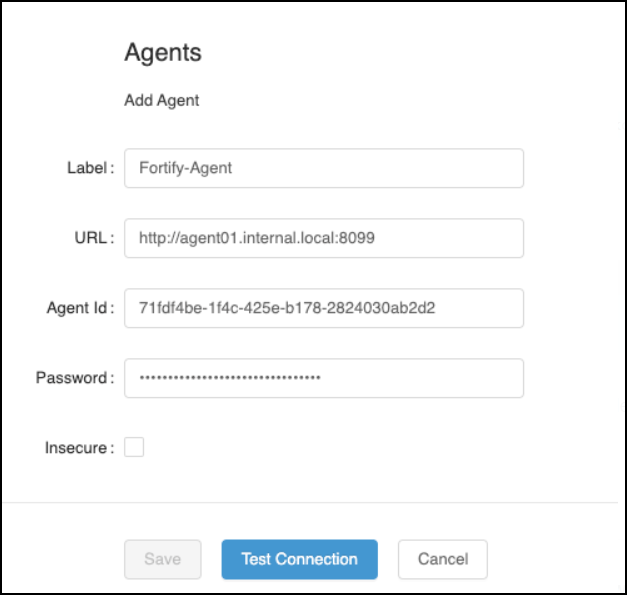
Click on the Add Agent button and configure:
- Label: An identifier name for the agent (ex. win-fortify, linux-fortify)
- URL: Agent HTTP Server address (ex. 10.200.1.1:8099)
- Agent Id: The UUID from kondukto.yaml (ex. 1eb6e894-84ec-4dc1-bf86-134dff659cd0)
- Password: The key from kondukto.yaml (ex. sh7b3CgvWTpSxSVIaTu7w6-ekOWNmUWA)
If everything works, Test Connection should pass, and you can save the configuration.
Add KONDA as a Windows Service
Currently, KONDA doesn't register itself as a Windows service; however, it's possible to register konda.exe as a Windows Service using external tools.
The easiest way is to use NSSM. You can use NSSM to install a service:
nssm install konda.exe
The installer consists of several tabs with lots of configurable parameters. Most are preset to NSSM's defaults, so it's possible to install a service without leaving the Application tab.
Need help?
Invicti Support team is ready to provide you with technical help. Go to Help Center