Role permissions
This document is for Invicti Platform
In Invicti Platform, permissions determine what actions users can take within the application and which features they can access. Permissions can also restrict users' access to certain assets.
This document explains the different permissions and their access levels.
Access level
Users require varying levels of access to available features. While some users may need full capability, others may only require the ability to view data or add comments.
In general, users can have either Full Access or Read Access:
- Full Access includes four permissions: create, modify, read, and delete.
- Read Access allows users to view data but not make changes.
For example, a System Administrator or an Owner can create and delete a custom scan profile, whereas a user with Read Access can only view the profile.
Permission-level access
System Administrators can manage access to Invicti's features by assigning users permissions based on their role requirements. This ensures they only have access to the functions necessary for their tasks while restricting non-essential features.
The following table outlines the available permissions and access levels:
| Permission | Access Level | Explanation |
|---|---|---|
| Excluded Hours | Full Access | The user can create, edit, and delete predefined and custom excluded hours profiles, and set the default excluded hours profile. |
| Excluded Hours | Read | The user can view the configured excluded hours profiles. |
| Users | Full Access | The user can create, edit, and delete users, and assign roles, assets, and collections. |
| Agents | Full Access | The user can display the list of DAST scanning agents (for example, assign them to an asset), and installation instructions with a token to deploy new agents. |
| Agents | Read | The user can display the list of DAST scanning agents (for example, assign them to an asset). |
| Assets | Full Access | The user can create, modify, and delete assets such as DAST target or projects from AST tools. |
| Assets | Read | The user can view the list of assets to which the user is assigned. |
| Integrations | Full Access | The user can create, modify, or delete integrations with third-party tools, such as Jira and GitLab. |
| Integrations | Read | The user can view the list of integrations. |
| Scan Profiles | Full Access | The user can create, modify, and delete custom scan profiles. |
| Scan Profiles | Read | The user can view scan profiles. |
| Collections | Full Access | The user can create, edit, and delete Collections of assets and apps. |
| Collections | Read | The user can access and view the Collections of assets and apps that they're assigned to. The user can also list the content of Collections they have access to. |
| Reports | Full Access | The user can create, view, and delete reports for any target to which the user is assigned. If a user is granted Reports Permission, they can generate reports for assets and scans they have access to. Users always retain access to the reports they generate. |
| Website Discovery | Full Access | The user has full access to the Website Discovery section. |
| Scans | Full Access | The user has full access to scan the assets, collections, and applications they have permission for. Full access includes creating scheduled or starting on-demand scans, pausing, cancelling, and deleting scans. |
| Scans | Read | The user can view the list of scans with details for the assets, collections, and applications they have permission for. |
| Vulnerabilities | Full Access | The user can manage vulnerabilities, including changing of vulnerability status, and adding notes. |
| Vulnerabilities | Read | The user can view vulnerabilities for the assets, collections, and applications they have permission for. |
| Applications | Full Access | The user can create, edit, and delete Applications. |
| Applications | Read | The user can access and view the Applications that they're assigned to, as well as list the content of the Applications they have access to. |
| Audit Log | Read | The user can access Audit Log records. |
| Subscription | Full Access | The user can manage subscriptions. |
| Automations | Full Access | The user can create, modify, and delete Automations. |
| Automations | Read | The user can view Automations. |
| API Security (when licensed) | Full Access | The user can add and manage API Discovery sources, link discovered APIs to targets, and access additional API security functions. |
| System | Full Access | The user has full access to system settings, including SSO, access control settings. |
Permissions and assets and targets
Permissions can be categorized into two groups: asset-based and general.
The main difference between asset-based and general permissions is that asset-based permissions influence a user's access to a collection. Whereas general permissions aren't affected by a user's access to a collection.
| Group | Permissions |
|---|---|
| Asset-based | • Assets • Applications • Collections • Scans • Vulnerabilities • Reports |
| General | • Agents • Integrations • Automations • Audit Log • Subscription • Excluded Hours • Users • System • Website Discovery • API Security |
For example, assume that the Owner or System Administrator assigns a user to the collection called "APAC" (as an AppSec user). The user assumes general and asset-based permissions, such as vulnerabilities, reports, and scans. The following diagram shows all of the user's permissions:
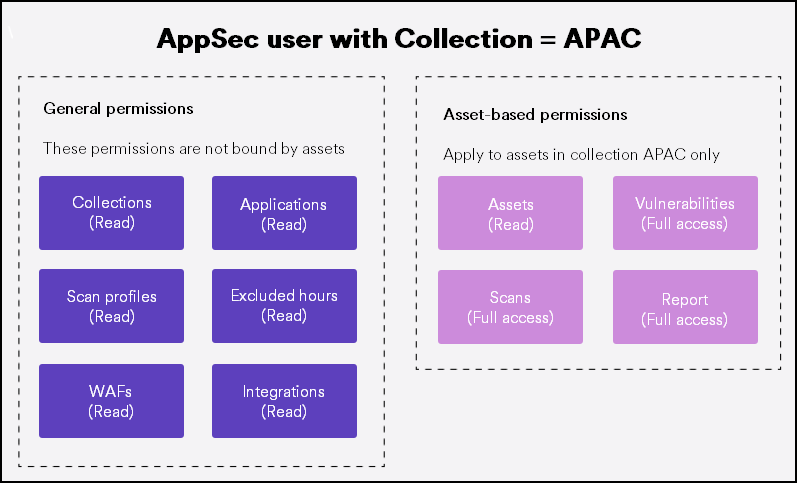
After that, the Owner or System Administrator creates a custom role to be responsible for vulnerabilities only in a collection "MENA" . And, the Owner or System Administrator assigns this role to the same user. Together with the responsibilities in the APAC, the user now has the following permissions in total:
- The user can view assets and collections and manage vulnerabilities in the APAC group.
- However, this user can't have access to the assets in the MENA group because the role only covers the vulnerabilities in the MENA group.
This example shows how the permissions affect the user's access to assets.
Need help?
Invicti Support team is ready to provide you with technical help. Go to Help Center