SSO upgrade steps
This document explains how to update your SAML SSO configuration when moving from an existing Invicti product to the Invicti Platform.
If you retain access to your existing account and intend to continue using Single Sign-On (SSO) with it, it's strongly advised that you set up a distinct SSO integration specifically for the Invicti Platform. Otherwise modifying your existing SSO configuration on the Identity Provider (IdP) side with this guide, will lead to SSO login failures for your current Invicti account. For detailed documentation concerning SSO, refer to the linked documentation.
Overview
During the upgrade, the Service Provider (SP) changes from your existing Invicti product to Invicti Platform.
Because the SP changes, two values must be updated in your IdP:
- ACS URL (Assertion Consumer Service URL)
- SP Entity ID (Identifier / Audience)
Your IdP settings (IdP login URL, IdP Entity ID, certificate) remain the same.
What changes
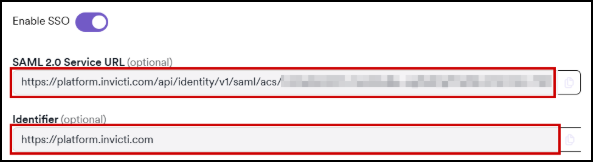
New Invicti Platform ACS URL
Replace your existing Invicti product ACS URL with the one shown in your Invicti Platform UI, for example:
https://platform.invicti.com/api/identity/v1/saml/acs/<unique_id>,https://platform-ca.invicti.com/api/identity/v1/saml/acs/<unique_id>orhttps://platform-eu.invicti.com/api/identity/v1/saml/acs/<unique_id>
This must be set in your IdP as the Reply URL or ACS URL.
New SP Entity ID (Identifier)
Replace:
https://www.netsparkercloud.comhttps://eu.netsparker.cloudhttps://ca.netsparker.cloudhttps://ie.invicti.comhttps://online.acunetix360.comorhttps://<your-enterprise-domain>
with:
https://platform.invicti.com,https://platform-ca.invicti.comorhttps://platform-eu.invicti.com
This must be set in your IdP as the Identifier / Audience / SP Entity ID.
What stays the same
The following settings from your current existing Invicti product SSO configuration can be reused directly:
- IdP Login URL (SAML 2.0 Endpoint)
- IdP Entity ID
- X.509 Signing Certificate
- NameID format (typically emailAddress)
- User attributes (email, name, groups if used)
No change is required on these.
Configure SSO in Invicti Platform
- Select Administration > Security & access control > SSO & Provisioning from the left-side menu.
- Enable SSO (after the upgrade it's turned off by default)
- Those values you’ll find inserted about your IdP (same as before):
- IdP SAML Endpoint (Login URL)
- IdP Identifier
- IdP X.509 Certificate
- Configure optional security options (signed or encrypted assertions) according to your IdP
- Save the configuration
Update your Identity Provider
| Setting | Old (existing Invicti product) | New (Invicti Platform) |
|---|---|---|
| ACS / Reply URL | Enterprise ACS | Platform ACS (from UI) |
| Identifier / Audience / SP Entity ID | URL of your existing Invicti product | https://platform.invicti.com, https://platform-ca.invicti.com or https://platform-eu.invicti.com |
| IdP login URL | same | unchanged |
| IdP Entity ID | same | unchanged |
| X.509 certificate | same | unchanged |
Only the two SP values change with the following information:
Test the new SSO login
- Go to https://platform.invicti.com/login, https://platform-ca.invicti.com/login or https://platform-eu.invicti.com/login
- Select Login with SSO
- Sign in via your IdP
- Verify you land inside the Invicti Platform successfully
If you encounter an error:
- Invalid Audience → Entity ID mismatch
- ACS URL mismatch → Wrong Platform ACS URL
- Signature validation issue → Certificate mismatch
- NameID missing → IdP must send email address
Summary
- Only ACS URL and SP Entity ID must be changed on the IdP
- IdP connection details remain the same
- Invicti Platform UI shows the new SP values
- Upgrade requires no certificate changes
- After updating, test SSO using the Platform login page
Need help?
Invicti Support team is ready to provide you with technical help. Go to Help Center