This integration is configured through the Invicti ASPM product.
Checkmarx One SCA integration
Checkmarx One SCA (Software Composition Analysis) is the SCA module within the Checkmarx One unified AppSec platform. It scans open-source dependencies across your repositories to detect known vulnerabilities and license risks. The Invicti ASPM integration connects to Checkmarx One via API and retrieves completed SCA scan results.
Prerequisites
| Field | Description |
|---|---|
| Token | A Checkmarx One API key used as a refresh token for authentication (labeled Token in the UI) |
| Tenant Name | Your Checkmarx One tenant name |
| Checkmarx One IAM URL | The IAM endpoint URL for your Checkmarx One tenant (e.g., https://eu.iam.checkmarx.net) |
Get an API Key (on Checkmarx One Side)
- Log in to your Checkmarx One instance.
- Click your profile icon in the upper right corner and go to My Profile.
- Navigate to the API Keys section.
- Click Generate API Key and provide a name.
- Copy the generated API key immediately — it will not be shown again.
The API key is used as a refresh token when authenticating. Ensure the associated user has at minimum SCA Viewer or SCA Reviewer permissions on the relevant projects.
Step 1: Navigate to Integrations
From the left sidebar menu, click on Integrations.
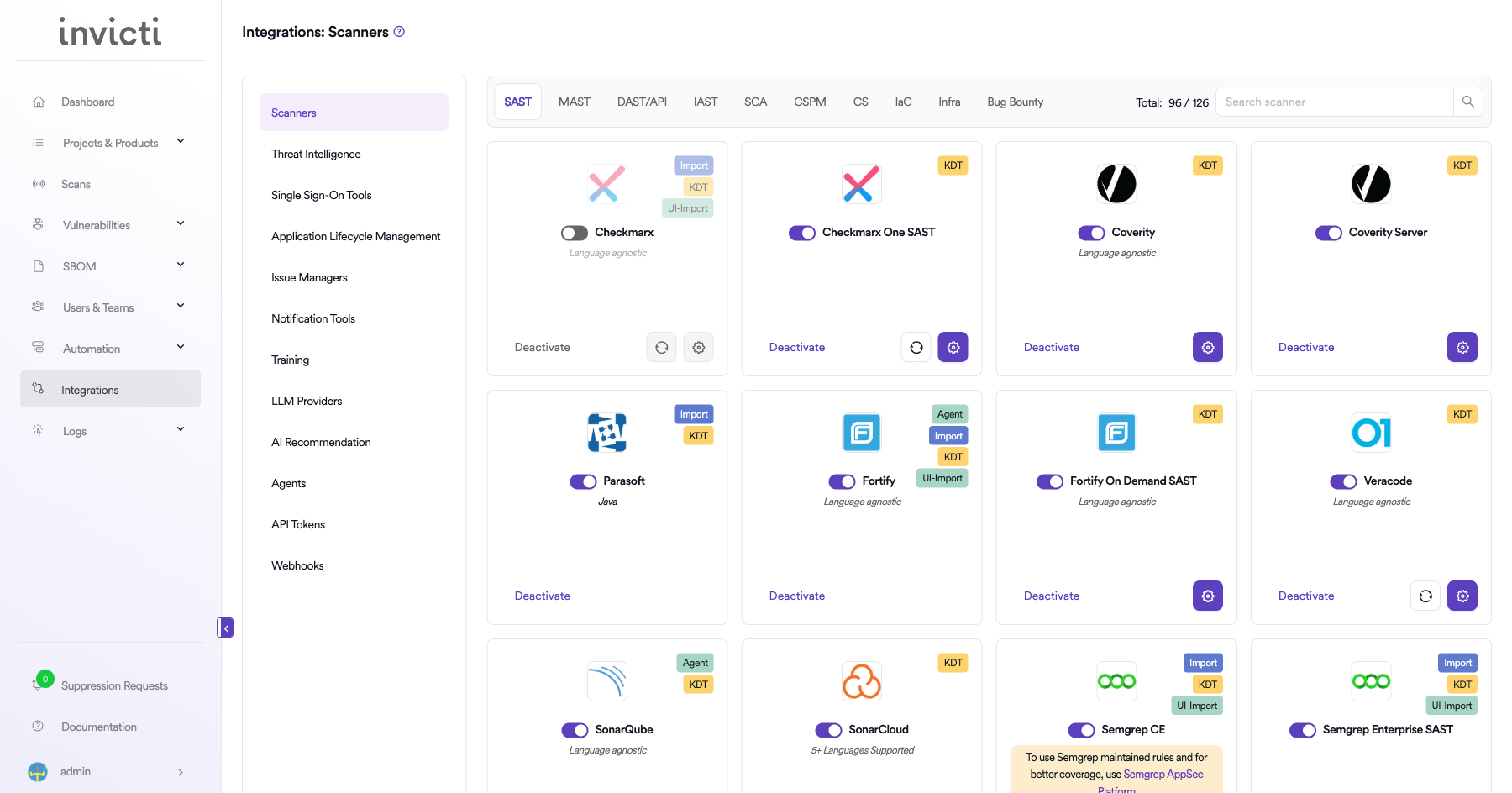
Step 2: Select the SCA Tab
On the Integrations > Scanners page, click on the SCA tab.
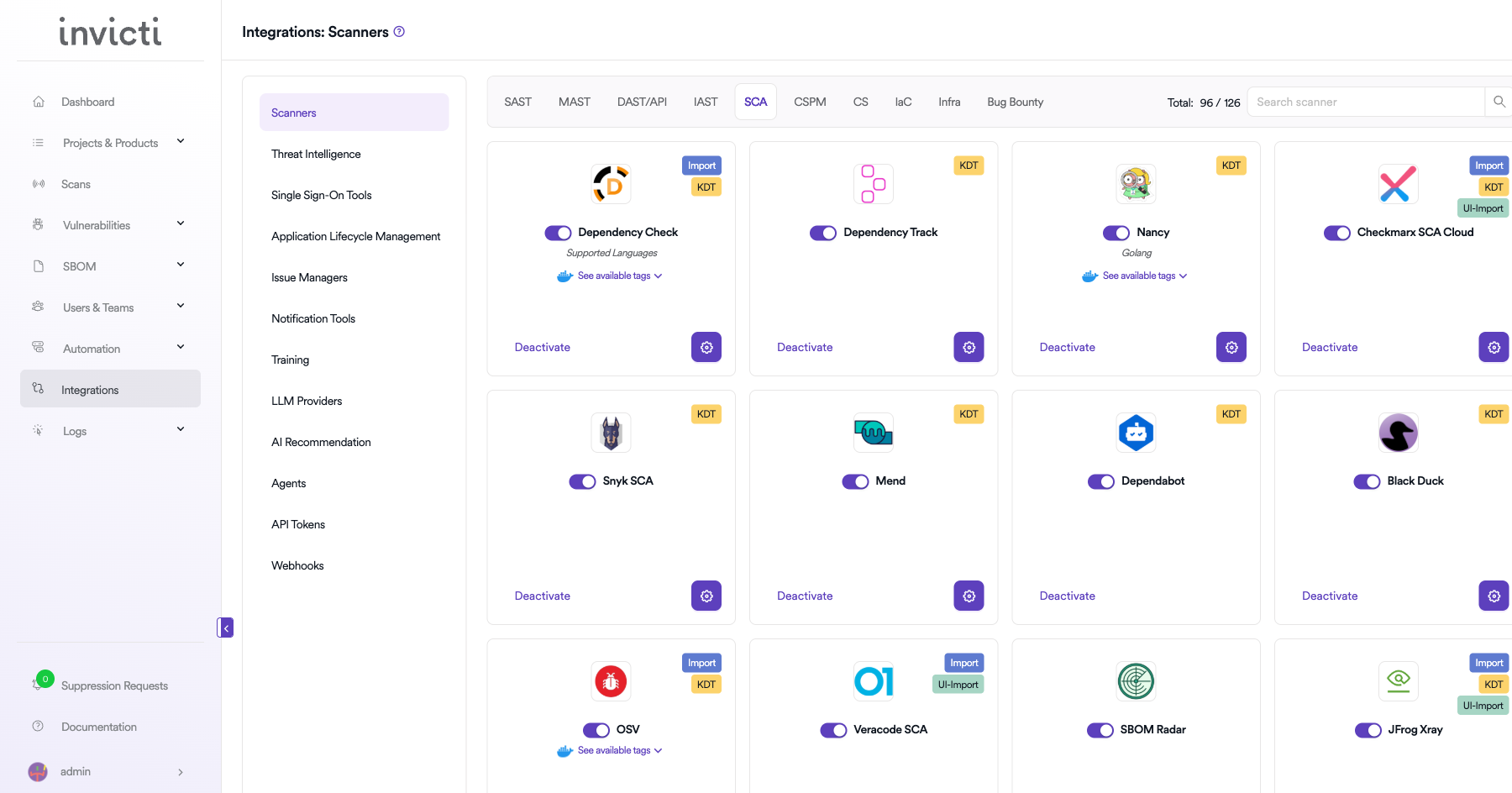
Step 3: Find and Activate Checkmarx One SCA
Scroll through the list of SCA scanners to find Checkmarx One SCA.
- If Checkmarx One SCA is not activated, click the Activate button to enable the integration.
The scan method badges on the Checkmarx One SCA card include Bind and KDT.
Step 4: Configure Connection Settings
Click the gear icon on the Checkmarx One SCA card to open the settings panel. Fill in the required fields:
| Field | Description | Required |
|---|---|---|
| Token | Your Checkmarx One API key (used as a refresh token for authentication) | Yes |
| Tenant Name | Your Checkmarx One tenant name | Yes |
| URL | Checkmarx One IAM URL for your region (e.g., https://eu.iam.checkmarx.net) | Yes |
| Insecure | Enable only if your instance uses a self-signed SSL certificate | No |
Regional IAM URL examples:
- US:
https://iam.checkmarx.net - EU:
https://eu.iam.checkmarx.net - Australia & New Zealand:
https://anz.iam.checkmarx.net - India:
https://ind.iam.checkmarx.net - Singapore:
https://sng.iam.checkmarx.net
The integration automatically converts the IAM URL to the corresponding AST API URL internally (e.g., https://eu.iam.checkmarx.net → https://eu.ast.checkmarx.net). You only need to provide the IAM URL.
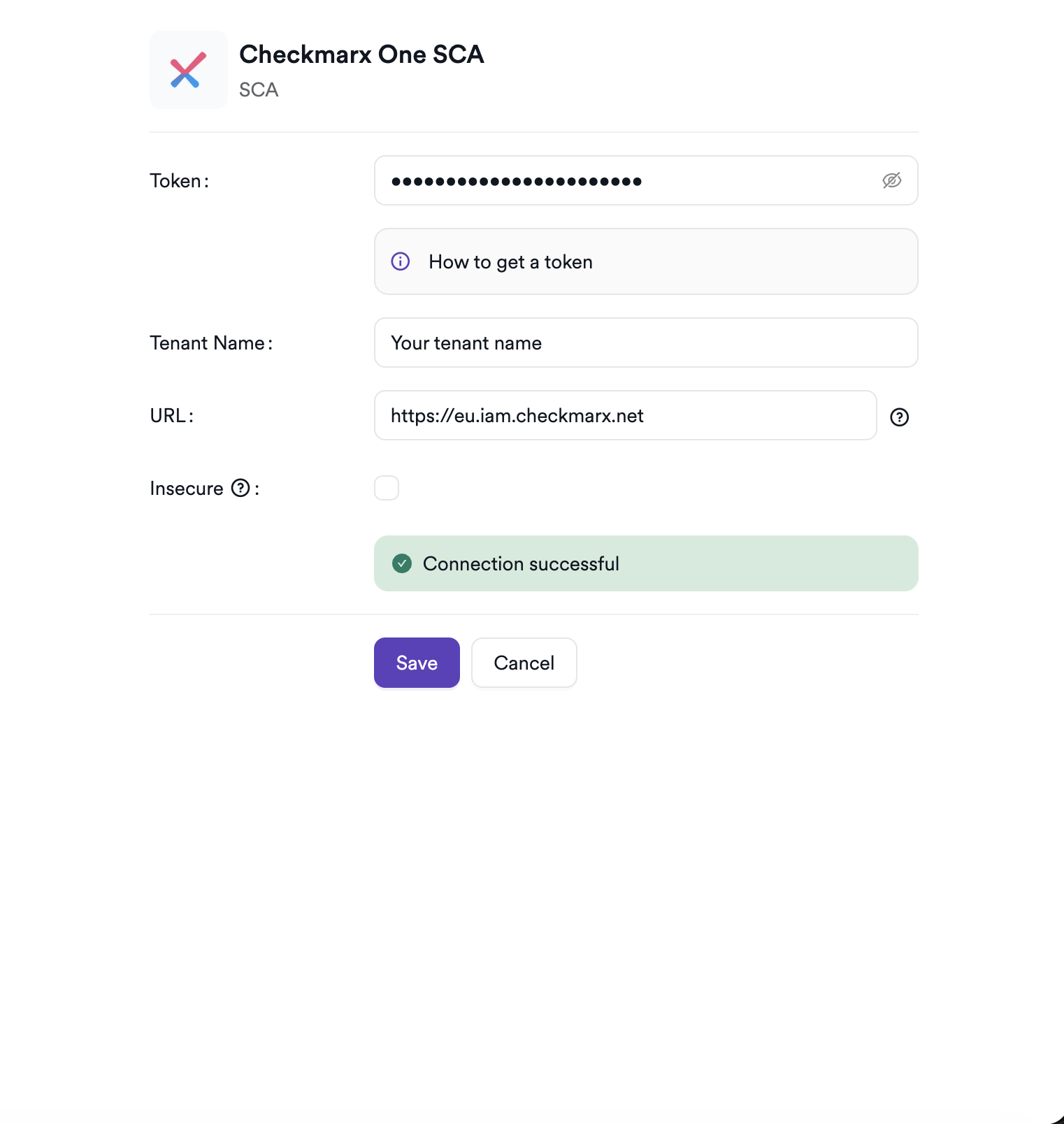
Step 5: Test the Connection
Click Test Connection. A green Connection successful message confirms that Invicti ASPM can authenticate with your Checkmarx One tenant.
Summary
| Step | Action |
|---|---|
| 1 | Navigate to Integrations from the sidebar |
| 2 | Select the SCA tab |
| 3 | Activate Checkmarx One SCA |
| 4 | Enter URL, API Key, and Tenant Name |
| 5 | Test the connection |
Create a Scan
Navigate to Project Scanners
- Open a project in Invicti ASPM.
- Go to Settings > Scanners.
- Click Add Scanner.
Add Checkmarx One SCA Scanner
- Select SCA as the scanner type.
- Choose Checkmarx One SCA from the scanner list.
- Click Add to open the scan configuration drawer.
Scan Configuration Fields
| Field | Description | Required |
|---|---|---|
| Environment | Select the environment for the scan | No |
| Project | Select the Checkmarx One project (loaded from your tenant) | Yes |
| Start Scan | Enable to trigger a new SCA scan in Checkmarx One on every run | No |
| Use Checkmarx Settings | When enabled, skips local clone and uses Checkmarx One's pre-configured Git settings | No |
| Branch | Source code branch associated with this scan | Yes |
| Meta Data | Additional metadata for the scan | No |
| Scan Tag | Tag to identify the scan | No |
When Start Scan is disabled, Invicti ASPM retrieves the latest completed scan from Checkmarx One without triggering a new one. Enable Start Scan for CI/CD pipeline integrations.
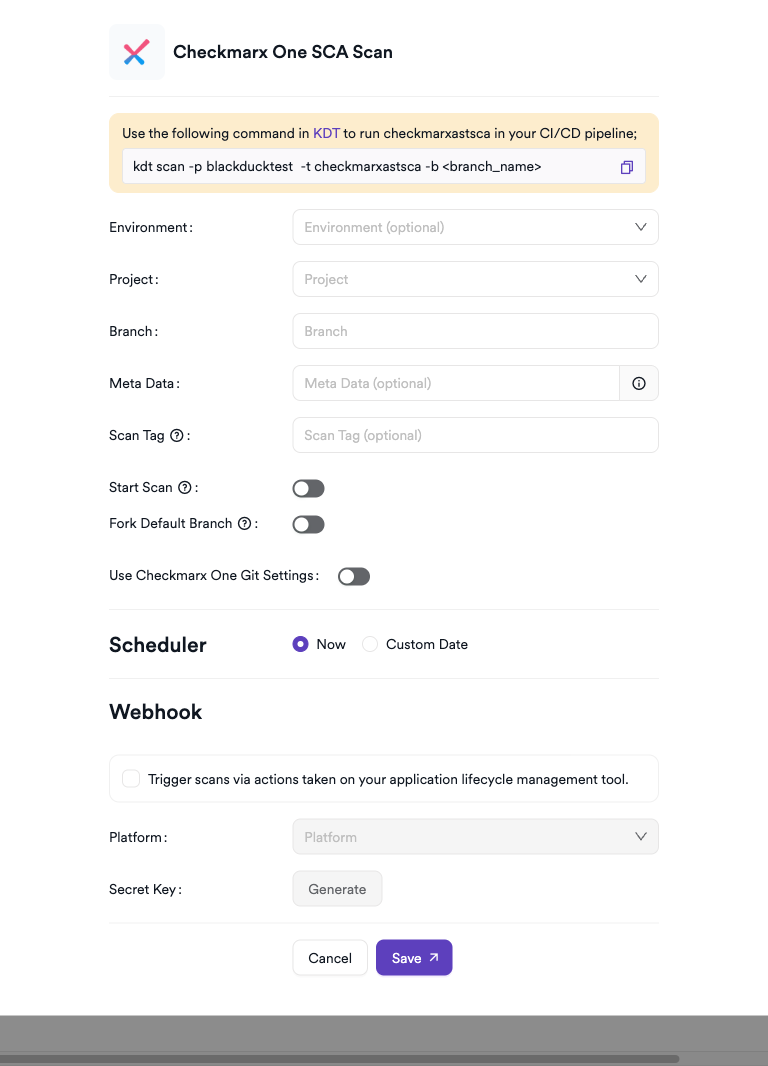
Scheduler
Enable the Scheduler toggle to run Checkmarx One SCA scans on a recurring schedule.
Webhook (Optional)
Add a webhook URL to receive scan completion notifications.
KDT Command
kdt scan -p <project_name> -t checkmarxastsca -b <branch_name>
Troubleshooting
Connection Fails
| Issue | Resolution |
|---|---|
| Invalid API Key | Ensure the API key has not expired and belongs to a user with SCA access. Regenerate if needed. |
| Tenant not found | Verify the tenant name is entered exactly as it appears in your Checkmarx One account settings. |
| Wrong IAM URL | Use the IAM URL that matches your region (e.g., https://eu.iam.checkmarx.net for EU). The integration converts it to the AST API URL automatically. |
| 401 Unauthorized | The API key may have insufficient permissions. Ensure the user has at minimum SCA Viewer access. |
Scan Issues
| Issue | Resolution |
|---|---|
| Project not found | Verify the project name or ID in Checkmarx One. Use the project ID (UUID format) for more reliable lookups. |
| No completed scans | If Start Scan is disabled, ensure at least one completed SCA scan exists in Checkmarx One for the specified branch. |
| Empty results | The project may have no open-source dependencies or the last scan returned no vulnerabilities. |
| Clone fails | Ensure the project has a repository configured in Invicti ASPM, or enable Use Checkmarx Git Config to delegate cloning to Checkmarx One. |
Best Practices
- Use a dedicated service account API key instead of a personal key to prevent disruption when team members leave.
- When using CI/CD pipelines, enable Start Scan and use the KDT command to trigger scans programmatically.
- Prefer using the project ID (UUID) in the scan configuration instead of the name to avoid issues with duplicate project names.
- Enable Use Checkmarx Git Config if your repository is already configured in Checkmarx One to avoid maintaining separate Git credentials.
- Rotate the API key periodically and update the integration settings accordingly.
Limitations
- Invicti ASPM only retrieves SCA-type findings (
scaandsca-container); SAST, KICS, and other result types from the same scan are excluded. - The integration does not support triggering SCA-only scans via the API when Start Scan is enabled — it triggers a full Checkmarx One scan, which may include SAST and KICS depending on your project configuration.
- A maximum of 1,000 SCA results per scan are retrieved from the API due to pagination constraints in Checkmarx One.
- Checkmarx One SCA does not support listing projects via the API in this integration; the project name or ID must be manually entered.
Need help?
Invicti Support team is ready to provide you with technical help. Go to Help Center