ACX Premium / Premium+ to Invicti Platform
This document explains how Invicti Platform handles internal agents from Acunetix Premium or Acunetix Premium+ during upgrade.
What is carried over
Carried over from Acunetix Premium / Premium+:
- Agent names
- Target - agent mappings
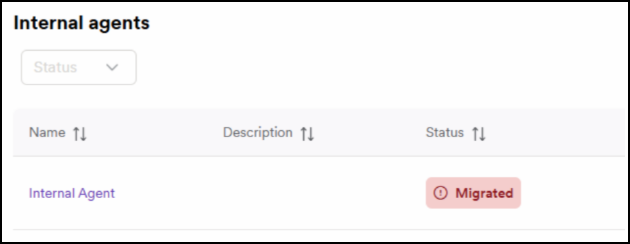
- Carried over agents appear in Platform with status: Migrated
Not carried over:
- Agent installations
- Configurations
tip
A new Invicti Platform agent installation is required.
Concurrency model
Both Acunetix Premium / Premium+ and Invicti Platform support:
- Up to 20 concurrent scans per agent
Meaning:
- Multiple agents are typically unnecessary
- No need for legacy grouping models
Viewing carried over agents
Scans → Agents
- https://platform.invicti.com/app/agents
- https://platform-ca.invicti.com/app/agents
- https://platform-eu.invicti.com/app/agents
Required actions after the upgrade
- Click the migrated agent to open its details.
- Copy its ID.
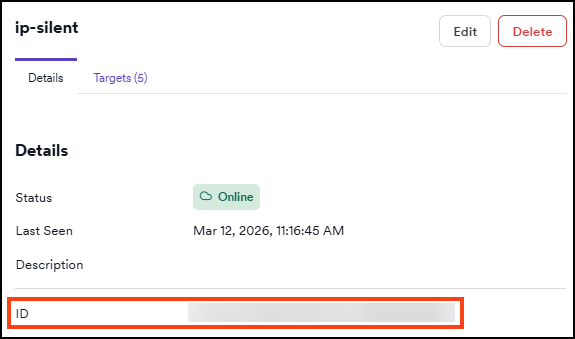
- Install the Invicti Platform internal agent as documented in the internal scanning installation category while using the copied ID as a replacement for Token.
- Optional: delete unused agent names.
- Verify targets still point to the correct agent.
Summary
| Source Product | Carried over | Not carried over | Required | Notes |
|---|---|---|---|---|
| Premium / Premium+ | Agent names + target - agent mapping | Installations, configs | Install Platform agent | up to 20 concurrent scans per agent |
Need help?
Invicti Support team is ready to provide you with technical help. Go to Help Center
Was this page useful?