Deployment: Invicti Platform on-premises, Invicti Platform on-demand
- On-premises: Scan logs are automatically available for all scans
- On-demand: Contact Invicti Support to enable this feature for your account
Download scan logs
After a scan has been completed, you can download detailed scan logs to troubleshoot issues, verify scan coverage, debug authentication problems, analyze performance, and maintain compliance audit trails. The logs provide comprehensive visibility into the scanning process, including initialization, crawling activity, security checks, and any errors or warnings encountered during execution.
Steps to download scan logs
- Select Scans and then DAST scans from the left side menu.
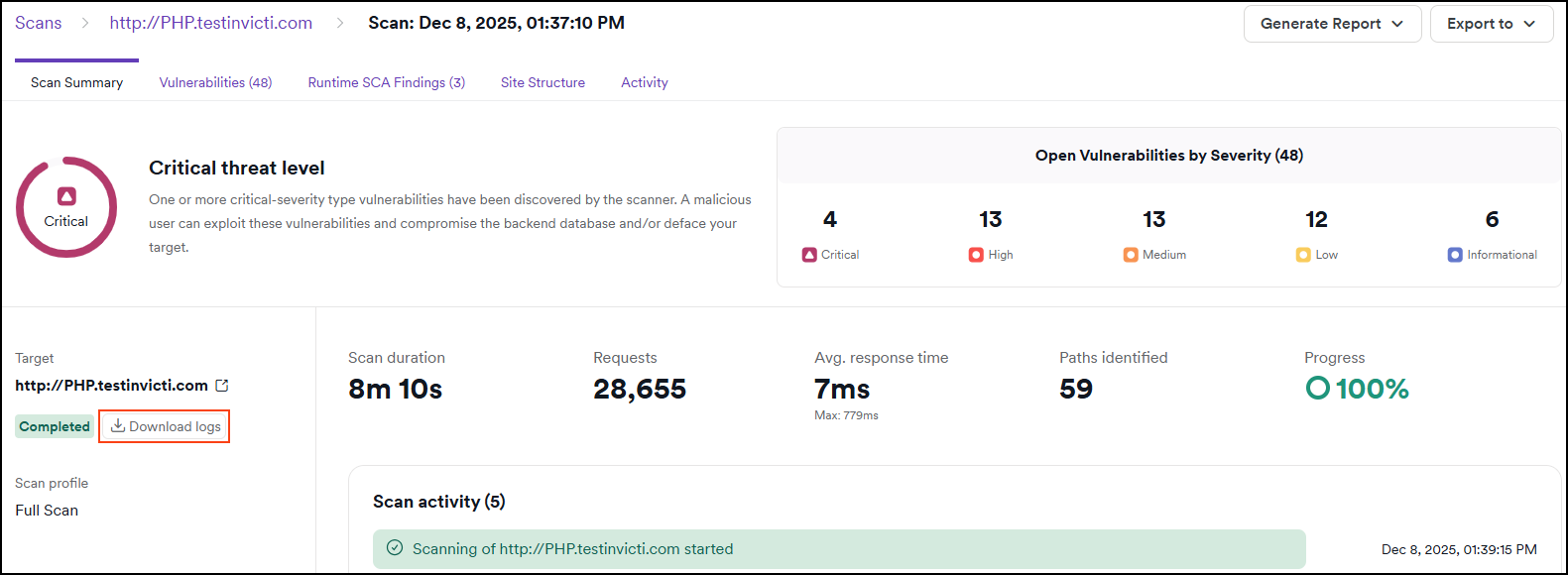
- Click the completed scan you would like download the logs for.
- Click Download logs to initiate a download.
Scan log contents
When you download scan logs from Invicti Platform, you receive a compressed CSV file containing detailed information about the scan execution. The log file includes:
Log structure
Each entry in the scan log contains the following information:
- Timestamp - The exact date and time when the log entry was created (in UTC format)
- Level - The severity or type of log entry (Info, Debug, Warning, Error)
- Message - Detailed description of the scan activity or event
- Additional context - Supplementary information such as URLs being scanned, HTTP status codes, response times, and technical details
What's included in scan logs
Scan logs provide comprehensive visibility into the scanning process, including:
- Scan initialization and configuration - Target details, scan profile settings, and authentication configuration
- Crawling activity - URLs discovered, links followed, and page navigation HTTP requests and responses - Request methods, response codes, headers, and timing information
- Security checks - Vulnerability tests performed and their results
- Authentication events - Login attempts, session management, and credential handling
- Errors and warnings - Issues encountered during the scan, such as timeouts, connection failures, or authentication problems
- Performance metrics - Request durations, page load times, and resource usage
- Scan completion - Final statistics and summary of findings
File format
- Scan logs are provided as a CSV (Comma-Separated Values) file
- The file is compressed in a .gz archive to reduce download size
- You can open the CSV file with spreadsheet applications (Excel, Google Sheets) or text editors
- Large scans may produce log files with hundreds of thousands of entries
Need help?
Invicti Support team is ready to provide you with technical help. Go to Help Center