License management
Users with access rights for Subscriptions can access and manage their Invicti Platform license details on the Settings page. This includes viewing your license key, package detail and expiration date as well as the number of licensed targets and used FQDNs and purchased add-ons.
This document explains how you can review license usage and how you can update your license keys.
To view FQDN usage information, users need either Owner or Subscription Reader access to the account.
Review license usage
- Select Settings from the left-side menu.
- In the Subscription section select License.
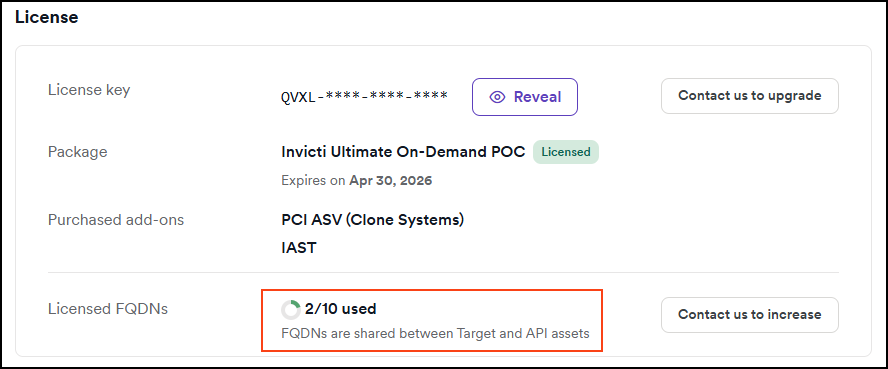
- Review the Licensed FQDNs section.
- It shows you the number of used and total licenses.
- To increase, use the Contact us to increase button.
Update a license
- Go to Settings from the left-side menu.
- In the Subscription section select License.
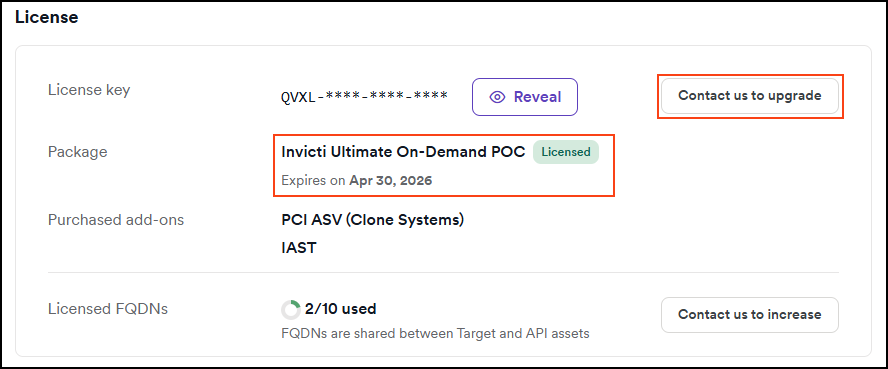
- Review the expiry date and use the Contact us to upgrade to update or renew.
Understanding FQDN licensing
For detailed rules about how targets are counted for licensing, refer to Target definition.
FQDN limits and buffer
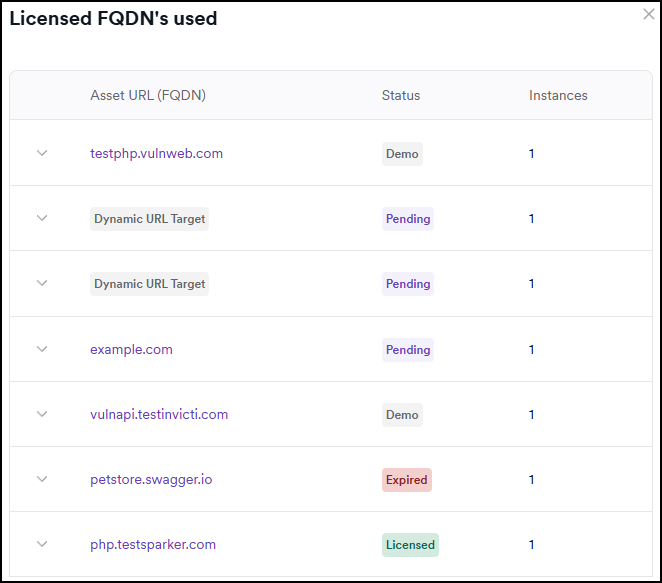
Your FQDN license displays as "6/10" where:
- 6 represents targets that have initiated a scan
- 10 is your licensed limit
- The system provides a 20% buffer (not applicable to POC accounts), giving you 12 total slots
- All targets in pending state (not yet scanned) and ephemeral targets also count toward your FQDN limit
Target variations: There is no limit on target variations. You can create multiple variations of the same target without consuming additional FQDN licenses.
Target status and license behavior
Demo targets: Test websites are marked with a Demo label and use separate license limits from regular registrations.
Target states and license impact:
-
Pending: A newly added target remains in pending state until a scan is started. During this time, it can be deleted and will show as Expired, making the license slot available again.
-
Licensed: Once a scan has been started, the status changes to Licensed. If the target is deleted afterward, it moves into a WaitingToExpire state.
-
WaitingToExpire: The FQDN stays reserved for 12 months from the license anniversary date as a penalty. After this period, it's permanently deleted and the license slot becomes available for a new target.
-
Expired: No longer valid in the system, removed or license-expired.
FQDN registration status states
- Pending: Has zero or more assets with this FQDN, but not registered yet
- Registered: Has one or more assets with this FQDN registered and actively used
- WaitingToExpire: No assets using this FQDN, but previously registered and still valid
- Expired: No longer valid in the system, removed or license-expired
Special cases
Ephemeral registrations:
- Created for assets without fixed FQDNs
- FQDN field is null
- Each asset gets its own ephemeral registration
- Automatically set to WaitingToExpire when asset is deleted
Demo registrations:
- Separate license limits from regular registrations
- Automatically detected based on URL patterns
- Marked with IsDemo flag
POC mode:
- In POC mode, FQDNs are automatically registered without requiring scans
- License limits may be different or not enforced
Need help?
Invicti Support team is ready to provide you with technical help. Go to Help Center