Sensorless API discovery configuration
Zero configuration discovery simplifies API detection for your applications during scanning. Instead of requiring manual setup, the scanner automatically examines common API paths and interacts with the application to identify existing and hidden API specifications. This process ensures that any APIs behind your web applications are discovered and reported as part of the scan results.
The scanner operates in two main modes:
-
Zero configuration discovery (turned on by default): The scanner checks predefined API paths (like /api or /swagger.json) to see if API specifications exist. Learn more about Zero configuration discovery.
-
Sensorless API discovery (turned off by default): The scanner opens the application pages and interacts with UI elements. For applications utilizing backend APIs, it observes API calls and reconstructs a specification based on detected traffic. This allows dynamic API discovery without requiring pre-existing specifications. Learn more about Sensorless API discovery.
To discover APIs effectively, running a Crawl-only scan is sufficient. The scanner navigates through the application, identifies potential API calls, and reports them in API discovery. This approach ensures you are aware of all APIs in your application, even if you didn’t know they existed.
Activate Sensorless API discovery
- Select Discovery > Configuration from the left-side menu.
- In the API discovery section, choose Zero-configuration discovery.
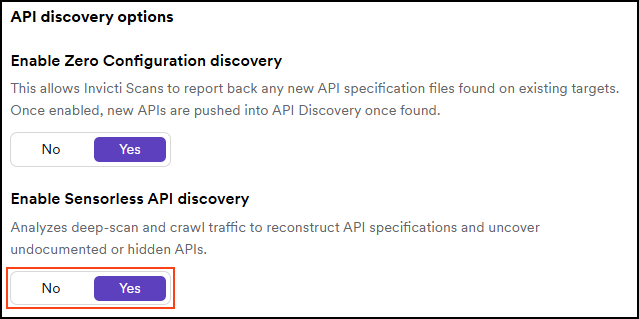
- Set the Enable Sensorless API discovery to Yes. No is the default option.
Deactivate Sensorless API discovery
- Select Discovery > Configuration from the left-side menu.
- In the API discovery section, choose Zero-configuration discovery.
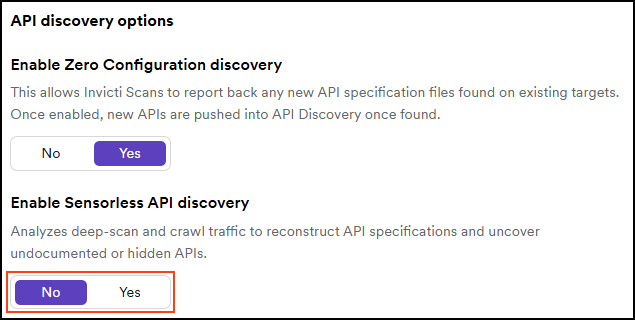
- Set the Enable Sensorless API discovery to No. No is the default option.
Scan activity examples
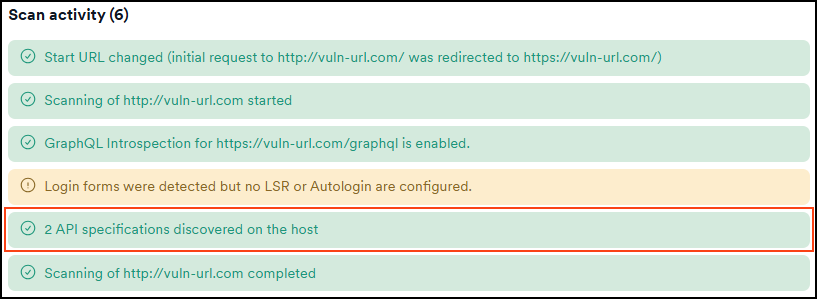
To demonstrate the difference in discovery behaviour, two crawl-only scans were run on the same target. One with Sensorless API discovery active and one without it.
The scan activity section on the Scans > DAST scans > Scan details page reflects these configurations:
- When only Zero configuration discovery is active, the scan log lists API specifications found in predefined API paths.
- When Sensorless API discovery is also active, the scan log includes an additional entry showing API specifications reconstructed from observed traffic.
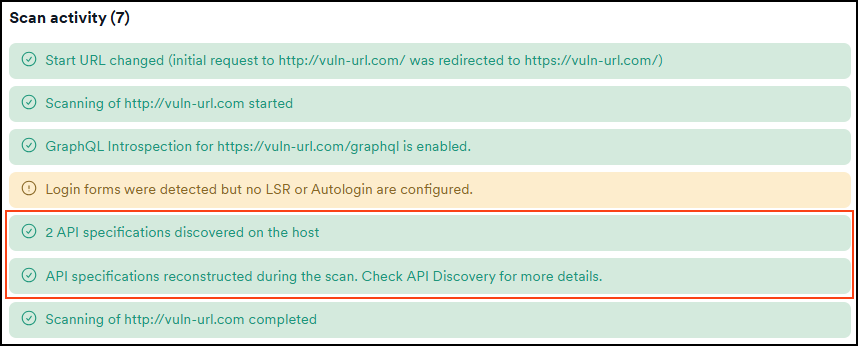
This helps you distinguish between APIs that were directly detected and those dynamically reconstructed from observed traffic during scanning.
Status codes and reconstructed endpoints
During Sensorless API discovery, only API endpoints that return a 2xx status code are included in the reconstructed API specification. Endpoints responding with other status codes are excluded.
If a swagger.json or similar API specification file is present on the target, the scanner combines results from the crawler and the reconstructor. While the crawler identifies available specifications, the reconstructor observes traffic and dynamically rebuilds additional API definitions. Note that the reconstructor is not guaranteed to detect every endpoint captured during the scan and should be considered a complementary method for uncovering further APIs.
Need help?
Invicti Support team is ready to provide you with technical help. Go to Help Center