Package: Invicti AppSec Enterprise (on-premise, on-demand)
Checkmarx One
Checkmarx KICS (Keeping Infrastructure as Code Secure) is an open-source IaC security scanner integrated into the Checkmarx One platform. KICS detects security vulnerabilities, compliance issues, and misconfigurations in Terraform, Kubernetes, Dockerfile, Ansible, CloudFormation, and other IaC formats. In Invicti AppSec, the Checkmarx One IaC/KICS integration connects to your Checkmarx One instance to import IaC security findings into your projects.
Prerequisites
| Field | Description |
|---|---|
| Token | Checkmarx One API token |
| Tenant Name | Your Checkmarx One tenant identifier |
| URL | Checkmarx One instance URL |
How to Get API Credentials (on Checkmarx One Side)
- Log in to your Checkmarx One console.
- Navigate to Access Management > API Keys.
- Click Generate API Key.
- Copy the generated API Key — this is your token. Note that it may only be shown once.
- Note your Tenant Name — this is the tenant identifier shown in your Checkmarx One URL or account settings.
- Note your Checkmarx One URL (e.g.,
https://ast.checkmarx.netfor US orhttps://eu.ast.checkmarx.netfor EU).
Step 1: Navigate to Integrations
From the left sidebar menu, click on Integrations.

Step 2: Select the IaC Tab
On the Integrations > Scanners page, click on the IaC tab.

Step 3: Find and Activate Checkmarx One IaC/KICS
Scroll through the list of IaC scanners to find Checkmarx One IaC/KICS.
- If Checkmarx One IaC/KICS is not activated, click the Activate button to enable the integration.
Step 4: Configure Connection Settings
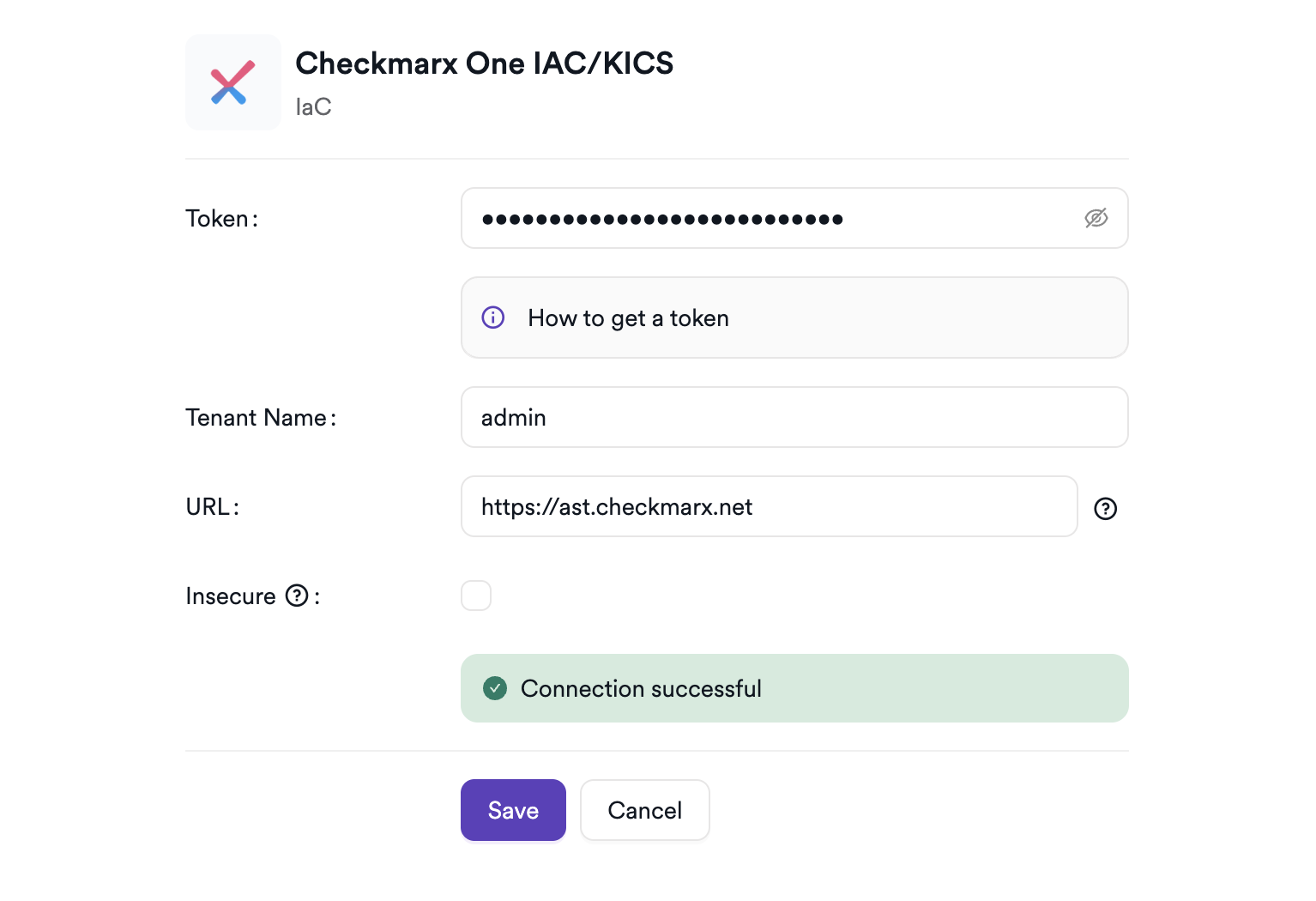
Click the gear icon on the Checkmarx One IaC/KICS card to open the settings panel. Fill in the required fields:
| Field | Description | Required |
|---|---|---|
| Token | Checkmarx One API key | Yes |
| Tenant Name | Your Checkmarx One tenant identifier | Yes |
| URL | Checkmarx One instance URL (without trailing path) | Yes |
| Insecure | Skip TLS certificate verification (not recommended for production) | No |
Step 5: Test the Connection
Click Test Connection. A green Connection successful message confirms that Invicti AppSec can authenticate with the Checkmarx One API.
Summary
| Step | Action |
|---|---|
| 1 | Navigate to Integrations from the sidebar |
| 2 | Select the IaC tab |
| 3 | Activate Checkmarx One IaC/KICS |
| 4 | Enter Token, Tenant Name, and URL |
| 5 | Test the connection |
Create a Scan
Navigate to Project Scanners
- Open a project in Invicti AppSec.
- Go to Settings > Scanners.
- Click Add Scanner.
Add Checkmarx One IaC/KICS Scanner
- Select IaC as the scanner type.
- Choose Checkmarx One IaC/KICS from the scanner list.
- Click Add to open the scan configuration drawer.
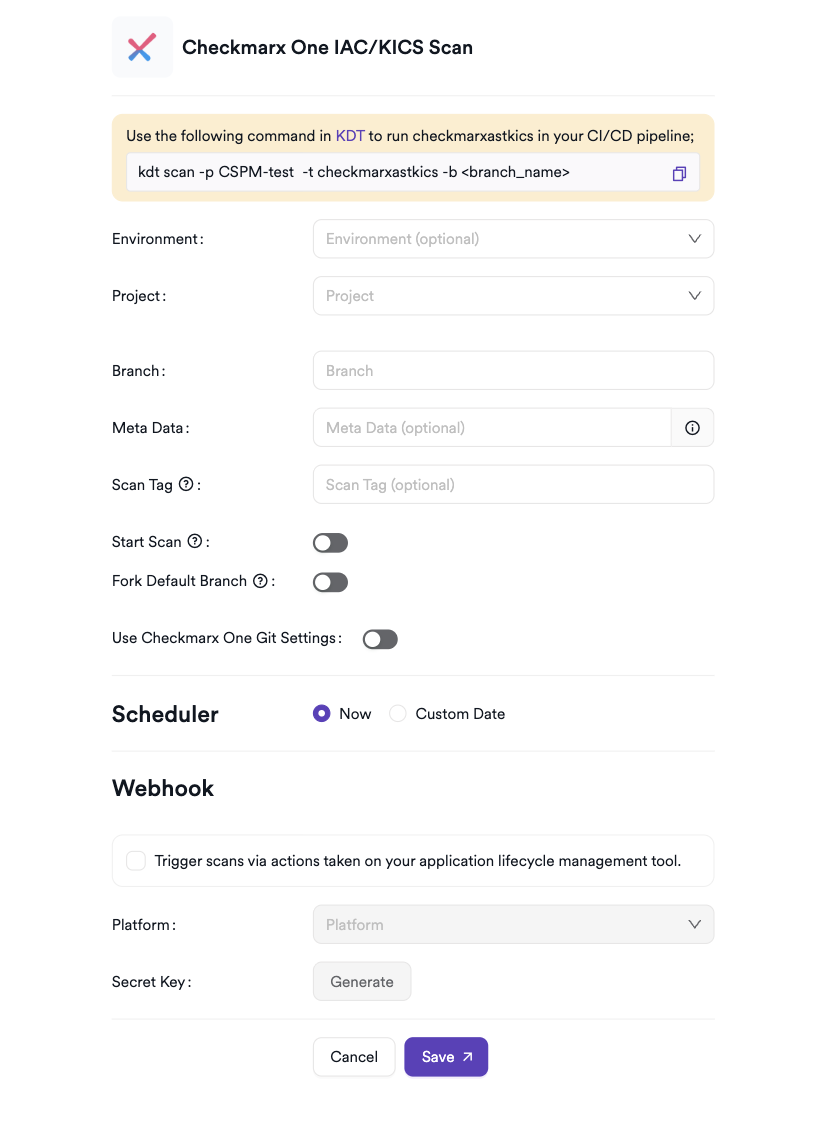
Scan Configuration Fields
| Field | Description | Required |
|---|---|---|
| Environment | Associate the scan with a feature environment | No |
| Project | Select the Checkmarx One project to import KICS findings from | Yes |
| Branch | The branch to associate IaC findings with | Yes |
| Meta Data | Additional metadata to tag the scan | No |
| Scan Tag | Free-text tag to identify or group scans | No |
| Start Scan | Toggle to trigger a new KICS scan in Checkmarx One before importing results (not available for management scans) | No |
| Fork Scan | Findings in the scanned branch are compared against findings in the default branch to remove pre-existing vulnerabilities (not available for management scans) | No |
| Use Checkmarx One Git Settings | Use the Git repository settings configured in Checkmarx One for the selected project | No |
Project is loaded dynamically from your Checkmarx One instance using the configured API token. Use the search box to find the project by name.
Start Scan triggers a new KICS scan in Checkmarx One before Invicti AppSec imports the results. Disable this toggle if you want to import results from the most recently completed Checkmarx scan without triggering a new one.
Use Checkmarx One Git Settings applies the repository and branch settings already configured in Checkmarx One for the selected project, instead of using the branch specified in Invicti AppSec.
Scheduler
Enable the Scheduler toggle to automatically re-run the Checkmarx One IaC/KICS scan on a recurring schedule.
Webhook (Optional)
Add a webhook URL to receive scan completion notifications.
KDT Command
kdt scan -p <project_name> -t checkmarxastkics -b <branch_name>
Troubleshooting
Connection Fails
| Issue | Resolution |
|---|---|
| Invalid token | Verify the API key in the Checkmarx One console under Access Management > API Keys. Generate a new key if the original was not saved. |
| Incorrect tenant name | Ensure the tenant name matches exactly as shown in your Checkmarx One account or URL. |
| URL unreachable | Verify the Checkmarx One URL is correct and the instance is accessible from your network. Do not include a trailing slash or path segment. |
| TLS errors | If using a self-signed certificate, enable the Insecure option. Do not use this in production. |
Scan Issues
| Issue | Resolution |
|---|---|
| No projects listed | Ensure the API token has access to at least one project in Checkmarx One. Verify that KICS scans have been run on those projects. |
| No findings imported | Confirm that the selected Checkmarx One project has completed a KICS scan and contains findings. |
| Start Scan fails | Verify that the project has a valid repository configured in Checkmarx One and that the API token has permissions to trigger scans. |
| Scan not starting | Verify the scanner is activated and the connection test passes in the integration settings. |
Best Practices
- Use a dedicated API key for Invicti AppSec — do not use personal or admin keys.
- Rotate the API key periodically and update the integration settings in Invicti AppSec accordingly.
- Enable Start Scan to ensure the latest IaC findings are always imported, rather than relying on a previously completed scan.
- Use Use Checkmarx One Git Settings when your Checkmarx One projects are already configured with the correct repository and branch, to avoid duplication of configuration.
- Disable the Insecure option in production environments to ensure encrypted communication.
- Map each Invicti AppSec project to a single Checkmarx One project to keep findings scoped to the relevant service.
Limitations
- Checkmarx One IaC/KICS in Invicti AppSec imports findings from Checkmarx One projects — only findings from projects accessible via the provided API token are available.
- Requires an active Checkmarx One subscription with KICS scanning capabilities enabled.
- The Start Scan trigger depends on the repository and branch settings configured in Checkmarx One. If the project has no repository configured, the scan will fail.
- Only KICS (IaC) findings are imported — SAST, SCA, or API security findings from the same Checkmarx One project are not included.
Need help?
Invicti Support team is ready to provide you with technical help. Go to Help Center