Sharing a Scan Policy
Sharing scan policies ensures consistency, promotes collaboration, and helps streamline security practices across teams. By making policies accessible to others, you can enhance security, improve compliance, and reduce duplication of effort.
This document provides instructions on how to share scan policies in Invicti Enterprise.
The user who has the Account Administrator role can see the private policies of the team members.
Types of Scan Policies
There are four types of Scan Policies:
• Default: Unless set as Shared, these are exclusively for your use • Shared: These policies are available for others to utilize • Private: Reserved solely for your own use, these policies cannot be accessed by others • Mine: Referring to the policies you have personally created
When you share your Scan Policy, other users can use it and clone it. Scan Policies that you create and do not share with your team members are labeled as "Mine" and "Private" in the Type column.

How to Share Scan Policies
Follow the instructions below to share a scan policy:
Step 1: Navigate to the New Scan Policy Window
- Navigate to the New Scan Policy window
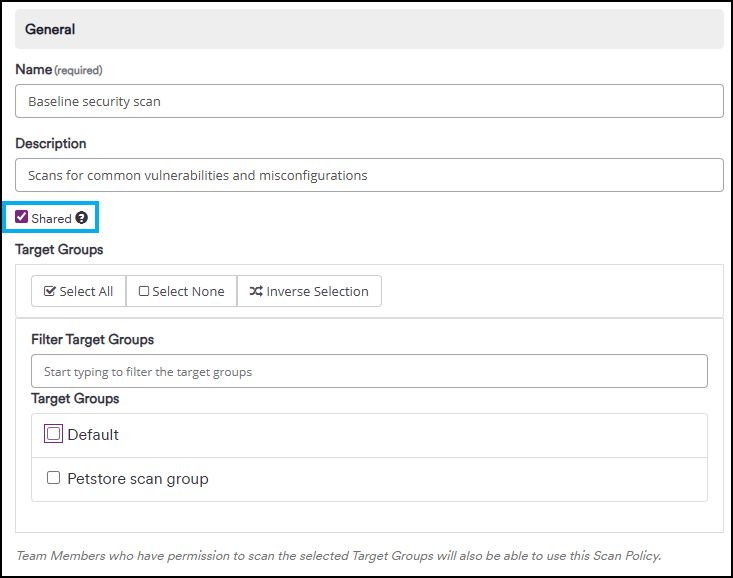
Step 2: Enable the Shared Field
- Enable the Shared field
Step 3: Select Target Groups
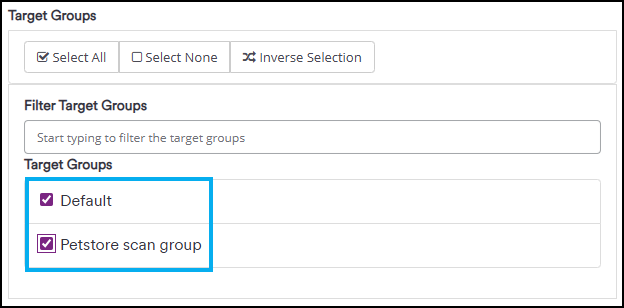
- A new section, Target Groups, is displayed
- Choose all the Target Groups with which the scan policy should be shared. Anyone with access to these groups will be able to use your Scan Policy.
Step 4: Save the Policy
- Click Save to apply and store the policy
By default, authentication verifier agents use incognito mode on Chromium browsers.
Need help?
Invicti Support team is ready to provide you with technical help. Go to Help Center