Delete a collection
This document is for Invicti Platform
A collection is a flexible grouping mechanism used to organize assets and even applications. it's ideal for creating reusable, business-aligned structures and for managing access control. Once you have created a collection, you can also edit it and assign applications and assets to it.
This document describes how to delete a collection in Invicti Platform.
Before deleting a collection make sure it's not assigned to any user or a team.
Steps to delete a collection
-
Select Inventory > Collections from the left-side menu.
-
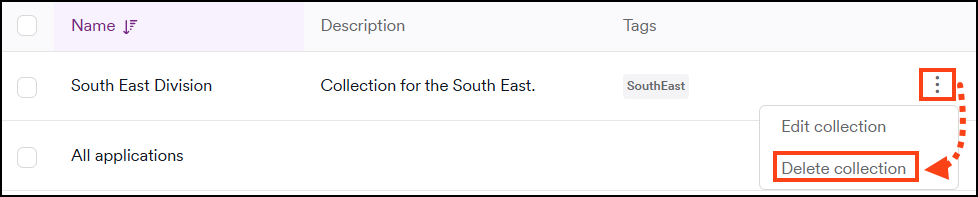
Locate the collection you want to edit and click the three-dot menu (⋮) to the right, then select Delete collection.
-
A pop-up appears asking you to confirm the deletion.
-
Select the I confirm that you want to delete this collection checkbox.
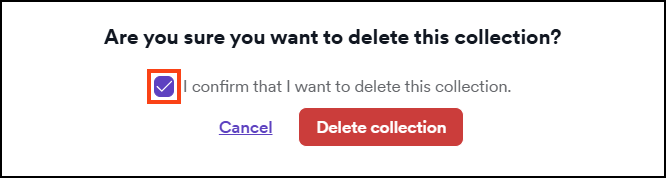
- Click Delete collection. If there are no assigned users, the collection is deleted. Otherwise, proceed to the section Collection couldn't be deleted.
After deleting the collection, the applications and assets are visible only to the Owner and Administrator.
Collection couldn't be deleted
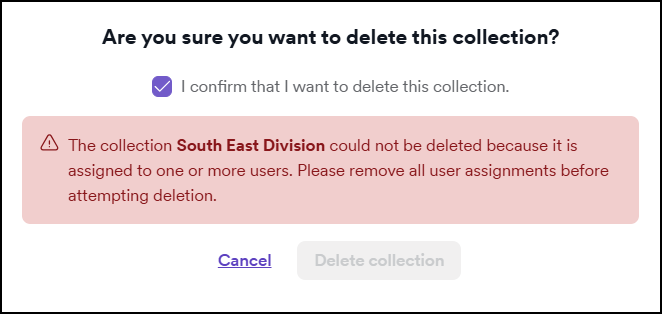
If you didn't remove assignments to the collection, when trying to delete it, you see the following error message:
Remove user assignment
-
Select Users, Teams & Roles > Manage users from the left-side menu.
-
Click Edit by the user you want to manage.
-
Scroll to the User roles section.
-
Click the X button to remove the assigned collection. Unless changed, all current and future collections are available.

-
Click Save to update the settings.
-
Proceed with instructions listed in the Steps to delete a collection section.
Remove team assignment
-
Select Users, Teams & Roles > Manage teams from the left-side menu.
-
Click the Edit icon by the team you want to manage.
-
In the Edit Team page, select the Access Management tab.
-
Click the X button to remove the assigned collection. Unless changed, all current and future collections are available.

-
Click Submit to update the settings.
-
Proceed with the instructions listed in the Steps to delete a collection section.
For more information on user and team management, refer to the Manage users and Manage teams documents.
Need help?
Invicti Support team is ready to provide you with technical help. Go to Help Center