Generate reports
Invicti Platform offers many different types of reports that you can generate from the Targets, Scans, Vulnerabilities pages. Regardless of which page you generate them from, you can find all generated reports on the Reports page. From the Reports page, you can download your generated reports in PDF or HTML format, or choose to delete a report. You also receive an email with a link to download the completed report.
On the Reports page, your generated reports fall into the following report type categories:
- Scan Report: a report on the vulnerabilities detected during a scan.
- Targets Report: a report on all the vulnerabilities detected on one or multiple targets taking into consideration all the scans done on the targets.
- Vulnerabilities Report: a report on the selected vulnerabilities.
The contents of each of these report types also depend on the report template that you chose from the list of standard and compliance reports. For more information about these report options, refer to the Types of reports document.
This document explains how to generate standard and compliance HTML and PDF reports in Invicti Platform.
- Comprehensive report - PDF availability: Invicti generates a PDF only when the HTML file is 10 MB or smaller. If the HTML exceeds this size, only the HTML file is available for download. For more information, refer to Types of reports.
- Export to file: To export the information to CSV, JSON, or XML file, refer to the specific Targets, Scans, or Vulnerabilities documents.
Generate a scan report
- Select Scans > DAST scans from the left-side menu.
- Click the scan to open the Scan details summary page.
- Click Generate report and choose your desired report template from the list of standard and compliance reports.
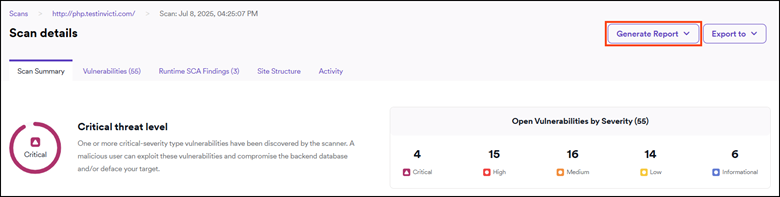
- The Reports page opens. The report may take a few seconds to generate.
- Click PDF or HTML, depending on your preference, to download the report.
- Open the report from your default downloads location.
Vulnerabilities with False positive and Ignored statuses aren't displayed in reports, but might still be visible in the Scan details page.
Generate a target report
In order to generate a target report you need to have already run a scan on the target.
- Select Inventory > Targets from the left-side menu.
- Use the three-dot menu (⋮) and pick Generate report.
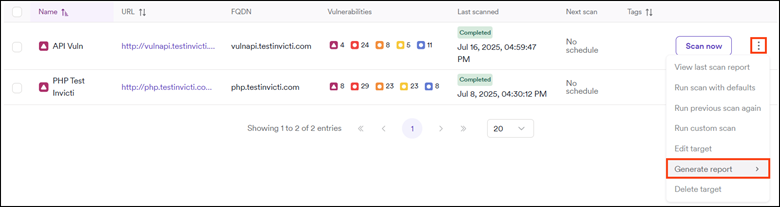
- Choose your desired report template from the list of standard and compliance reports.
- Click the pop-up message or go to Reports page from the left-side menu. The report may take a few seconds to generate.
- Click PDF or HTML, depending on your preference, to download the report.
- Open the report from your default downloads location.
Generate a vulnerability report
- Select Vulnerabilities from the left-side menu.
- Enable the checkboxes next to the specific vulnerabilities for report generation.
- Click Bulk action > Generate report.
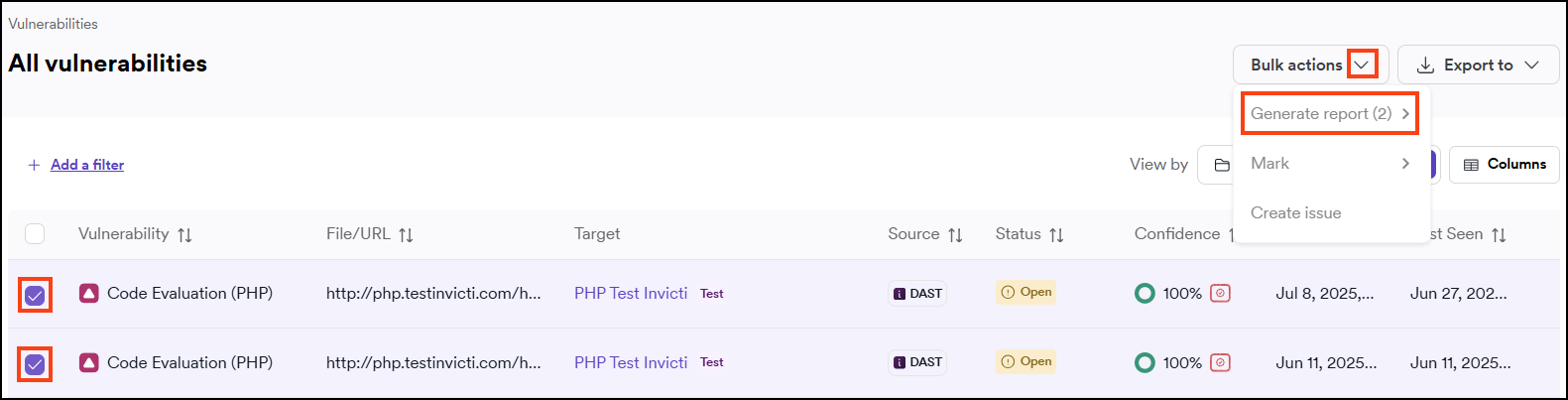
- Choose your desired report template from the list of standard and compliance reports.
- Click the pop-up message or go to Reports page from the left-side menu. The report may take a few seconds to generate.
- Click PDF or HTML, depending on your preference, to download the report.
- Open the report from your default downloads location.
Need help?
Invicti Support team is ready to provide you with technical help. Go to Help Center