Deployment: Invicti Platform on-demand, Invicti Platform on-premises
HTTP authentication
Web servers may require users to authenticate themselves, presenting the user with a dialog to fill in a username and password. Invicti sends this information in the "Authorization: Basic" header.
This document explains how to configure HTTP authentication for a target and how to use stored secrets as credentials.
If your target requires this type of authentication, you can add one or more sets of HTTP credentials - each covering a specific URL prefix - for Invicti Platform to use when it encounters an HTTP Authentication request by the web server. You can enter credentials directly or reference a stored secret - refer to Use a secret for authentication credentials.
Why this matters
Without HTTP authentication configured, Invicti Platform only reaches publicly accessible pages. Authenticated areas, APIs behind login walls, and protected resources remain untested, leaving vulnerabilities undetected.
Using stored secrets instead of plain credentials means you manage access in one place. When a password changes, you update it once and every scan configuration using that secret picks up the change automatically.
Configure HTTP authentication
Kerberos authentication is supported on Windows only.
- Select Inventory > Targets from the left-side menu.
- Locate the target you would like to amend, using the three-dot menu (⋮), then select Edit target.
- Select Authentication from the target settings sidebar.
- Select HTTP (Basic, Digest, NTLM and Kerberos) as the Authentication method.
- Click + Add credential.
- In the Add HTTP credential dialog, enter the URL Prefix (optional), Username, and Password.
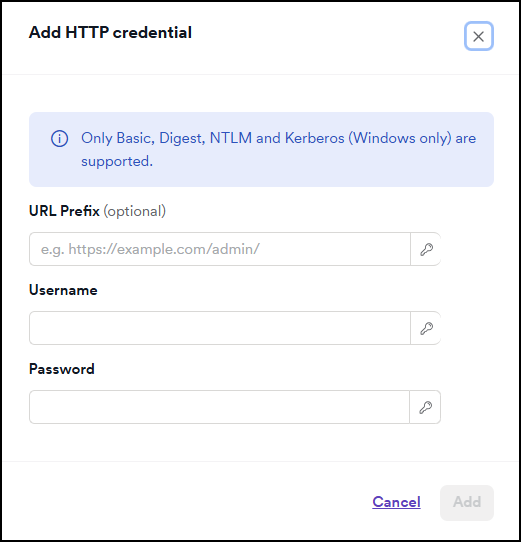
The URL Prefix field acts as a prefix filter. The scanner only attaches the credentials to requests whose URL starts with the value you enter. Set this to the site root (e.g., https://example.com/) or the deepest directory that covers all protected resources. If you enter a path to a specific file (for example, https://example.com/app/login.html), credentials are sent only to that file. All other requests - stylesheets, scripts, images, and API calls - are sent without credentials and return 401.
- Click Add to save the credential entry.
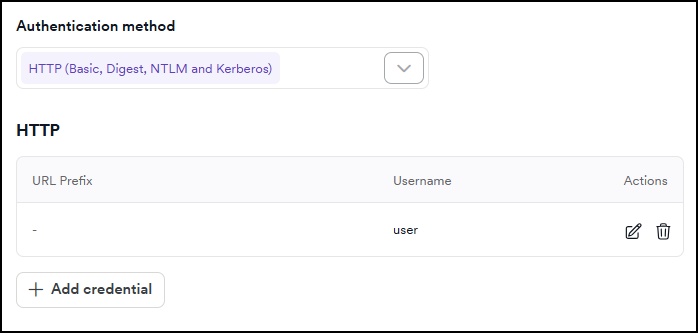
- Repeat steps 5-7 to add credentials for additional URL prefixes if needed.
- Click Save target configuration to confirm.
Use a secret for authentication credentials
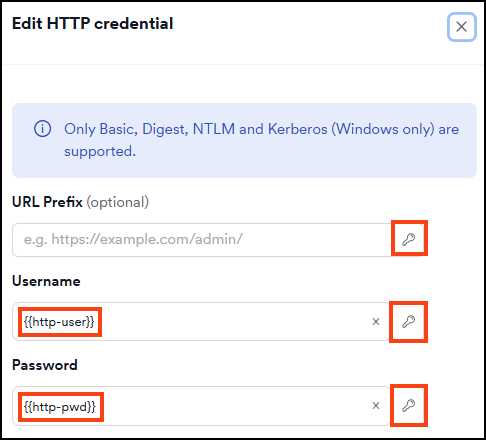
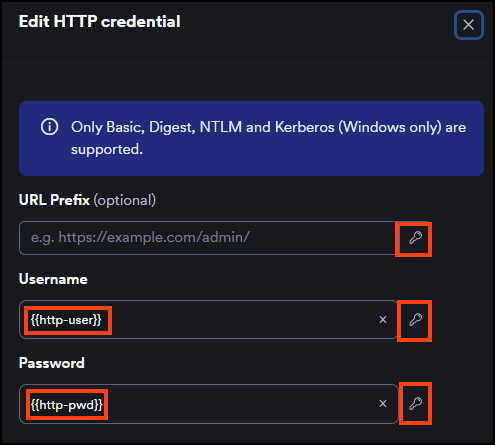
Instead of entering a username or password directly, you can reference a stored secret. This lets you reuse credentials across targets and manage them from a single location. The Username and Password fields support secret references; the URL Prefix field also supports secrets if needed.
- Follow steps 1-5 of Configure HTTP authentication to open the Add HTTP credential dialog.
- Click the key icon on the right side of the Username or Password field.
- Select the secret you want to use. The field displays the secret name in
{{secretName}}format to confirm the reference. - Click Add, then click Save target configuration.
To remove a secret reference and enter a value manually, click the X next to the secret name in the field.
To create a new secret without leaving the authentication settings, click the key icon and select +Add secret at the bottom of the panel.
For more information on managing secrets, refer to the Secrets document. To see all authentication methods that support secrets, refer to the Using secrets in scans document.
Troubleshooting
The scan reports "HTTP Authentication required on: {path}"
The scanner reached a page that requires HTTP authentication but found no credentials for that path. Add HTTP authentication credentials in the target's authentication settings and retry the scan.
For a full list of scan warning and error messages, refer to the Scan statuses and error messages document.
The main page loads but most discovered URLs return 401
The URL Prefix is set to a specific file rather than a directory or site root. The scanner authenticates that one URL and leaves all other requests unauthenticated. Change the URL Prefix to the site root or the highest directory that covers all protected resources.
Need help?
Invicti Support team is ready to provide you with technical help. Go to Help Center