Package: Invicti AppSec Core (on-demand)
Product scans
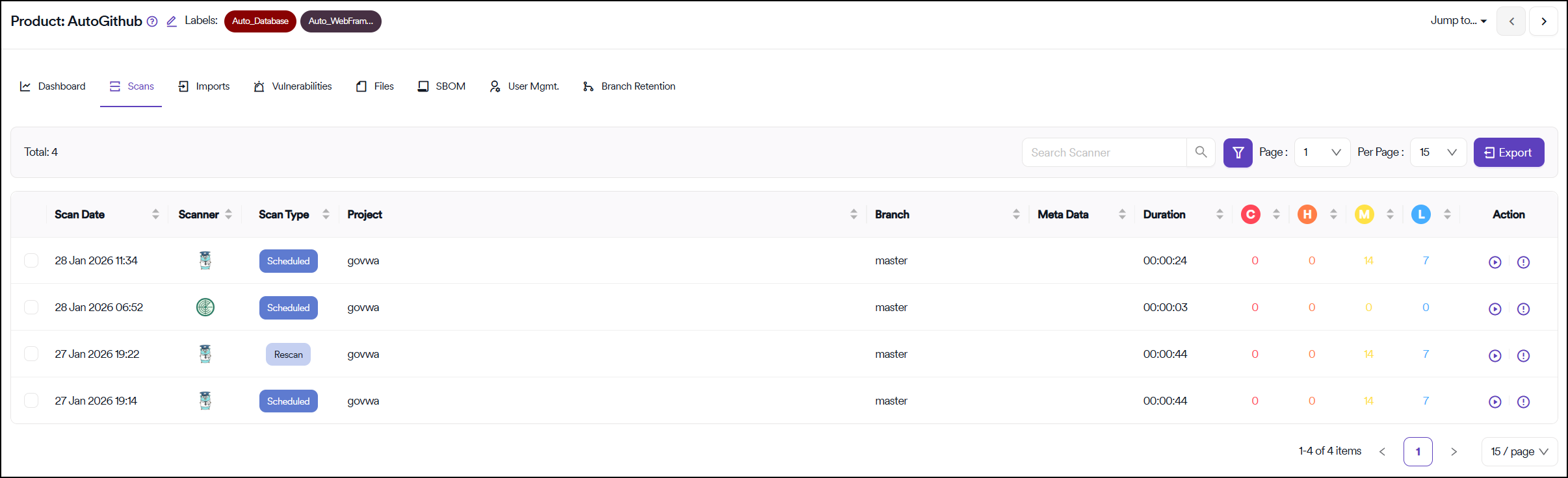
The Scans section displays a list of all completed scans performed on the projects placed under the selected product.
You can access a list of vulnerabilities discovered in each scan by clicking the Vulnerabilities button in the rightmost Action column of each row.
You can also restart a scan from this view by clicking the Rescan button under the Action column.
Filter scans
The table can be filtered by:
- Projects
- Scanners
- Branches
- Metadata
- Scan type
The number of vulnerabilities corresponding to each scan reflects the original number of vulnerabilities discovered in the scan. Subsequent changes made to the vulnerability in Invicti AppSec, such as changing the severity, are not reflected in this view.
Need help?
Invicti Support team is ready to provide you with technical help. Go to Help Center