Creating a New Scan Policy
A scan policy is a set of settings for web application security scans that determines the security tests to be conducted when initiating a scan. You can choose pre-defined policies, customize them based on your target's characteristics, or create new ones from scratch. Additionally, you can share policies within a group or duplicate them from existing configurations.
This document provides step-by-step instructions on how to create a new scan policy in Invicti Enterprise, enabling you to define custom security testing parameters that align with your organization's specific requirements and compliance standards.
How to Create a New Scan Policy
Follow these steps to create a custom scan policy tailored to your security testing requirements:
- Navigate to Policies > New Scan Policy from the left-side menu in your Invicti Enterprise interface
- The New Scan Policy configuration window will open, presenting you with various tabs and configuration options
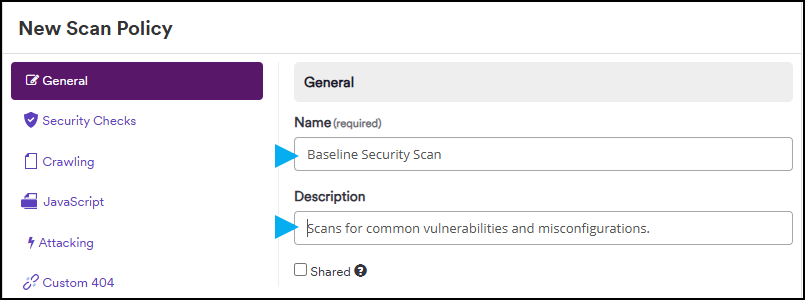
- Fill in the Name field with a descriptive title that clearly identifies the purpose of your scan policy
- Complete the Description field with a comprehensive overview of the policy's features, target applications, and intended use cases for anyone who may use it
- Select the Shared checkbox to share the policy with other users in your organization
For comprehensive details about each configuration tab and field, refer to the Scan Policy Fields external documentation, which provides detailed explanations of every available option.
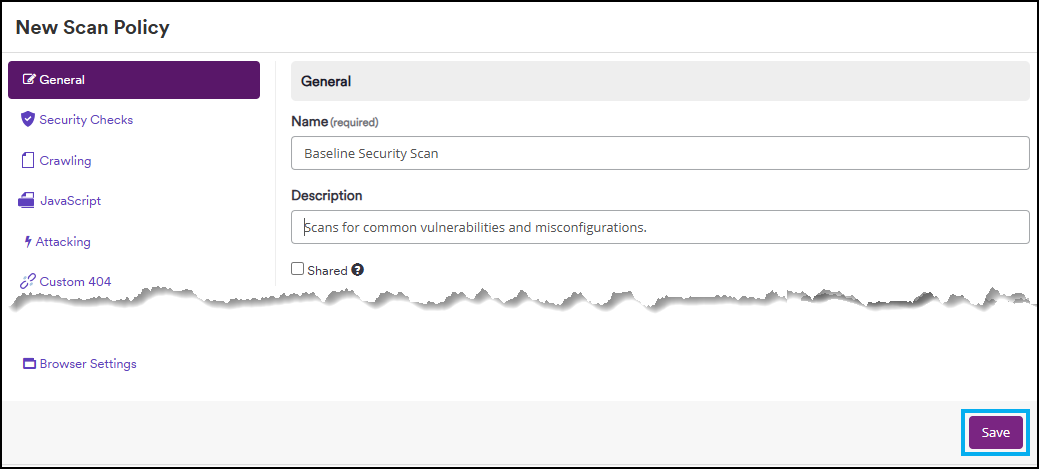
- Click Save to create your new scan policy
Need help?
Invicti Support team is ready to provide you with technical help. Go to Help Center