This feature is available with Invicti API Security Standalone or Bundle.
Integrate NTA in K8s with NGINX in K8s
To collect access logs from NGINX, configure it to forward logs using the Syslog protocol. In this setup, NGINX acts as a reverse proxy and sends access logs to the Traffic Signal Aggregator (TSA), which is part of Invicti's Network Traffic Analyzer (NTA).
The TSA receives logs over UDP and forwards them to the Reconstructor service, which analyzes the data to reconstruct API activity for security analysis.
Both NTA and NGINX run on Kubernetes:
- NTA (TSA + Reconstructor) is deployed in a Kubernetes cluster using Helm.
- NGINX is also deployed in the same Kubernetes cluster and configured to forward access logs to the TSA service using the Syslog protocol.
This document explains how to: deploy NTA (TSA + Reconstructor) in Kubernetes, deploy and configure NGINX to forward logs via Syslog, and validate the integration.
The configuration is a 3-step process:
- Step 1: Deploy NTA in Kubernetes using Helm
- Step 2: Configure NGINX to forward logs via Syslog
- Step 3: Test the setup
Prerequisites
Before getting started, ensure the following:
- You have access to a Kubernetes cluster (for example, Minikube, EKS, GKE).
kubectlis configured and connected to the cluster (verify by runningkubectl get nodes).- NGINX version 1.9.11 or later is deployed in a Kubernetes pod (verify with
nginx -v). - You have access to Invicti Enterprise, and can navigate to APIs > Sources to add a New source and copy the Registration token.
- Helm is installed (verify with
helm version). - The NGINX pod can reach the TSA service over UDP port 15400.
Step 1: Deploy NTA in Kubernetes using Helm
Since the default namespace is being used, you don't need to create a new namespace. You can proceed with the following Helm command to install the Invicti API Discovery components.
Deploy NTA in K8s using Helm
Use the following Helm command to install the Invicti API Discovery components with the required configuration:
helm install invicti-api-discovery oci://registry.invicti.com/invicti-api-discovery --version 25.11 -n default --set imageRegistryUsername=<your-username> --set imageRegistryPassword=<your-password> --set trafficSource.tsa.enabled=true --set trafficSource.tsa.syslogEnabled=true --set reconstructor.JWT_TOKEN="<your-apihub-jwt-token>"
Replace the following placeholders with your actual credentials:
<your-username>and<your-password>- your image registry credentials - email address used for Invicti Enterprise and the password can be found under Agents > Manage Agents > New agent > Docker command-line tool & Openshift section, copy the password in field 2- When prompted, enter the password.
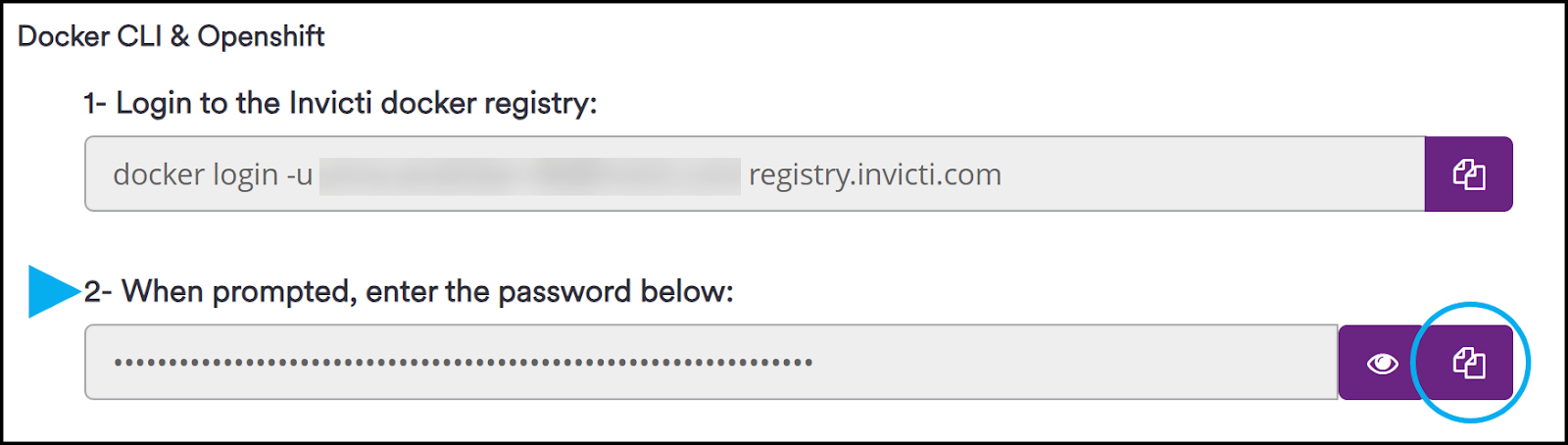
<your-apihub-jwt-token>- your API Hub JWT token. You can find the ApiHub token under APIs > Sources > New source > copy the Registration token > click Save.
Verify deployment
Run the following command to ensure the components were deployed successfully:
kubectl get pods -n default
You should see pods for both TSA and Reconstructor running in the default namespace.
Step 2: Configure NGINX to forward logs via Syslog
To enable log forwarding from NGINX to the TSA service using the Syslog protocol, you’ll need to modify the NGINX configuration file.
Update the configuration
- Locate the
nginx.configfile. It's typically located at/etc/nginx/nginx.confor within/etc/nginx/conf.d/. - Update the configuration.
Edit the configuration file and add the following custom log format under the http block:
http {
  log_format tsalogformat
    '@@@http_x_request_id=$http_x_request_id'
    '@@@request_scheme=$scheme'
    '@@@request_host=$host'
    '@@@remote_addr=$remote_addr'
    '@@@request_method=$request_method'
    '@@@request_uri=$request_uri'
    '@@@server_protocol=$server_protocol'
    '@@@response_status=$status'
    '@@@request_body=$request_body'
    '@@@header_referer=$http_referer'
    '@@@header_accept=$http_accept'
    '@@@header_content_type=$http_content_type'
    '@@@server_port=$server_port';
}
- Configure the
access_logto use Syslog. Still within the samehttpblock, locate theaccess_logdirective and replace it with the following:
access_log syslog:server=invicti-api-discovery-tsa-service.default.svc.cluster.local:15400,facility=local7,tag=nginx,severity=info tsalogformat;
Replace invicti-api-discovery-tsa-service.default.svc.cluster.local with the actual DNS name of your TSA service in the cluster.
- To retrieve the TSA service name, run:
kubectl get services - Look for the service associated with TSA (typically named
invicti-api-discovery-tsa-service).
Restart NGINX
After making the changes, restart NGINX to apply the new configuration:
sudo systemctl restart nginx
or, if you're running it inside a container:
nginx -s reload
Step 3: Test the setup
Follow the steps to verify that NGINX is successfully forwarding logs to the TSA service and that the NTA components are functioning correctly.
-
Check pod status
- Run the following command to list all pods:
kubectl get pods- You should see entries similar to the following. Wait until both pods show a
Runningstatus:

-
Check the TSA logs
- Verify that TSA is receiving logs by checking its logs:
kubectl logs deployment/invicti-api-discovery-tsa- You should see incoming Syslog messages that resemble log entries from NGINX.

-
Check Reconstructor logs
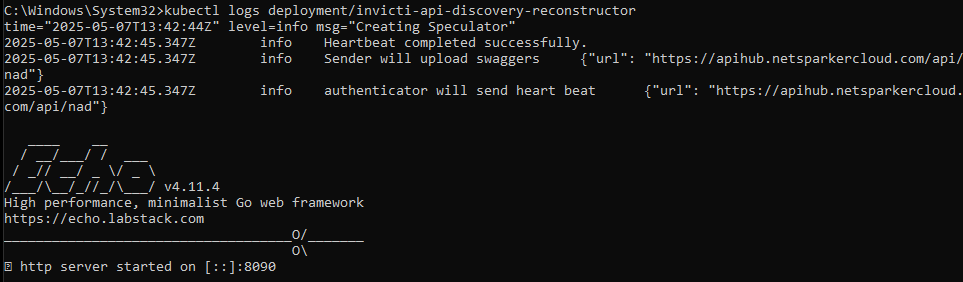
kubectl logs deployment/invicti-api-discovery-reconstructorLook for parsed and processed API activity in the logs.
Notes
- UDP Port 15400 must be reachable between the NGINX pod and the TSA service.
- TSA and Reconstructor are deployed using Helm and communicate with each other internally within the cluster.
- Before restarting NGINX or deploying changes, always validate the configuration syntax.
Need help?
Invicti Support team is ready to provide you with technical help. Go to Help Center