Add comments or tags to vulnerabilities
Adding comments and tags to vulnerabilities helps you organize, track, and collaborate on security findings from your DAST scans. Use comments to document remediation efforts, provide context, or communicate with team members. Use tags to categorize vulnerabilities by priority, team ownership, compliance requirements, or any custom criteria that fits your workflow.
This document explains how to add comments or tags to one or more vulnerabilities in your scan results.
Add comments or tags
-
Select Vulnerabilites from the left-side menu.
-
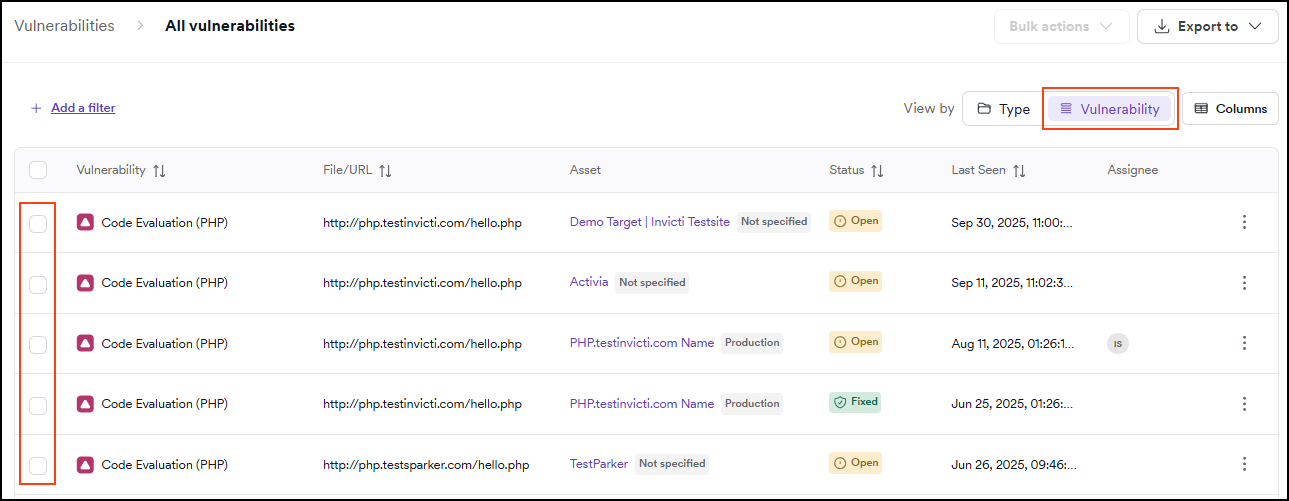
Use the checkboxes to specify each vulnerability you want to add a comment or tags to.
-
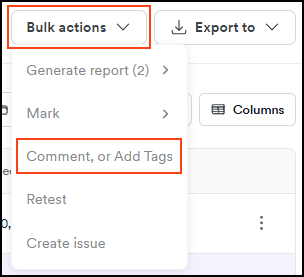
In the Bulk actions dropdown, click Comment or add tags.
-
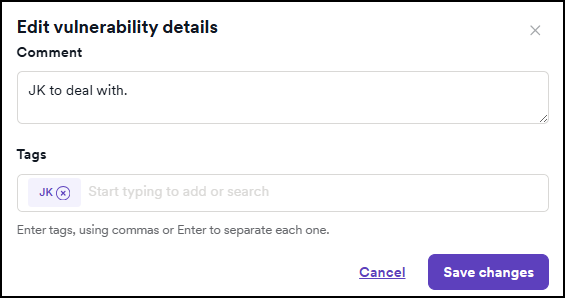
In the dialog box that opens:
- For comments: Enter your comment text
- For tags: Specify the tags you want to apply by typing the tag and pressing enter after each to confirm
-
Click Save changes to apply your changes.
You can select multiple vulnerabilities and apply the same comment or tags to all of them at once, saving time when managing large scan results.
Best practices
- Use consistent tags across your organization to make filtering and reporting easier
- Add comments when changing vulnerability status to create an audit trail
- Tag by team to route vulnerabilities to the appropriate developers or security personnel
- Tag by priority to identify critical issues that need immediate attention
Need help?
Invicti Support team is ready to provide you with technical help. Go to Help Center