Change vulnerability severity
This document explains how to change the severity of a specific vulnerability found by a DAST scan. To change the severity level globally for DAST scans, refer to the Severity overrides document.
- Role requirements: possibility to override the vulnerability's severity level in Invicti Platform requires either an Administrator, Owner, Security Analyst, Security Manager role, or a custom role with the Vulnerability full-access permission.
- Precedence: severity levels follow this hierarchy:
- Asset: the specific severity set for the asset.
- Global: the organization-wide severity setting.
- Default: Invicti's standard system severity level.
Change severity level
Change the severity level for a specific vulnerability on the All vulnerabilities page or the Vulnerability tab of the Scan details page once the scan is complete.
- Click the vulnerability to open its drawer with additional information.
- Scroll to Severity level drop-down, click the arrow to open a list.
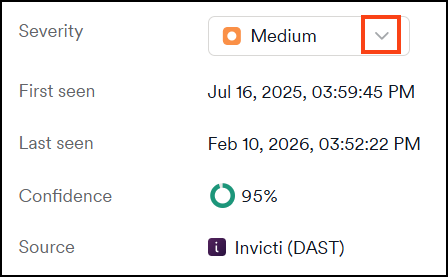
- Select the new severity level and click tick to confirm. The drawer shows an information about the change.
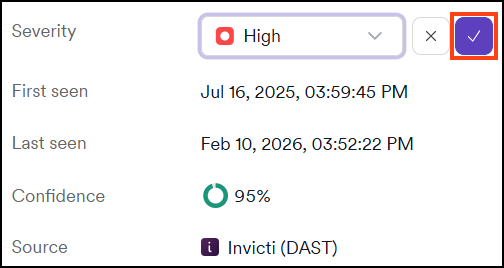
- The vulnerability's new severity level is automatically visible in the:
- Vulnerability drawer details.
- All vulnerabilities page.
- Scan details page: in Scan summary, Vulnerabilities, and Past scans (when applicable) tabs.
- Any new report created after the change.
Audit log records the severity override details and name of the user who performed the change. Basic information on the change is also recorded in the Activity tab in the vulnerability's drawer.
Revert the change
Change the severity level for a specific vulnerability on the All vulnerabilities page or the Vulnerability tab of the Scan details page once the scan is complete.
- Click the vulnerability to open its drawer with additional information.
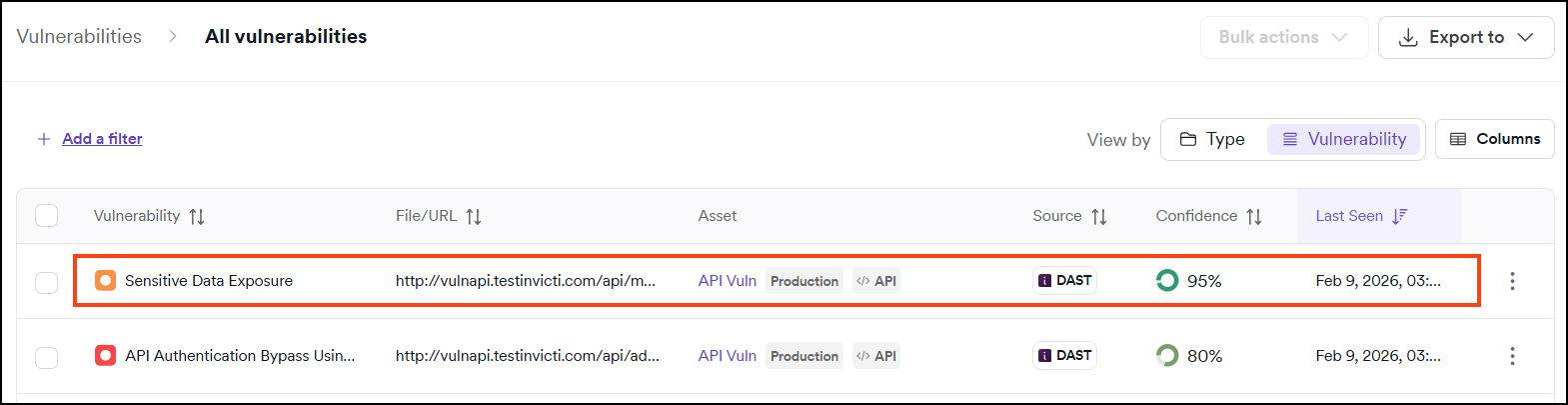
- Scroll to Severity level drop-down.
- Click the arrow icon to undo the change.

- The vulnerability's severity level is reverted to the global vulnerability's severity level.
Audit log records the reversal of severity override details and name of the user who performed the change. Basic information on the change is also recorded in the Activity tab in the vulnerability's drawer.
Need help?
Invicti Support team is ready to provide you with technical help. Go to Help Center