Retest vulnerabilities
To verify a fix, you can retest the vulnerability. Selecting Retest triggers a targeted scan using a custom profile to confirm the vulnerability is fixed.
- If an Invicti retest scan confirms that the vulnerability isn't found anymore, it's marked as Fixed.
- If an Invicti retest scan identifies that the Fixed (Unconfirmed) vulnerability is found, it's listed as Rediscovered. If the status was Open, it remains Open.
- All vulnerabilities are retestable.
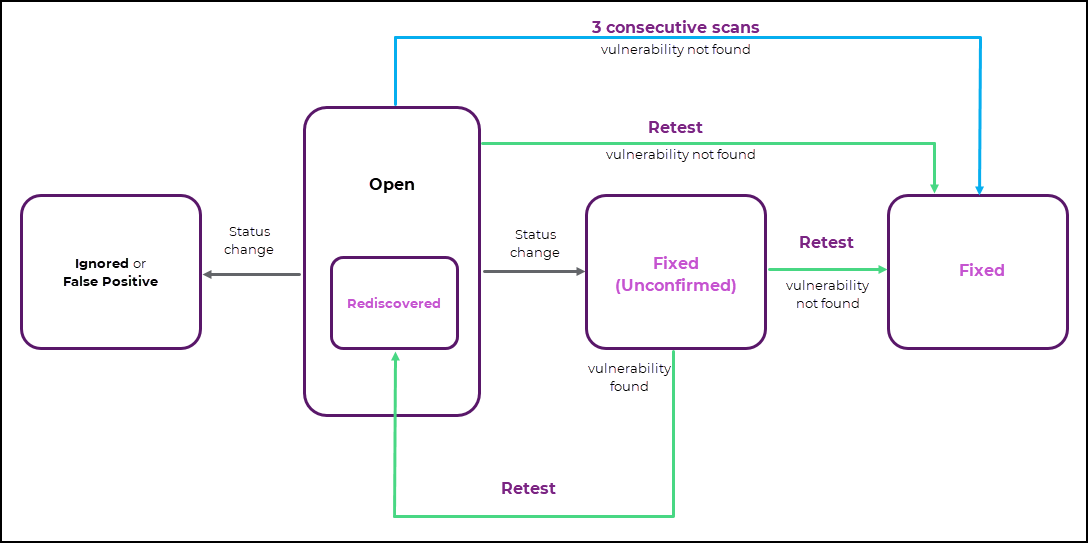
This document explains how to retest vulnerabilities after a fix was done - one at a time from scan results, all at once for a scan, or in bulk from the Vulnerabilities page.
Why this matters
After you fix a vulnerability, a retest confirms that the fix works without running a full scan again. Retesting all vulnerabilities found by a scan saves you from selecting them one by one, so you can verify a batch of fixes in a few clicks. Invicti updates the status of each vulnerability from the retest result, which keeps your vulnerability list accurate.
Retest a vulnerability from scan results
- Select Scans > DAST scans from the left-side menu.
- Click the scan to open the Scan details page.
- From the Vulnerabilities tab, click a vulnerability to open its details.
- Click Retest to initiate the retest scan.
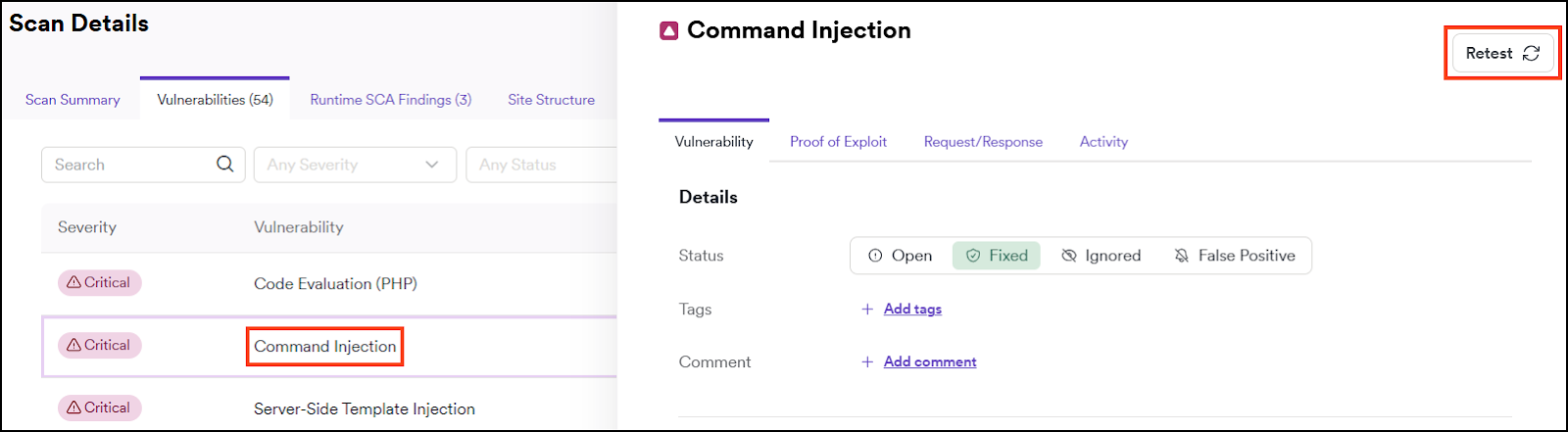
- A notification appears confirming that a scan has been initiated to retest the selected vulnerability.
- Select Scans > DAST scans from the left-side menu to see the status of the retest scan.

Retest all vulnerabilities found by a scan
Deployment: Invicti Platform on-demand
Retest every vulnerability that a DAST scan found, without selecting them one by one.
- Select Scans > DAST scans from the left-side menu.
- Click a completed or aborted scan to open the Scan details page.
- Click Scan again to open its menu.
- Select Retest found vulnerabilities.
- A notification confirms that the retest started.
- Select Scans > DAST scans from the left-side menu to see the status of the retest scans.
If the scan found more than 200 vulnerabilities, Invicti splits the retest into several scans of up to 200 vulnerabilities each. For example, 450 vulnerabilities start three retest scans: 200, 200, and 50.
The Scan again menu also includes Rerun scan, which starts the scan again, and Create schedule, which opens the page for scheduling a scan on the same Target.
The Retest found vulnerabilities option appears only for scans with the Completed or Aborted status, and it's unavailable if the scan found no vulnerabilities. You also need Full Access to Vulnerabilities in your role and access to the Target that was scanned. For more information, refer to the Role permissions document.
Bulk retest vulnerabilities
- Select Vulnerabilities from the left-side menu.
- Enable checkboxes by the vulnerabilities you want to retest.
- Click Bulk actions > Retest to initiate the retest scans.
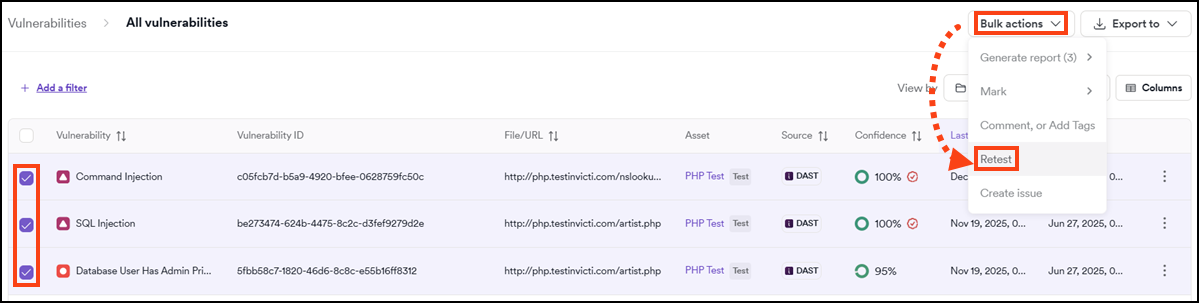
- A notification appears confirming that scans have been initiated to retest the selected vulnerabilities.
- Select Scans > DAST scans from the left-side menu to see the status of the retest scans.

Follow these steps to configure the automatic retest of vulnerabilities with Fixed (Unconfirmed) status:
- Select Settings > Scanning from the left-side menu.
- Set Automatically rescan vulnerabilities when marked as Fixed (Unconfirmed) to Yes.
- Confirm by clicking Save changes.
For more information, refer to the Scanning settings document.
Don't have time to fix your vulnerabilities? Try exporting your vulnerabilities from Invicti Platform and importing them into your WAF to save time for the fix. For more information, refer to the Exporting scan results to WAFs document.
Troubleshooting
The Retest found vulnerabilities option is missing or unavailable
Check the following:
- The scan status is Completed or Aborted. The option doesn't appear for scans that are still running or have Failed. For more information, refer to the Scan statuses and error messages document.
- Your role has Full Access to Vulnerabilities. For more information, refer to the Role permissions document.
- The scan found at least one vulnerability. The option is unavailable for scans with no vulnerabilities.
A notification says "Failed to start the retest"
Invicti couldn't start the retest. The most common cause is that the scanning service is temporarily unavailable or didn't respond in time, so try again in a few minutes.
If the message appears again, check the following:
- Your role has Full Access to Vulnerabilities, and you can access the Target that was scanned.
- You're still signed in. If your session expired or your connection dropped, sign in again and retry.
If the problem continues, contact Invicti Support.
Need help?
Invicti Support team is ready to provide you with technical help. Go to Help Center