Allowed hosts
This document is for Invicti Platform
Your target may start at one domain but span multiple domains. You can use this option to allow the crawler and scanner to follow links in your web applications across multiple domains, as long as each of those domains are:
- Already configured as webapp targets
- Listed in the allowed hosts list
This document describes how to specify allowed hosts for your selected target, and the limits and requirements that apply.
Why this matters
Many applications span more than one domain, for example a main site and the other domains it links to. When you add those domains as allowed hosts, Invicti follows the links between them, so the scan covers the whole application and not only the domain where it starts.
Steps to set up your allowed hosts
- Select Inventory >Targets from the left-side menu.
- Locate the target for which you would like to configure allowed hosts, and use the three-dot menu (⋮) to enter Edit mode.

- Find the Allowed host field and, using the dropdown menu, select the URLs that should be scanned when scanning this target.
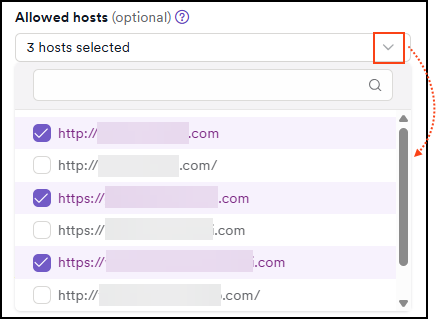
The Parent application is used to group findings from a specific target, allowing scan results to appear under multiple application groups.
Allowed hosts, on the other hand, are additional domains or IPs permitted to be scanned alongside the main target—they're separate from the parent application and define what the scan can include.
Limits and requirements
- A target can have up to 10 allowed hosts. The same limit applies when you add allowed hosts through the API.
- Only webapp targets can have allowed hosts. API targets don't support allowed hosts.
- Each allowed host must be an existing webapp target. You can't add an API target as an allowed host.
- You can't add the target itself, or the same host twice.
For the differences between webapp targets and API targets, refer to the targets overview document.
Troubleshooting
I see "Too many allowed targets, a target can have at most 10"
The target already has the maximum number of allowed hosts. Remove an allowed host that you no longer need, and then add the new one.
I see "Host already attached"
The host is already in the list of allowed hosts, or it's the target itself. Select a different target as the allowed host.
I see "Allowed hosts are not supported for API targets" or "Only standard targets can be added as allowed hosts"
Allowed hosts work only with webapp targets. API targets can't have allowed hosts, and an API target can't be added as an allowed host. Select a webapp target instead.
Need help?
Invicti Support team is ready to provide you with technical help. Go to Help Center