Assign excluded hours profile to target
This document is for Invicti Platform
You can configure each target to scan outside of specified excluded hours or days. This document explains how to assign an existing excluded hours profile to a target.
info
For information on how to create a new excluded hours profile, refer to the Configure excluded hours profile document.
Add excluded scan hours to a target
- Select Inventory > Targets from the left-side menu.
- On the Targets page, click the three-dot menu (⋮) next to the target you want to configure and select Edit.
- Select Excluded scan hours.
- From the Hours profiles dropdown, select the profile you want to use.
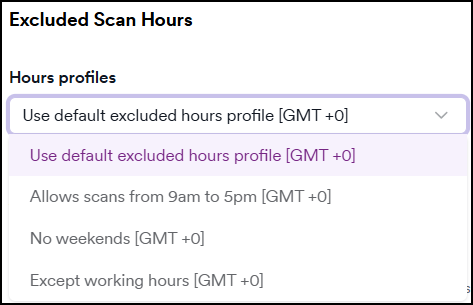
- Click Save target configuration to apply the changes.
Need help?
Invicti Support team is ready to provide you with technical help. Go to Help Center
Was this page useful?