Import scan results into Fortinet FortiWeb
This document is for Invicti Platform
Once you have exported the scan results from Invicti Platform, follow this document to import them to Fortinet FortiWeb WAF.
Prerequisites
- Your FortiWeb system configuration needs to be completed according to the networking environment surrounding your web application
- You completed a scan in Invicti Platform and created a WAF export file in FortiWeb format.
Import vulnerability export data into FortiWeb
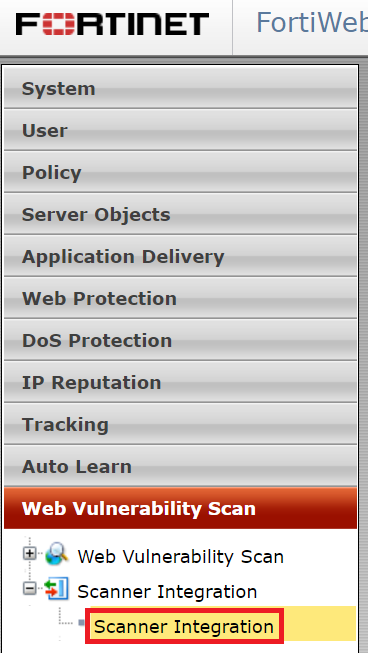
- Choose Web Vulnerability Scan > Scanner Integration > Scanner Integration from the menu.
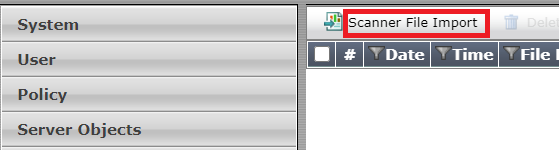
- Click Scanner File Import.
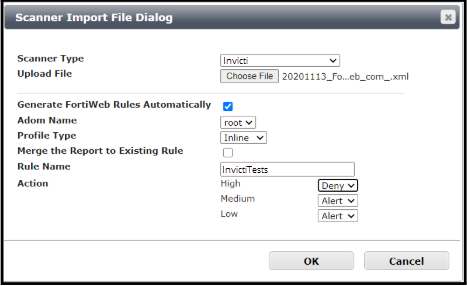
- Set Scanner Type to Invicti.
-
The Upload File section allows you to browse your folders and choose the WAF export file.
-
Enable the Generate FortiWeb Rule Automatically checkbox.
-
Set ADOM Name to the ADOM that the generated rules apply to.
-
Set the Profile Type depending on whether the generated rules apply to an Inline or Offline Protection Profile.
-
Specify in the option Merge the Report to Existing Rule whether to create a new Rule set for the generated rules, or to add the generated rules to an already existing Rule set.
- If creating a new Rule set, give this new Rule set a name (in this example use InvictiTests).
- If adding to an already existing Rule set, choose the Rule set to which the generated rules are added.
-
You need to specify what action FortiWeb takes when it detects a user making a request that would trigger a vulnerability which the generated rules are defending against
- Different actions can be set depending on whether the vulnerability is classified as high-level or medium-level or low-level
- The Alert action allows the request and generates an email alert and/or a log message
- The Deny action blocks the request and generates an email alert and/or a log message
-
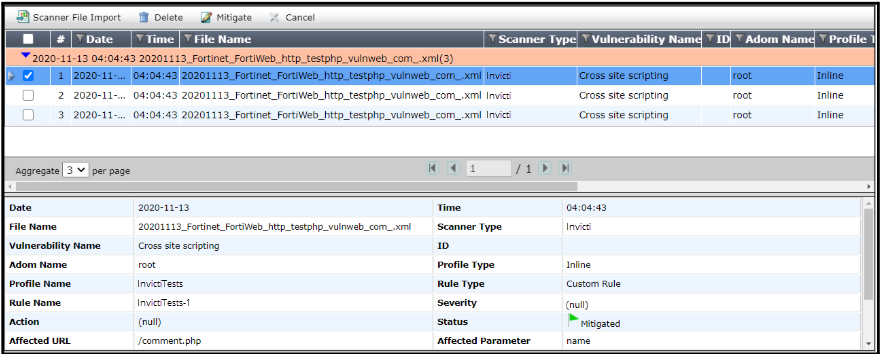
Click OK to upload the export file. Your WAF export has now been integrated into your FortiWeb Rule Set.
Need help?
The Support team is ready to provide you with technical help. Go to Help Center