WAF export introduction
The detection of vulnerabilities in a web application is the first step. Ideally, these vulnerabilities are fixed rapidly after they're identified, however, experience shows that this isn't always the case. If vulnerabilities can't be fixed in a timely fashion, the next best option is to mitigate the risk.
This document explains how to export a scan result as a Web Application Firewall rule.
Available export formats
Export scan data to a common format for integration with other tools or for additional analysis. Select from the following formats:
- XML: provides comprehensive, raw information of the scan data.
- JSON: offers highly detailed and structured scan results data.
- CSV Locations: a CSV file detailing the scan scope (URLs and paths scanned).
- CSV Vulnerabilities: a CSV file focusing on vulnerabilities and their details.
Invicti Platform scan results data can be exported to a format supported by the most popular Web Application Firewalls (WAFs), including:
- Citrix Web App Firewall
- F5 Big-IP ASM (Application Security Manager)
- Fortinet FortiWeb
- Imperva SecureSphere WAF
Steps to export a scan result as a WAF rule
- Select Scans from the left-side menu to open All scans page.
- Access the scan results by clicking on the specific scan.
- On the scan details page, click the Export to drop-down.
- Choose the type of WAF file you wish to export.
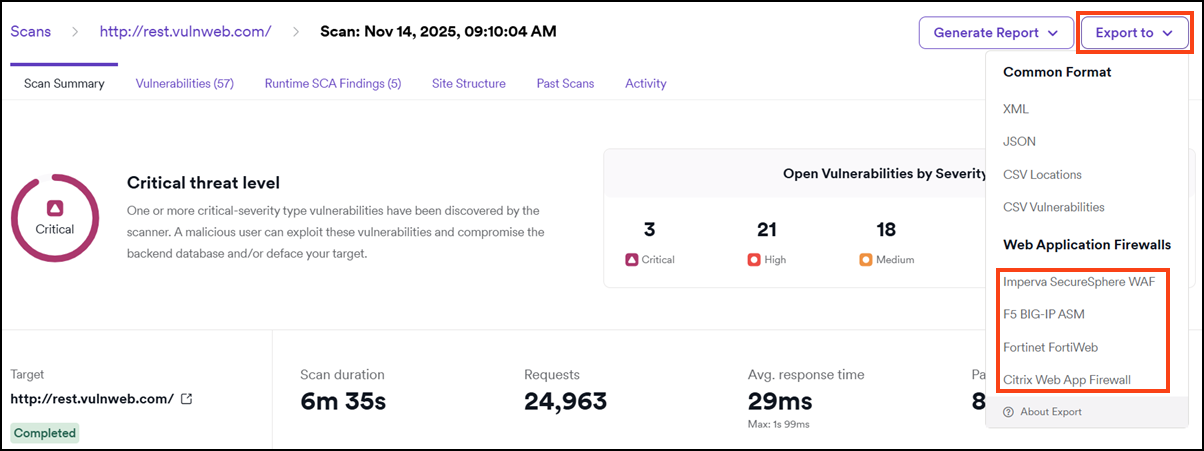
After a few moments, Invicti generates the export file. Once the export is complete, you can import this file into your chosen Web Application Firewall (WAF) to apply the mitigation rules.
Need help?
The Support team is ready to provide you with technical help. Go to Help Center