availability
Deployment: Invicti Platform on-demand, Invicti Platform on-premises
Package: Invicti API Security Standalone or Bundle
Check your NTA version
The Network Traffic Analyzer (NTA) monitors and analyzes network traffic to discover APIs in your environment. Keeping NTA up to date ensures you have the latest features, stability improvements, and bug fixes.
This document explains how to check your installed NTA version and view details about the latest release.
View your NTA version
To find out what NTA version you have installed, follow the steps below:
- Select Discovery > Configuration from the left-side menu.
- Scroll down to the API sources section and locate the NTA in the API sources table.
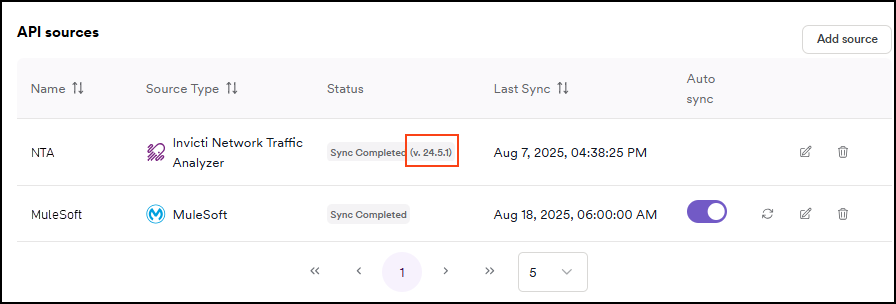
- The current NTA version number is displayed in the status column when NTA is fully configured (reaches Sync completed status).
Current version details
- Version: 25.11
- Release date: 19 November 2025
What's new in the latest version
- Enhanced data persistence - NTA now preserves reconstruction context even if the container stops or crashes, preventing loss of collected API specifications
- Improved stability - General stability enhancements for more reliable operation
Need help?
Invicti Support team is ready to provide you with technical help. Go to Help Center
Was this page useful?