Assign an issue to another team member
If you are named as a website's Technical Contact, all the vulnerabilities and security issues identified during a web security scan are assigned to you. You can assign an issue to another Team Member in the Issues window (or from the Technical Report in the scan results).
For further information, see Viewing Issues in Invicti Enterprise and The issue lifecycle in Invicti Enterprise.
How to assign an issue to another team member in Invicti Enterprise
- In Invicti Enterprise, select Issues > To Do from the left-side menu.
- Select the checkbox for the relevant item, then Edit. (Alternatively, click the title of the issue.)
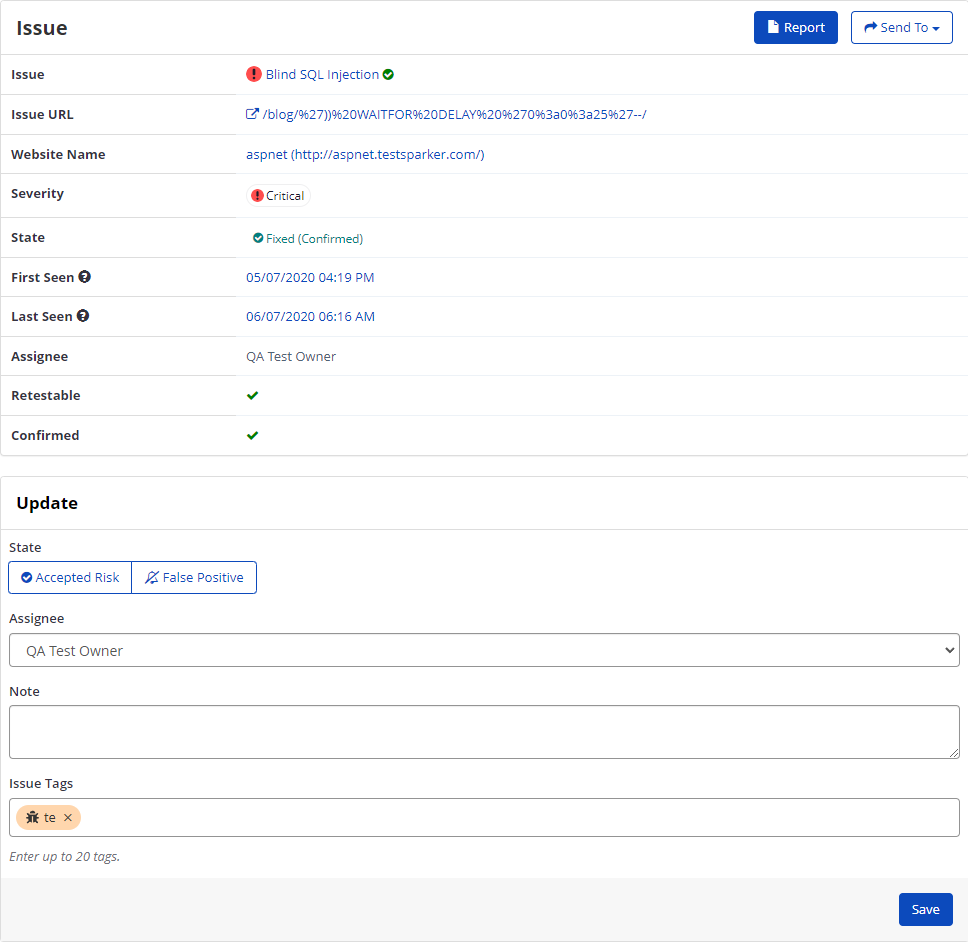
- In the Update panel, from the Assignee drop-down, select an option.
- In the Note field, you can add some helpful information for the new Assignee.
- Select Save.
Need help?
Invicti Support team is ready to provide you with technical help. Go to Help Center
Was this page useful?