Stop assigning issues to the code committer
By default, if scans are configured to be triggered by a version control system change (such as a git commit), Invicti Enterprise will assign the detected Issues to the committer if Invicti Enterprise has a registered user matching committer.
Disabling this behavior means that Invicti Enterprise assigns the detected Issues to the website's Technical Contact regardless of whether Invicti Enterprise is able to identify the committer.
Only Administrators can stop this default behavior.
For further information, see Integrating Invicti into your existing SDLC.
Steps to stop assigning issues to the code committer
- In to Invicti Enterprise, select Settings > General from the left-side menu.
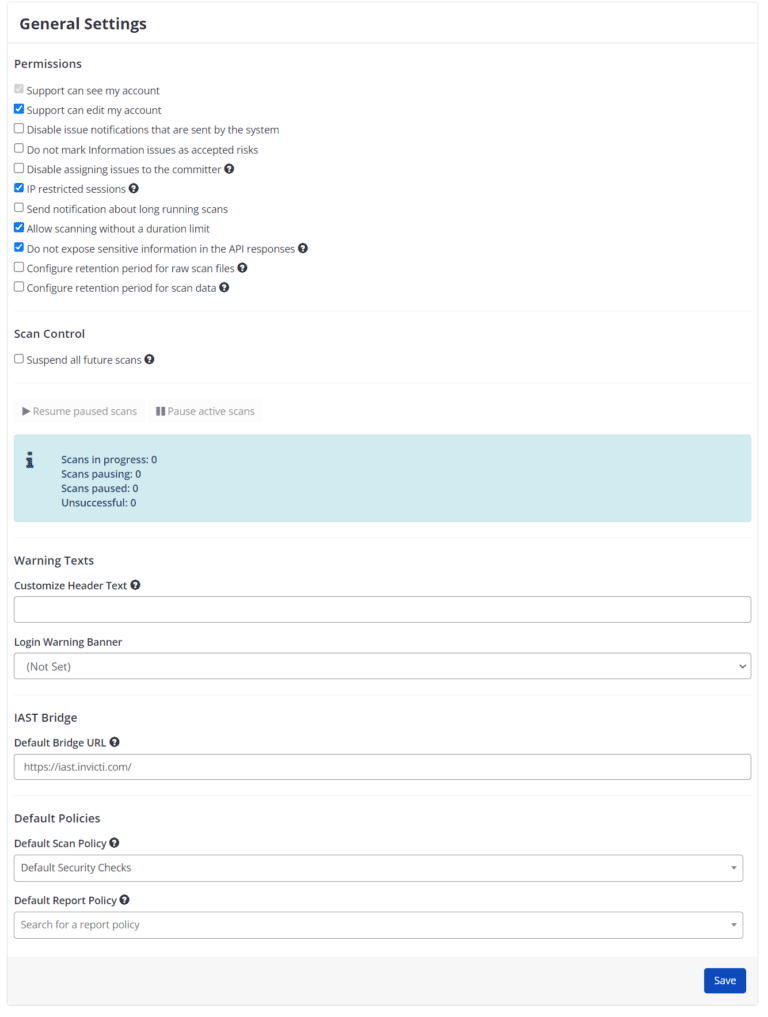
- Select the Disable assigning issues to the committer checkbox.
- Select Save.
Need help?
Invicti Support team is ready to provide you with technical help. Go to Help Center
Was this page useful?