Deploy Invicti Shark for Node.js - Docker
Invicti Shark enables you to carry out interactive security testing (IAST) in your web application to confirm more vulnerabilities and further minimize false positives.
- Node.js is an open source server environment designed to build scalable network applications, as it's capable of handling a vast number of simultaneous connections with high throughput. Depending on the specific frameworks and libraries, debugging a Node.js application can be tricky though.
- You can take advantage of Invicti's unique DAST-induced IAST approach to get an inside view into how security checks and test payloads are processed within these environments. These additional insights let you isolate the location and root cause of security defects quickly.
For more information, see Invicti adds IAST support for Node.js.
The most principled way of deploying Invicti Shark in a Docker scenario is to simply layer the Shark modifications onto your already existing container definition.
The following example demonstrates how you can deploy the Shark together with your web application.
Step 1: Download the Shark sensor
For this example, assume that the URL for your target is http://invictiexample.com:60000.
- Select Scans > New Scan from the left-side menu.
- Choose a Target URL.
- From the Scan Settings, choose Shark (IAST and SCA).
- Turn on Enable Shark.
- From the Server Platform drop-down, choose Nodejs, then Save As.
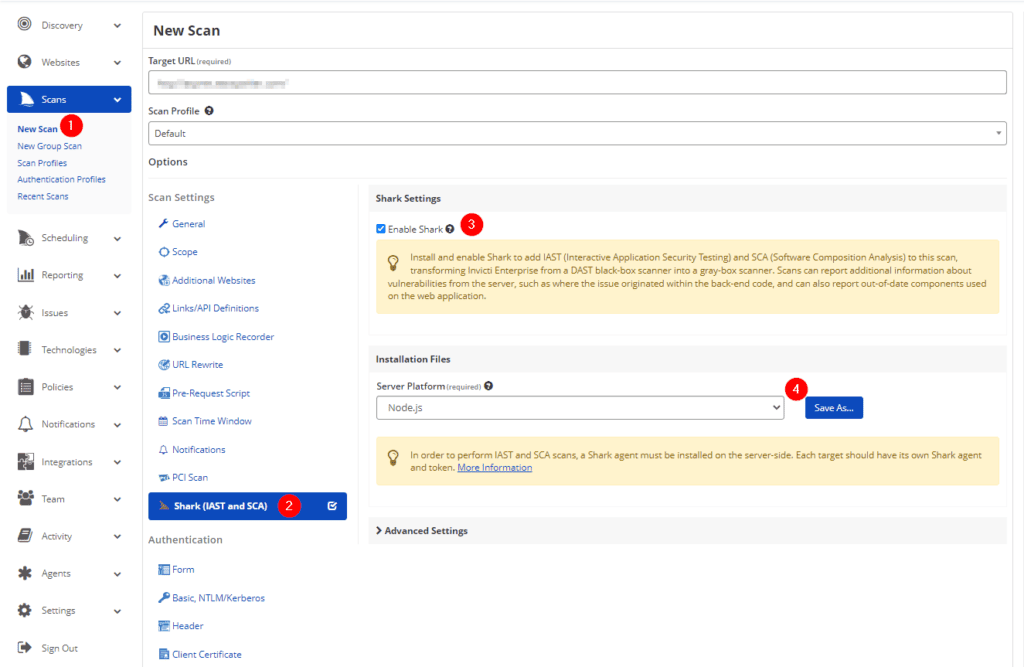
Invicti downloads the following .tar file: Shark(IAST and SCA).tar
Change the name of the TAR file into this: SharkNodeJs.tar
Step 2: Define the web application image
The following file structure defines the simple web application.
/testnodejs-docker/
/testnodejs-docker/Dockerfile
/testnodejs-docker/src/app.js
/testnodejs-docker/src/package.json
- Create your
/testnodejs-docker/Dockerfilefile to read as follows:
FROM node:12

COPY src/ .
RUN npm install

#setup and install Invicti Shark
COPY SharkNodeJs.tar /shark/node-shark.tar
RUN chmod +x /shark/node-shark.tar
# launch the app with Invicti Shark
CMD [ "npx", "/shark/node-shark.tar", "app.js" ]
- Create your
/testnodejs-docker/src/app.jsfile to read as follows:
const app = require('express')();
const port = 60000;

app.get('/', function (req, res) {
  res.send(
    '<html><body>' +
    '<h1>Shark(IAST) Example for Node.JS</h1>' +
    '<br>' +
    'Hello World! - Main Page' +
    '<br>' +
    '<a href="/page1">Go to Page 1</a>' +
    '</body></html>'
  );
});
app.get('/page1', function (req, res) {
  res.send(
    '<html><body>' +
    '<h1>Shark(IAST) Example for Node.JS</h1>' +
    '<br>' +
    'Hello World! - Page 1' +
    '<br>' +
    '<a href="/">Go to Main Page</a>' +
    '</body></html>'
  );
});
app.listen(port, function(err){
  if (err) console.log(err);
  console.log("Server listening on port: ", port);
});
- Create your
/testnodejs-docker/src/package.jsonfile to read as follows:
{
  "name": "testnodejs-docker",
  "version": "1.0.0",
  "dependencies": {
    "express": "*"
  }
}

Step 3: Build and run the docker image
- Build and run your image with:
cd /testnodejs-docker
docker build -t testnodejs-docker .
docker run -d -p 60000:60000 --name mytestnodejs testnodejs-docker
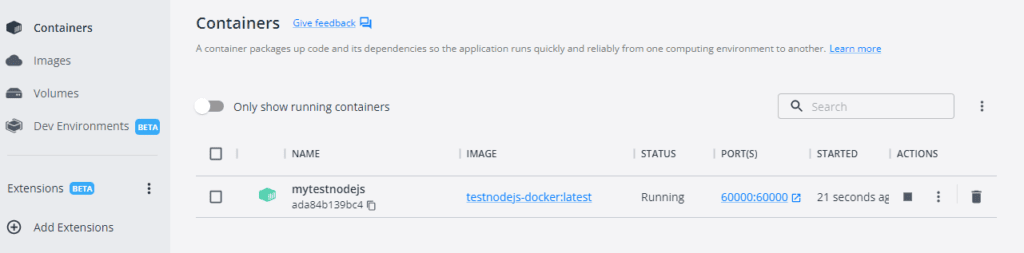
Step 4: Test and scan your web application
-
Point your browser to your web application—in this example
http://invictiexample.com:60000to confirm it's running as intended. -
Run a scan on your URL. The scan summary displays whether Invicti Shark is used for the scan.
Need help?
Invicti Support team is ready to provide you with technical help. Go to Help Center