Manage targets
The Targets page in your Invicti Enterprise account can be used to manage all the web assets you have set up as targets. This topic explains what information is available on the Targets page and how to edit, delete, and filter your list of targets.
For information about adding targets, refer to Add a target and Import targets.
View all targets
To view a list of all the targets you have set up in your Invicti Enterprise account:
For all filtering options, refer to Filters.
- In Invicti Enterprise, select Targets, then Targets from the left-side menu.
- The Targets page now displays a table with information about each web asset that has been set up as a target for scanning. The following information is displayed:
- Name: This is the name of the web asset that you provided when adding it as a target.
- Description: Any additional information about the web asset you may have provided when adding it as a target.
- URL: The URL of the target.
- Results: A count of the active issues identified in the last scan of the target.
- Last Scan: The date and time of the last scan of the target.
- Groups: All the target groups that a target is assigned to.
- Tags: Any website tags that were added when the target was created.
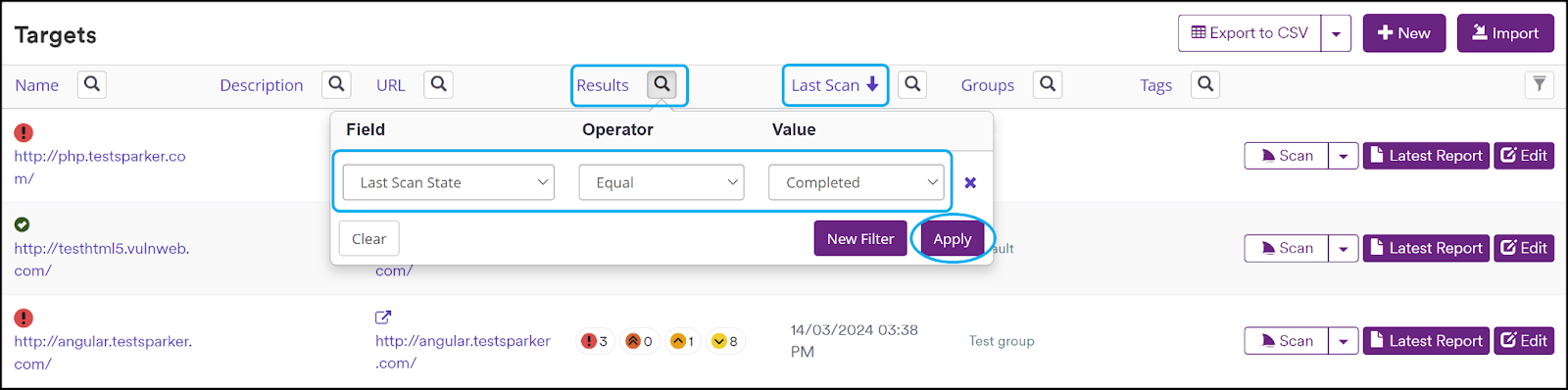
- Configure the table view according to your preferences. The following options are available:
- Sort: Click on any column name to arrange the list in alphabetical order based on the entries in that column.
- Filter: Click the search icon next to a column title and enter filtering criteria (Field, Operator, and Value). Click Apply for the table to update according to the filter you have set. More information about filtering is available at the end of this document.
The Scan button provides quick access to launch a new scan, incremental scan, retest detected issues, or schedule a scan.
Edit or delete a target
- In Invicti Enterprise, select Targets, then Targets from the left-side menu.
- Choose Edit or Delete next to the relevant target.
- Make your changes to the target, then click Save, or click Delete to confirm deletion of the target.
When you delete a target, you cannot restore it or its data. Deleting a target will not recover the license used. If you have a question about licensing, we recommend submitting a ticket through Invicti Help Center.
Need help?
Invicti Support team is ready to provide you with technical help. Go to Help Center