Scan Search in Invicti Standard
You can search and filter in various places in Invicti Standard. This feature provides a centralized and quick search for anything in the current scan, including requests, responses, and vulnerabilities. You can conduct a scan search during a scan, or once it has been completed. This document provides step-by-step instructions on how to search for an existing scan in Invicti Standard.
How to conduct a scan search in Invicti Standard
- With a scan running or completed, open the search dialog by pressing CTRL + K. The search dialog is displayed overlaying the scan action beneath.

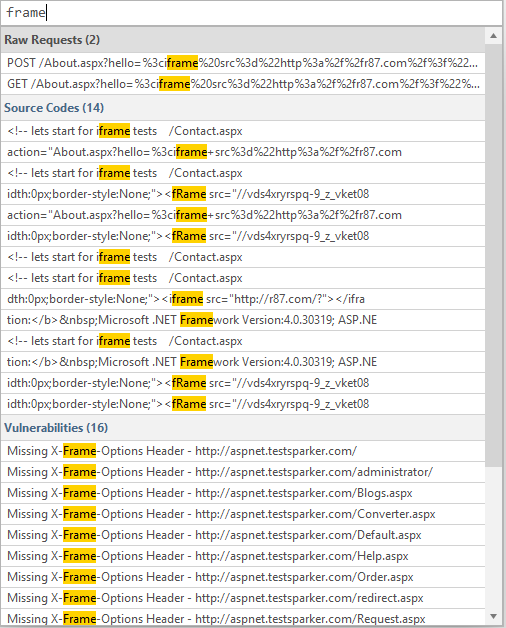
- Enter the word or phrase on which you want to search (in this example, 'frame').
- If the word or phrase is in the scan, results are displayed immediately in filtered categories.
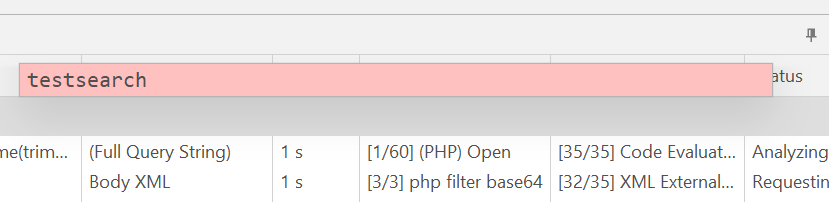
- If the word or phrase does not occur in the scan, the box turns red.
-
Double-click on any search result to display its details in the relevant panel.
-
Press ESC to close the search dialog.
Need help?
Invicti Support team is ready to provide you with technical help. Go to Help Center
Was this page useful?