SAML Authentication Services
The Invicti web application security solution is designed to be an integral part of the Software Development Lifecycle (SDLC) environment: developers commit new code or updates, then Invicti Enterprise automatically scans the commits and reports any identified issues, ensuring the applications are secure before they are moved to a live environment.
Businesses that have successfully integrated Invicti Enterprise into their SDLC and DevOps environments, and have involved their developers in the vulnerability scanning and management processes are already benefiting from financial savings and more secure web applications and web services.
To facilitate the hassle-free involvement of all relevant developers and other team members, Invicti Enterprise now supports Single Sign-On (SSO). When you integrate Invicti Enterprise in your environment and enable Single Sign-On, users do not have to manually log in to Invicti Enterprise each time they want to access a vulnerability report or scan results. Instead, their already authenticated session is used to access the Invicti Enterprise dashboard and all the information they require.
Single Sign-On integration helps streamline the development workflow by eliminating the need for multiple authentication steps when accessing vulnerability reports and scan results.
Invicti Enterprise can also be integrated with these authentication services, so that users do not have to sign in when they already have a session and need to access Invicti Enterprise:
- PingIdentity
- PingFederate
- Okta
- Azure Active Directory
- ADFS (Active Directory Federation Service)
- SAML (Security Assertion Markup Language)
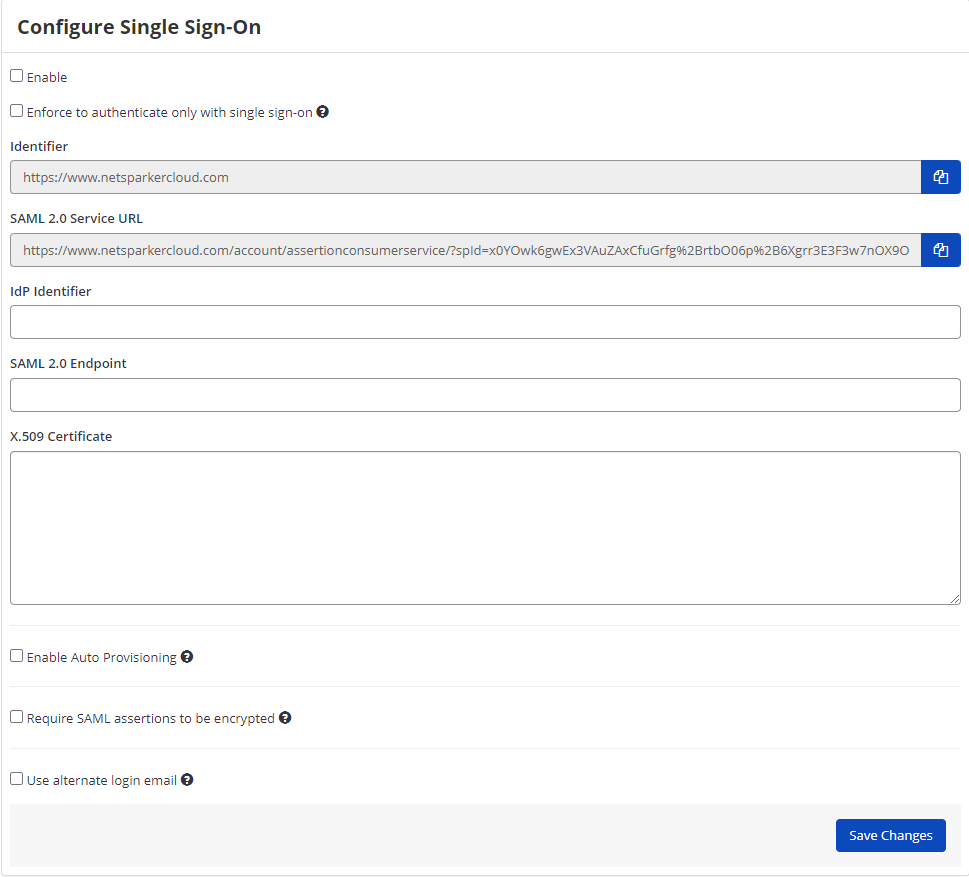
SAML (Security Assertion Markup Language) is an XML-based standard for exchanging authentication and authorization data between an identity provider and a service provider, enabling secure single sign-on functionality.
For detailed configuration instructions for each specific identity provider, refer to the individual integration guides linked above. Each provider may have unique configuration requirements and setup procedures.
Need help?
Invicti Support team is ready to provide you with technical help. Go to Help Center