View issues in Invicti Standard
Once you run a Scan, you can view all detected Issues in the Scan Summary Dashboard.
Issues are listed in various ways:
- Issues panel
- Sitemap panel
In the Issues panel, issues can be filtered, grouped, sorted and searched, using the icons at the top of the panel, depending on what you want to view. You can use the Group by dropdown to group the issues by Vulnerability Type, Severity, Confirmation or URL
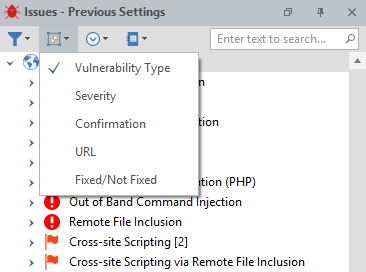
Issue panel icons
This table describes and explains the icons above the Issues panel.
| Field | Explaination |
|---|---|
| Filter | Use the Filter icon to filter issues by the following criteria:
|
| Group by | Use the Group By icon to group issues by the following criteria:
|
| Sort by | Use the Sort by icon to sort issues in alphabetical (or reverse alphabetical) order. |
| Previous settings | Use the Previous Settings icon to:
|
Steps to view an issue in Invicti Standard
- Navigate to the Scan summary dashboard (refer to Scan Summary Dashboard in Invicti Standard).
- In the Issues panel, select the Issue you want to view. (Alternatively, you can click on any item in the Sitemap window.) The Issue is displayed in the Vulnerability tab in the Central Panel.
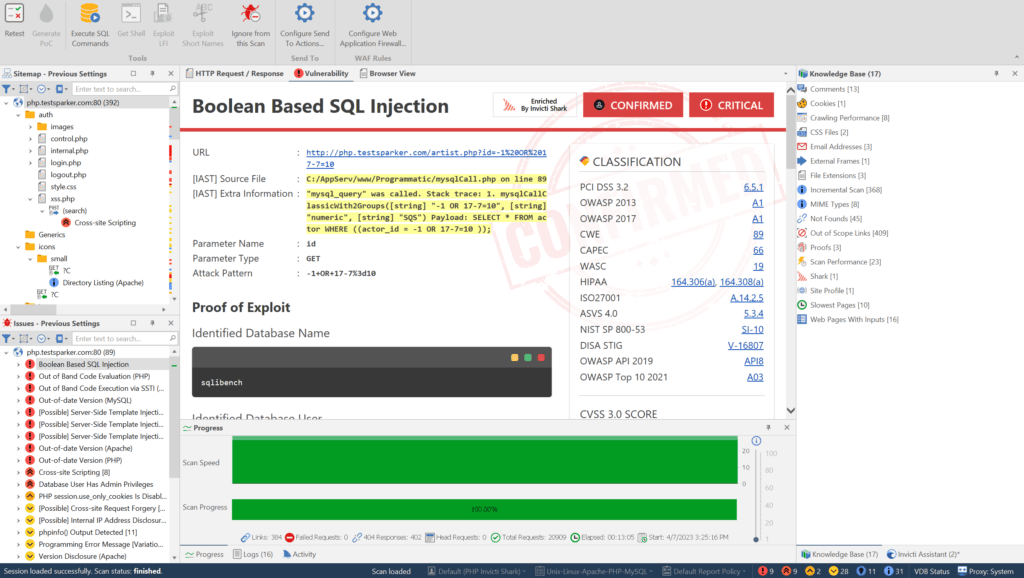
- You can use the tabs at the top of the Vulnerability Details window panel to see more information about the highlighted issue such as the URL, the name and type of the vulnerable parameter, remedial actions, and more.
Steps to view an issue in a browser in Invicti Standard
Browser View allows you to view the present view of the web page, including its response to the attack payloads which Invicti sends.
- From the Scan Summary Dashboard, in the Issues panel, select the Issue you want to view.
- Above the Central Panel, click Browser View to display the item in the Internet Explorer-based preview window. Note that all CSS and client-side scripts are disabled in the browser view for security reasons.

Need help?
Invicti Support team is ready to provide you with technical help. Go to Help Center
Was this page useful?