LSR advanced troubleshooting
This document provides details on common LSR (Invicti Platform standalone Login Sequence Recorder) playback errors, their potential causes, and recommended troubleshooting steps. Understanding these errors can help diagnose and resolve session-related issues efficiently.
This document uses Fiddler to diagnose session pattern issues during setup or manual validation. If you're configuring session detection for the first time, refer to the Session detection document first. If your scan is running and showing the login sequence is invalid alert, refer to the Login sequence is invalid document.
In some cases, the LSR may fail to detect a valid session manually or may encounter errors noted in the debug logs. Below is a step-by-step guide to efficiently troubleshoot and resolve such issues:
Invalid session detection error
The error Invalid session detection - Session still invalid after login playback may occasionally appear in the debug logs during a scan.
Setup
- Install Invicti Platform Login Sequence Recorder:
- Follow the instructions in the Install the Standalone LSR on Windows document.
- Set Up Fiddler:
- Download and install Fiddler from the official website.
- Enable the option to decrypt HTTPS traffic.
- Temporarily stop traffic capture to prepare for the next steps.
- Launch LSR in Developer Mode with Proxy Support:
-
Open a command prompt and run the following command:
cd "C:\Program Files (x86)\Invicti LSR" && node lsr standalone --devtools --proxy 127.0.0.1:8888 -
This command opens the LSR in editor mode and routes all requests through Fiddler. The default port for Fiddler is
8888, listening on localhost (127.0.0.1). You can adjust these settings to match any proxy configuration.
-
- Use LSR with Fiddler:
- In the LSR window opened from running the previous command, open an existing LSR file or configure a new one.
- Playback the authentication steps to simulate login actions.
- Verify that all traffic generated by the LSR is now being routed through Fiddler.
Identify session pattern issues
There are 2 common scenarios:
- Scenario 1: LSR can't identify a session pattern:
- The following error is displayed in the LSR interface: Session pattern could not be identified.
- Scenario 2: Session pattern incorrect during a scan:
- The scan logs or the Activity Tab in the UI displays the following error: Invalid session detection - Session still invalid after login playback.
Scenario 1: Troubleshooting session pattern could not be identified
- Explore the application in the LSR:
- After successfully authenticating in the LSR, navigate through the application.
- Interact with various features of the application, such as submitting forms or clicking on links to generate authenticated requests.
- Analyze captured traffic in Fiddler:
- Review the traffic captured in Fiddler to identify elements that are only accessible when authenticated.
- Look for specific requests and responses that include authentication-only content, such as "Change Password," "Manage Account," or other user-specific pages like
/mycartor/cart.php. - Refer to the screenshot of Fiddler traffic analysis.
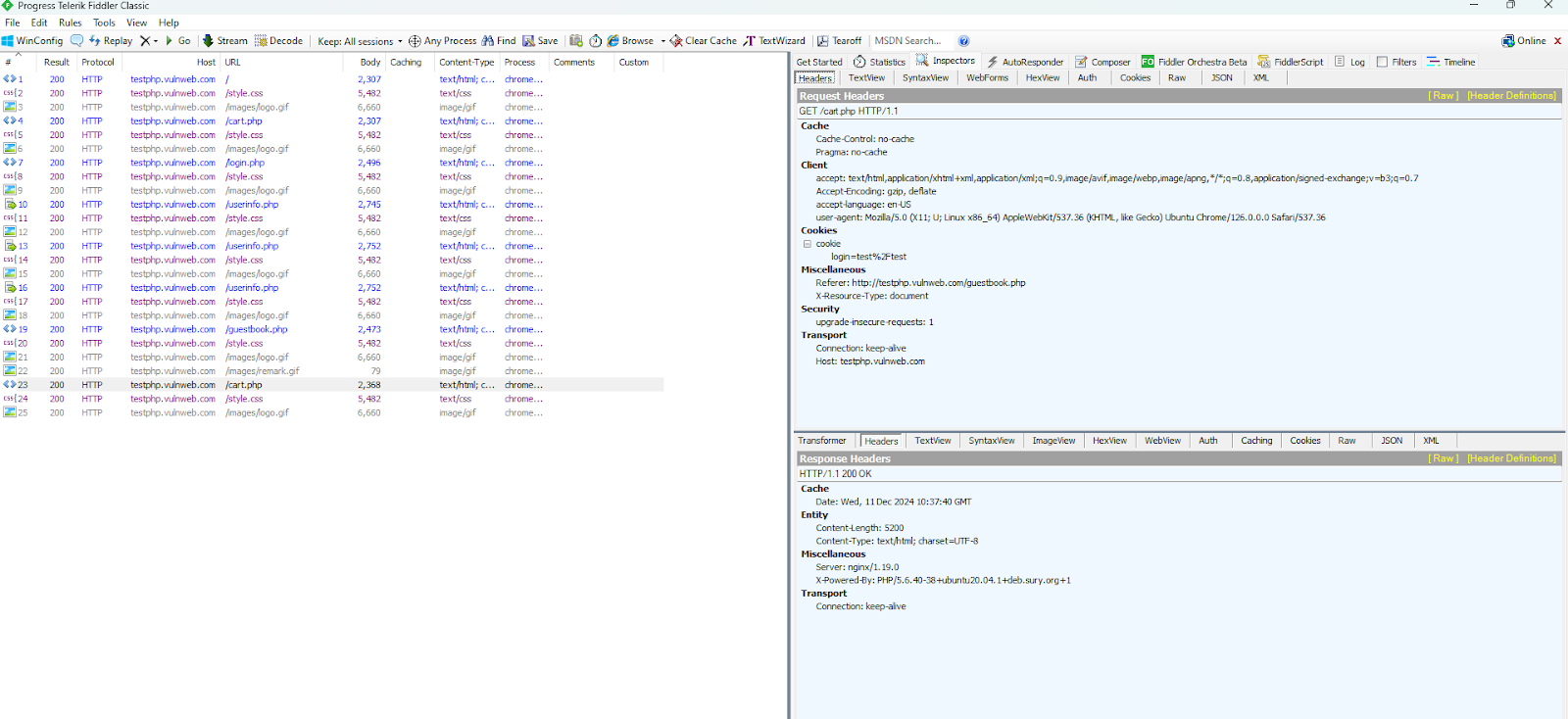
- In this example, we observed a request to
/cart.php. Based on the captured data, this request appears to be available only when authenticated.
- Key observations from the screenshot:
- Request URL:
/cart.php. - Cookies and Headers: The
logincookie value suggests authentication. - Response: The successful response (HTTP 200 OK) confirms that this resource is available only after authentication.
- Request URL:
- We attempt to establish a session pattern:
- Use the identified request, such as
/cart.php, to configure a session pattern in the LSR. - Assuming the
/cart.phpreturns a status code 200 when logged we attempt to use this for a session pattern. - In the LSR we build session validation request to look like
GET http://testphp.vulnweb.com/cart.php HTTP/1.1ifstatus code is 200- we are doing this assuming that if a status code of 200 is returned we are authenticated. - Click Check Pattern to verify.
- Use the identified request, such as
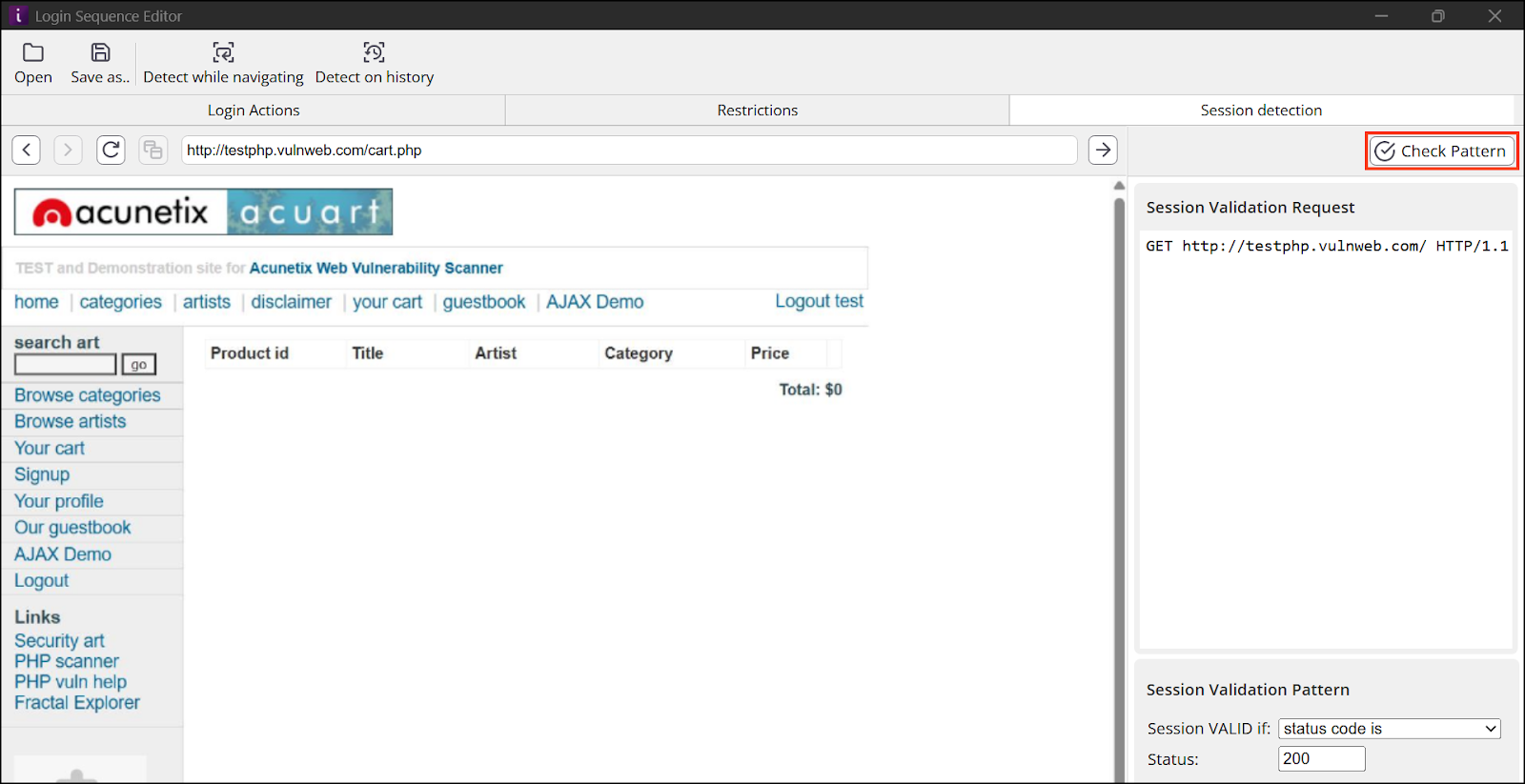
- Key observations from the screenshot:
- Request URL:
/cart.php - Cookies and Headers: The
logincookie value suggests authentication. - Response: The successful response (HTTP 200 OK) confirms that this resource is available only after authentication.
- Request URL:
- Check pattern:
- Click Check Pattern in the LSR.
- If the pattern is successful Pattern was successfully identified is displayed. The LSR can be saved and the scan started.
- In this case specifically, requesting
/cart.phpdidn't help us identify a pattern.
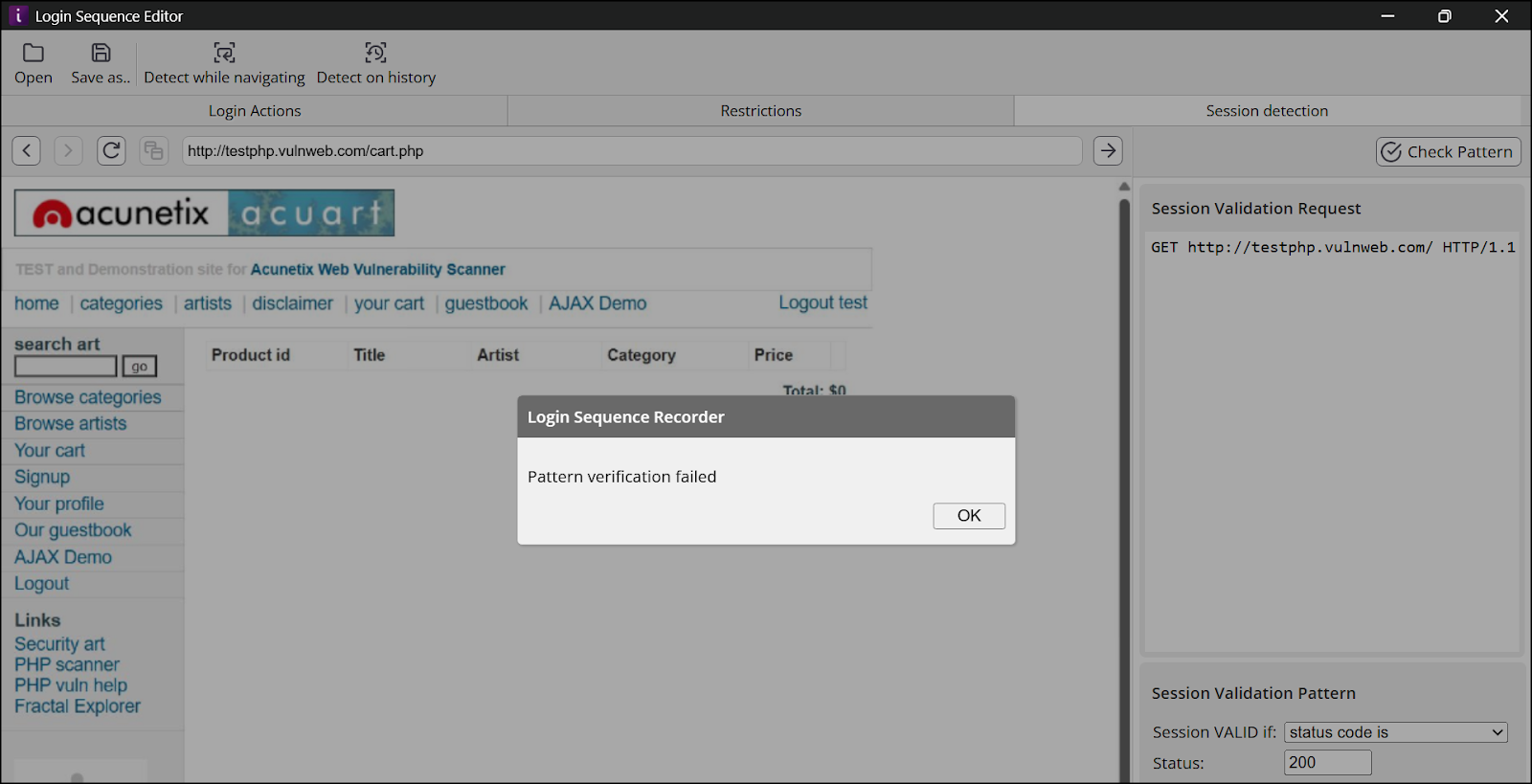
This takes us to scenario 2.
Scenario 2: Troubleshooting session pattern incorrect during a scan
Whilst the error message wasn't displayed during the scan or found in the logs, the method of troubleshooting remains the same. We need to identify a session pattern that can be used for this Target.
Troubleshooting steps:
- Analyze captured traffic in Fiddler:
- Click Check Pattern in the LSR to verify the session pattern.
- Two requests are sent when clicking Check Pattern:
- Authenticated Request: Includes session information, cookies, and authorization tokens.
- Unauthenticated Request: Excludes session-related cookies or tokens.
- Look for these two requests in Fiddler.
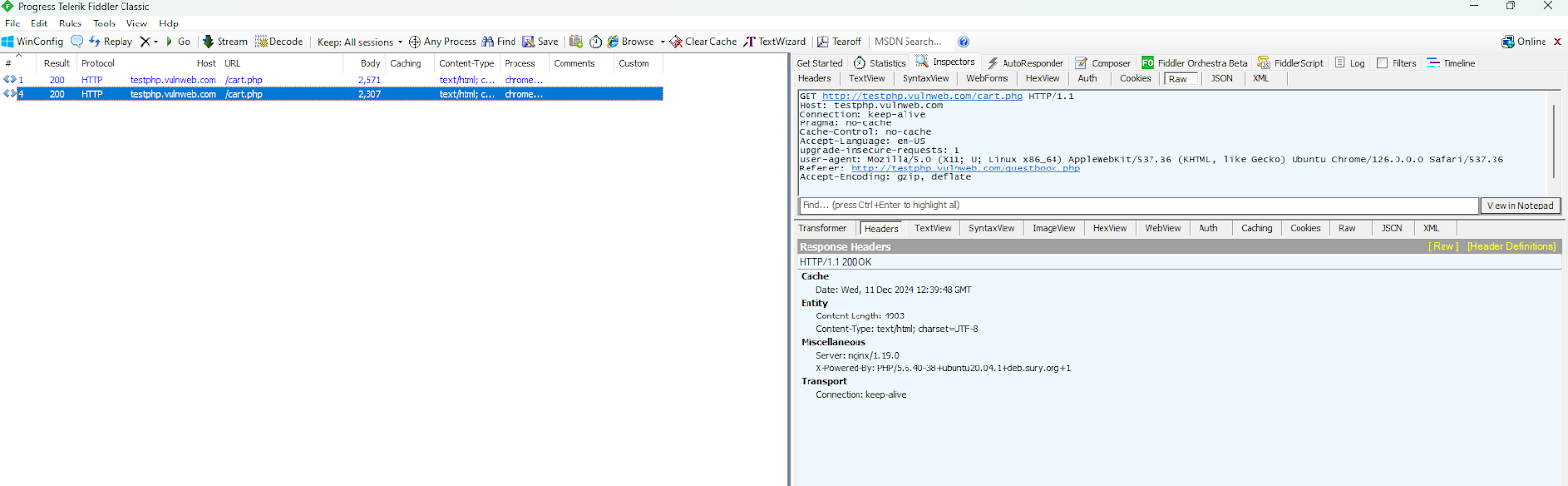
- Opening the requests in Fiddler:
- Identify the two requests sent by Check Pattern and open them.
- Delete all extra requests sent for clearer presentation.
- Open the Headers view in the Inspectors tab as an initial step.
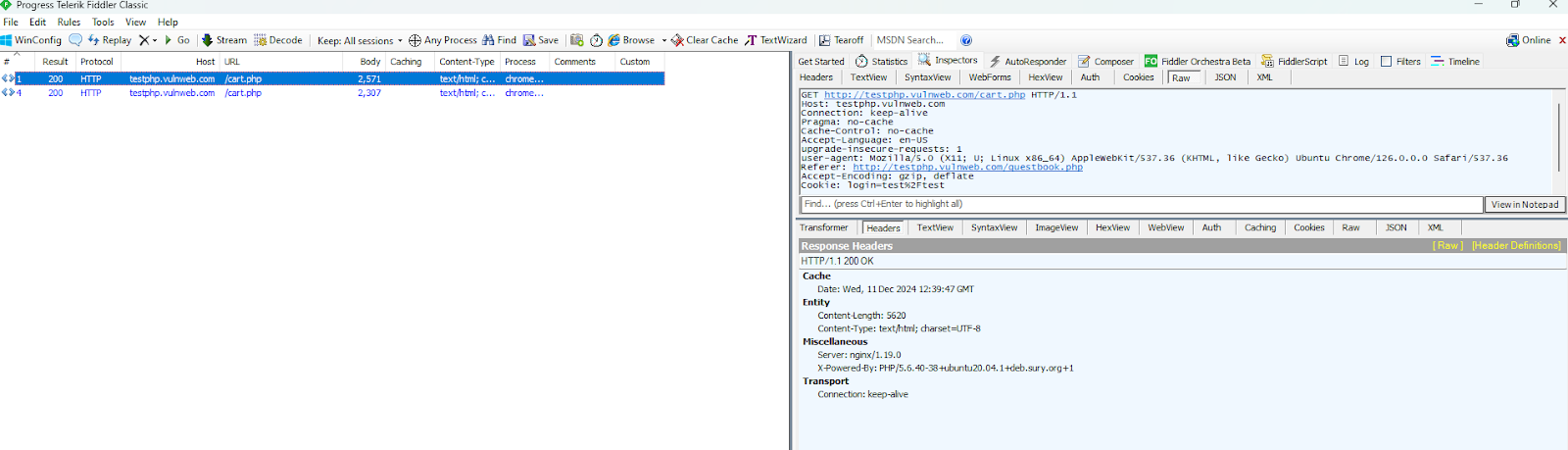
- Reviewing the requests in Fiddler:
- Compare the response status code for both requests.
- If both responses return a 200 status code, it indicates that the LSR couldn't differentiate between authenticated and unauthenticated states.
- Key observations:
- The authenticated request contains a cookie in the header, for example:
Cookie: login=test%2Ftest, indicating it was sent with session information. - The response headers for both requests are nearly identical, apart from the Content-Length.
- The authenticated request contains a cookie in the header, for example:
- Compare the response status code for both requests.
- Investigate further:
- Open the Raw.
- Notice that the initial request had a cookie in the header
Cookie: login=test%2Ftestindicating this is the authenticated request sent by the LSR. - Notice that the headers in the response are nearly identical, apart from the content length, indicating that something in the response is different from when authenticated and not.
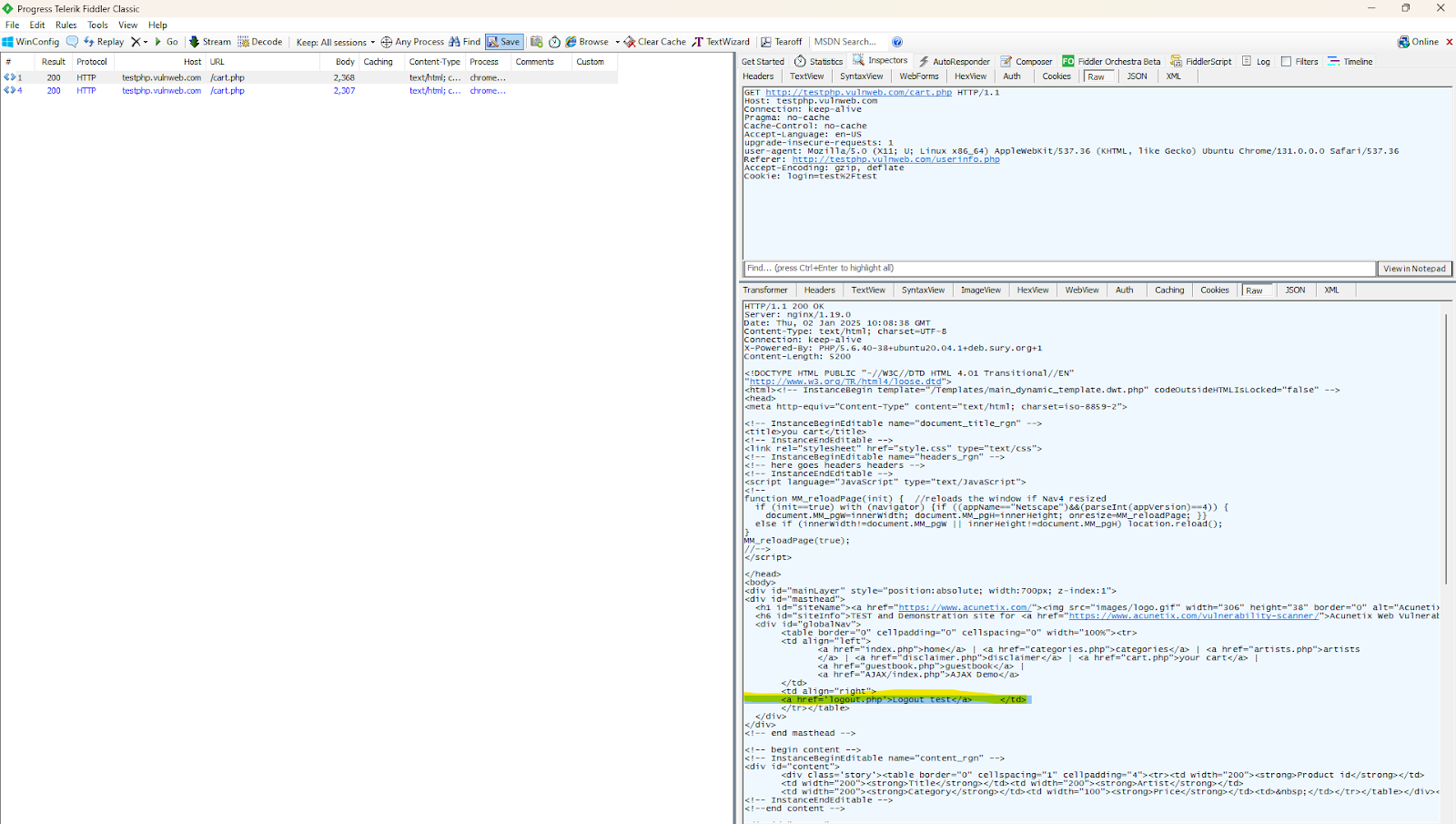
- Notice the different responses for when authenticated:
- For the request with the cookie, we observe that the response contains unique content only visible when authenticated. Specifically, the response includes:
<a href='logout.php'>Logout test</a> - This logout link is only available in the authenticated state, making it a suitable indicator for a session pattern. We can use this as the basis to configure a session pattern.
- This allows us to configure a new session pattern.
- For the request with the cookie, we observe that the response contains unique content only visible when authenticated. Specifically, the response includes:
- Configure the new session pattern:
- Since the
<a href='logout.php'>Logout test</a>is available in the response, we need to configure the session pattern to check for this. - Navigate to the Session Validation Pattern section and set the session as valid if the pattern is found in response (see screenshot):
- Since the
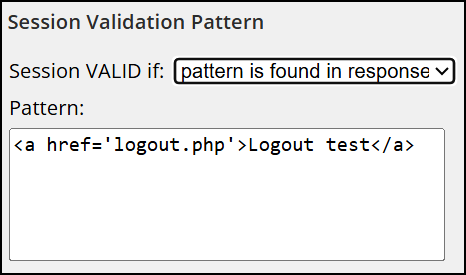
- Enter the following pattern in the text field:
<a href='logout.php'>Logout test</a>. - This instructs the Login Sequence Recorder and scanner to consider the session authenticated only when
<a href='logout.php'>Logout test</a>is present in the response.
- Validate the Pattern:
- Click Check Pattern.
- This logout link is only available in the authenticated state, making it a suitable indicator for a session pattern. We can use this as the basis to configure a session pattern.
- This allows us to configure a new session pattern based on
<a href='logout.php'>Logout test</a>being available in the response. - By completing these steps, the LSR is able to differentiate between authenticated and unauthenticated states based on the presence of the logout link (
<a href='logout.php'>Logout test</a>) in the response.
Need help?
Invicti Support team is ready to provide you with technical help. Go to Help Center