Moving from Invicti Enterprise to Invicti Platform
We are excited to upgrade your account to the new Invicti Platform. This transition represents a significant step forward in our technology, offering a more robust, scalable, and modern architecture.
Because Invicti Platform features a new design and enhanced architecture compared to Invicti Enterprise, the upgrade process involves specific logic regarding your data. While we've ensured that your core configurations and assets are carried over, some historical data and specific settings require a fresh start or manual configuration.
This document explains what data and configurations are carried over automatically when your account upgrades from Invicti Enterprise to Invicti Platform, what doesn't carry over, and what actions you need to take after the upgrade. If you run Invicti Enterprise on-premises, it also explains how to export your data and import it into Invicti Platform. For a detailed breakdown of how individual settings and configurations are handled, refer to the IE to Invicti Platform upgrade reference document.
Move from Invicti Enterprise on-premises
If you use Invicti Enterprise on-premises, you move your data yourself in two stages:
- Exporting your data from Invicti Enterprise on-premises.
- Importing that data into Invicti Platform.
You can import into Invicti Platform on-premises or on-demand.
Before you begin
Before you start, review the following requirements:
- Update your Invicti Enterprise on-premises installation to the latest version. The exporter is built in, so you don't need to download a separate tool.
- Make sure you can sign in to Invicti Enterprise as the account owner. Only the owner can run the export.
This warning applies only if you're importing into Invicti Platform on-premises.
- Install Invicti Platform on-premises on a server before you import data. For installation instructions, refer to the Helm installation document or the Windows installation guides.
- Don't complete the registration process. Invicti Platform can only have one account, and the import isn't allowed if a user is already registered. The import registers your previous account in the new platform.
Export your data from Invicti Enterprise
- Sign in to Invicti Enterprise as the account owner.
- Select Settings > Exporter.
- Under Target environment, select the Invicti Platform deployment you're moving to:
- OnPrem - Invicti Platform on-premises.
- OnDemand - Invicti Platform on-demand.
- Select Start export.
- Follow the progress in Live logs. You can filter the log by INFO, WARNING, and ERROR. When the export is complete, Export finished. appears at the top of the page.
The exporter runs automatically and creates the encrypted export archive, invicti_platform.zip.
Encryption key handling
The exporter encrypts sensitive data with an RSA key pair. How it gets the keys depends on the deployment you selected:
- OnPrem - the exporter generates a new RSA key pair. It uses the public key to encrypt the sensitive data and saves the private key as
private_key.pemin the.keysfolder. - OnDemand - the exporter doesn't generate a key pair. It uses a built-in public key to encrypt the sensitive data, so there's no private key to keep.
The exporter saves the files on the server where you installed Invicti Enterprise, in the Exporter\logs folder inside the bin folder of the installation folder:
- Export archive:
<installation folder>\bin\Exporter\logs\invicti_platform.zip - Private key (OnPrem only):
<installation folder>\bin\Exporter\logs\.keys\private_key.pem
When you move to Invicti Platform on-premises, you need the private key to decrypt the export during the import. Store it in a secure location.
When the export is complete, copy the archive from the server. If you moved to Invicti Platform on-premises, also copy the private key. You need them in the import step.
Import your data into Invicti Platform
Follow the instructions depending on your Invicti Platform deployment: on-premises or on-demand.
- On-premises
- On-demand
- Navigate to the import page at
https://[YOUR-INVICTI-PLATFORM-URL]/import.
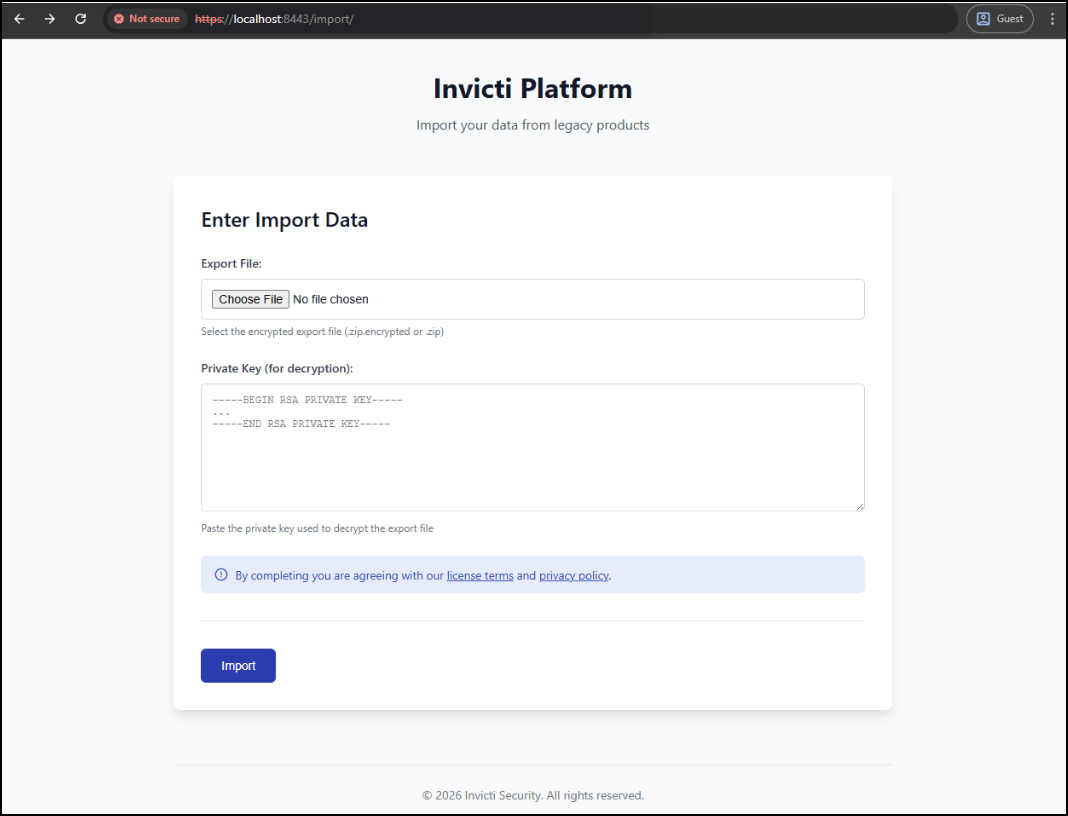
- Enter the export file and private key, then select Submit. Invicti Platform uploads the files and starts the import process immediately.
- Once the import is complete, open the login page and sign in with your existing credentials.
Your data import is managed directly by Invicti. To complete the upgrade, follow these steps:
- Request upload link - Reach out to the Support team via your existing Zendesk ticket to request a secure data upload link.
- Upload data package - Using the link provided by support, upload your exported archive file.
- Notify support - Once the files are uploaded, reply to your Zendesk ticket to notify the team that your data package is ready.
- Import and confirmation - The team processes the import into Invicti Platform on-demand and notifies you via Zendesk when it's complete.
- Platform access - Log in to your new Invicti Platform on-demand instance using your existing account credentials.
Infrastructure & access requirements
Before running scans on the new platform, you must account for our new infrastructure.
- Trustlisting: Invicti Platform operates on a new infrastructure with different IP addresses and access requirements. Your existing allowlists (firewall rules) from Invicti Enterprise won't work.
- Required action: You must update your network settings to allow our new IP ranges. Consult the Trustlist requirements documents.
What is carried over
The following assets, users, and configurations are automatically carried over. Some may require verification or additional steps as noted.
Accounts & users
- Accounts: your root account is carried over.
- Users: all user accounts are carried over, including their existing passwords and 2FA settings.
- User profile settings: individual user preferences and profile details are retained.
- User groups: your existing group structures remain intact.
- RBAC settings (custom roles): custom roles are carried over. Since the permission structure has evolved, we map these to the best possible matching permissions in the new platform.
- User access settings: existing access configurations are preserved.
How targets are carried over from Invicti Enterprise
In Invicti Platform, each target includes its own embedded scan configuration. To preserve your existing configurations, Invicti Platform creates a separate target for each scan profile and scheduled scan associated with an IE target. A single IE target URL can result in multiple Platform targets.
All targets are carried over with the IE target name. If the same IE target produces multiple Platform targets, they are named sequentially: the first keeps the original name, and subsequent ones get a suffix - Target Name - 2, Target Name - 3, and so on.
Each target is carried over with a description that identifies where it came from, such as Created From Scan Profile [profile name] or Created for Scheduled Scan [scan name], followed by the original IE target description. For the full breakdown of how each scenario creates targets and how to identify them, refer to the Multiple Targets showing the same URL after upgrade document.
Review your targets after the upgrade and remove any you no longer need.
Scanning configurations
- Scan profiles: your custom scan definitions are carried over.
- Web discovery: all web discovery settings and discovered records are retained.
- API security settings: your specific API security configurations are carried over.
- Excluded hours: time windows where scanning is forbidden are preserved.
- Max Scan Duration value is carried over.
- Entered links in scan settings are carried over as Generic Links.txt.
- Form authentication: these settings are carried over, but the new engine requires additional verification.
- Required action: follow the Form Authentication steps.
- Custom Form Auth credentials: username/password and the form auth script are carried over into Login sequence recorder settings.
- Basic, Digest, NTLM/Kerberos and Negotiate Authentication: your HTTP Authentication configurations are carried over.
Automation & scheduling
- Scheduled scans: eligible scheduled scans are carried over. Scheduled group scans are carried over as Collections. Scans that were turned off in Invicti Enterprise are also carried over in a turned-off state.
- For details on frequency conversions and what isn't carried, refer to the Scheduled scans upgrade guide document.
- Notification rules: notification rules are converted into Automations in Invicti Platform. For details on scope mapping, trigger events, and what isn't transferred, refer to the IE notifications upgrade guide document.
Integrations & connectivity
-
Internal scanning agents: agent names transfer as temporary placeholder agents with a migrated status. These placeholders aren't functional until reconfigured to connect to an installed Invicti Platform Agent. Refer to the IE to Invicti Platform upgrade reference document for how agent configurations are handled during the upgrade.
noteYou need to install the new Invicti Platform Agents. Refer to the upgrade steps document.
-
Issue tracker integrations: Jira, Azure Boards, GitHub, GitLab, Slack, Microsoft Teams, and Webhook integrations are carried over automatically with their connection settings.
- Some settings aren't preserved and some integration types are silently skipped. Review the IE integrations upgrade guide document.
Authentication & SSO
-
SSO settings: single sign-on configurations are carried over, but SSO is turned off by default after the upgrade. Invicti Platform generates new SAML Service URL and Identifier values, so your Identity Provider must be updated before SSO works.
infoAdditional configuration steps are required to finalize SSO. Refer to the SSO upgrade steps document.
Import files
Supported scan import files (Burp Suite exports, HAR files, Fiddler sessions, Postman and OpenAPI collections, and a few others) are carried over into the target's DAST configuration. File types not supported in Invicti Platform - including RAML, WADL, WSDL, GraphQL, and gRPC Proto - are skipped during the upgrade.
For the full list of supported and unsupported file types, refer to the IE to Invicti Platform upgrade reference document.
What isn’t carried over
Due to architectural differences and the opportunity to provide a cleaner environment, the following data and settings aren't carried over.
Historical data & reporting
- Past scans: historical scan data (including HTTP requests/responses and Scan Activity logs) isn't carried over.
- Vulnerabilities: existing vulnerability records aren't carried over. Vulnerability data populates fresh as you run new scans on the Invicti Platform.
- Reports: saved historical reports aren't moved to the new platform.
- Audit events: audit logs from Invicti Enterprise/A360 aren't retained.
Targets & scanning configurations
- Additional targets: In Invicti Enterprise, Additional Targets (found under the Scan Settings section) aren't automatically carried over as Allowed Hosts to the Invicti Platform. This is because the new Platform architecture requires each host to have its own specific target configurations and settings.
- Required action: you must select an existing target or manually create new Targets in Invicti Platform for any hosts previously listed as Additional Targets. This ensures that each target can be managed with its own dedicated target settings.
- OAuth 2.0 authentication: the custom authentication flow and Authorization Code settings aren't carried over.
- Custom security checks: these scripts aren't carried over.
- Required action: rewrite these for the new engine.
- Pre-request scripts: these scripts aren't carried over.
- Required action: rewrite these using the updated documentation. Refer to the Pre-request scripts document.
Authentication & security settings
- SCIM: SCIM settings aren't carried over.
- Required action: create SCIM settings from scratch using this documentation.
- LDAP: LDAP settings (relevant to on-premises) aren't carried over.
- IP restrictions: allow/deny lists based on IP aren't carried over.
- U2F security keys: hardware security key associations aren't carried over.
- Authentication profiles: saved authentication profiles aren't carried over.
Developer & automation
- API scripts & automation: Invicti Platform uses a different API schema than Invicti Enterprise. Existing automation scripts or custom integrations built on the Invicti Enterprise API won't function.
- Required action: review and update your scripts to match the new API. Refer to the API differences guide document.
Miscellaneous
- Bell notification history: in-app notification history isn't carried over.
- Paused scan status: scans paused at upgrade time don't resume automatically; restart them manually after the upgrade.
- Vault integrations: Invicti Platform supports HashiCorp Vault integration. Refer to the HashiCorp Vault integration document for setup instructions.
- Unsupported issue trackers: integrations for trackers not supported in Invicti Platform won't be available.
Need help?
Invicti Support team is ready to provide you with technical help. Go to Help Center