Retrieve the target ID
This document explains how to find each of the two identifiers that Invicti Platform uses for targets and when to use them.
Invicti Platform has two different identifiers for each target. Both are UUIDs and look identical - the only difference is where they appear:
| ID | Where to find it | When to use it |
|---|---|---|
| Asset ID | Browser URL (?assetId=<uuid>) when you open a target | INVICTI_TARGET_ID in CI/CD pipeline scripts and Inventory API calls |
| DAST target ID | Details drawer when you open a target | Direct DAST API calls to launch scans |
Why this matters
Using the wrong ID - for example, using the DAST target ID as INVICTI_TARGET_ID in a CI/CD pipeline - causes scans to fail with a "Failed to retrieve target" error. Because both IDs are UUIDs that look identical, there's no visual way to tell them apart - only their location in Invicti Platform distinguishes them.
Through the Invicti Platform UI
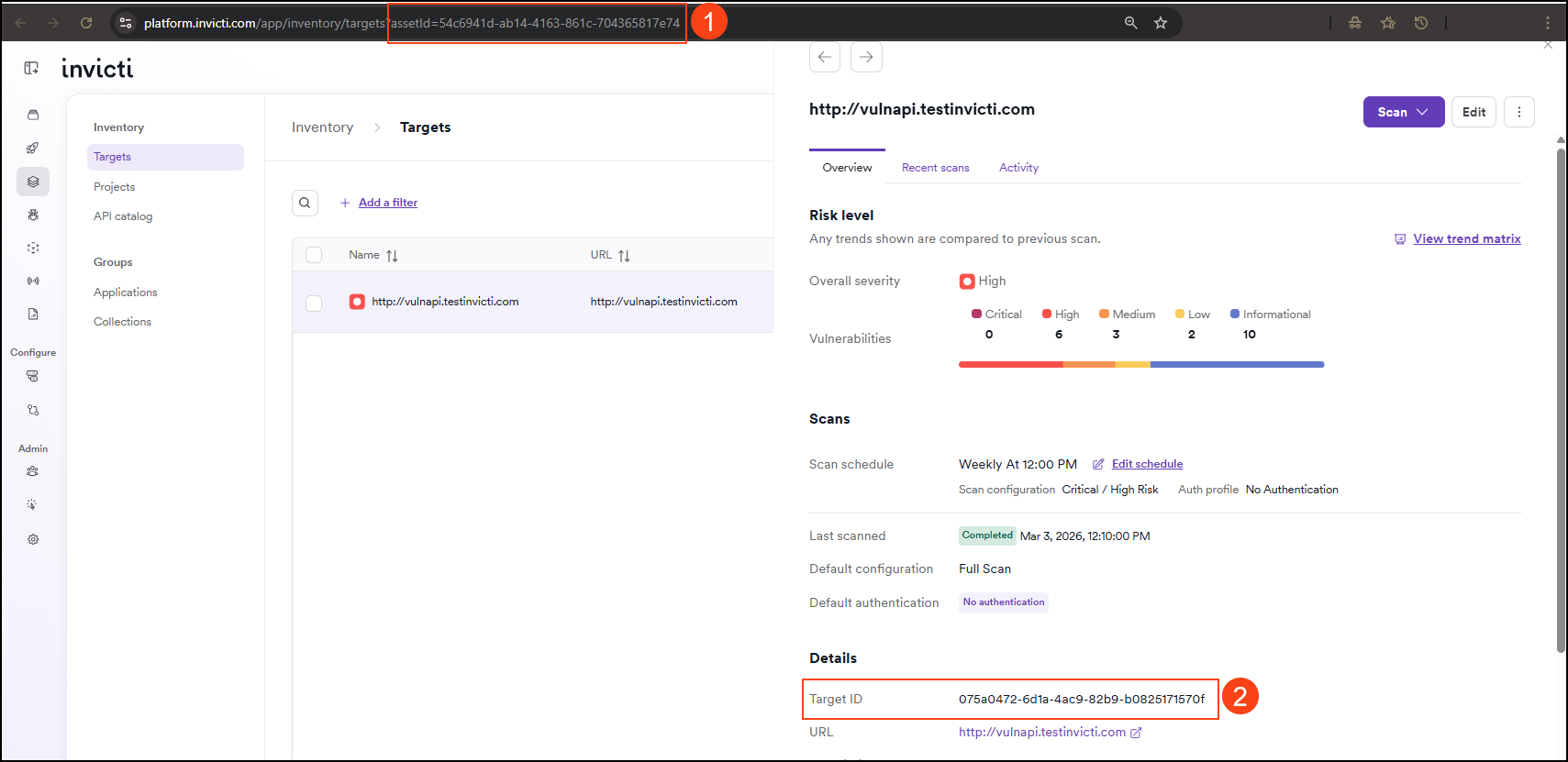
- Asset ID - visible in the browser URL as the
assetIdparameter - DAST target ID - shown in the Details section of the target drawer
Asset ID
The Asset ID is the assetId value visible in the browser URL when you open a target in Invicti Platform. Use this as INVICTI_TARGET_ID in CI/CD pipeline scripts.
-
Select Inventory > Targets from the left-side menu.
-
Find and click the target for which you want to obtain the ID.
-
The Asset ID appears in the browser URL as the
assetIdparameter:https://platform.invicti.com/app/inventory/targets?assetId=7809d1b4-871a-4fc2-af0f-5d36c9f4b86d -
Copy the UUID value of
assetId. This is the Asset ID to use in your integrations and scripts (for example, asINVICTI_TARGET_IDin CI/CD pipelines). For instructions on setting up a pipeline, refer to Integrate CI-driven scans.
DAST target ID
The DAST target ID appears in the target's Details drawer in Invicti Platform. Use this ID when making direct DAST API calls to launch scans - don't use it as INVICTI_TARGET_ID in CI/CD pipeline scripts.
- Select Inventory > Targets from the left-side menu.
- Find the target for which you want to obtain the DAST target ID.
- Click on the target to open its drawer.
- The DAST target ID appears in the Details section.
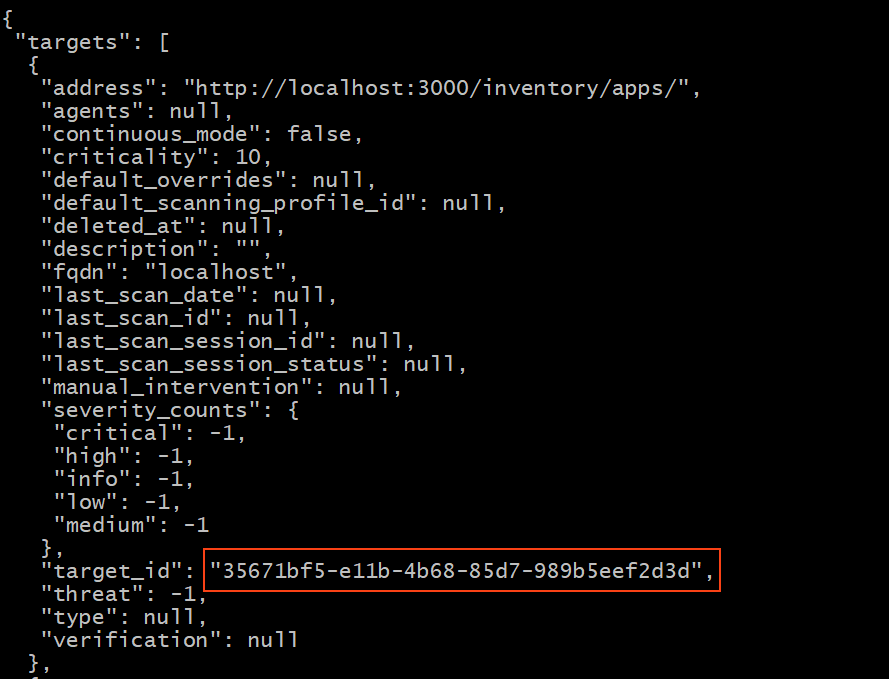
You can also retrieve the DAST target ID programmatically by sending a GET request to the Invicti API.
Retrieve the DAST target ID via API
This section returns the DAST target ID - use it for direct DAST API calls only. If you need the Asset ID for INVICTI_TARGET_ID in a CI/CD pipeline, see the Asset ID section.
Use the provided command to make a GET request to the Invicti Platform API and retrieve a list of targets with a filter applied.
Here is a breakdown of the command:
https://platform.invicti.com/api/v1/targets?q=localhost: the URL for the GET request. It includes the endpoint /api/v1/targets for retrieving targets and a filter q=localhost to filter the results based on target names or descriptions containing"localhost".-H "Accept: application/json": specifies that the client expects JSON-formatted responses from the server.-H "X-Auth: [API-Key]": provides authentication to the Invicti Platform API using an API key. Replace the [API‑Key] with the actual API key.
curl -i -k -X GET https://platform.invicti.com/api/v1/targets?q=localhost -H "Accept: application/json" -H "X-Auth: [API-Key]"
The provided response includes information about a target, including its DAST target_id. Here is the response with the target_id highlighted:
Troubleshooting
I copied an ID from Invicti Platform but the scan fails with "Failed to retrieve target"
You've most likely used the DAST target ID instead of the Asset ID. Both are UUIDs and look identical - the only way to tell them apart is where you find them. Open the target in Invicti Platform and copy the UUID from the browser URL bar (?assetId=...), not the ID shown in the Details drawer. For step-by-step instructions, see Asset ID.
The assetId parameter doesn't appear in the browser URL
You need to open a specific target, not just view the targets list. Select Inventory > Targets from the left-side menu, then click a target to open it. The assetId parameter appears in the URL only when a target is open.
Need help?
Invicti Support team is ready to provide you with technical help. Go to Help Center