Deployment: Invicti Platform on-demand, Invicti Platform on-premises
Scan GraphQL APIs
Invicti Platform can scan GraphQL APIs. This document explains how you can import a GraphQL schema to a target or link to a hosted location where your GraphQL API definitions are held, and then scan for vulnerabilities in your GraphQL APIs. For information about GraphQL and the security issues in GraphQL, refer to the sections at the end of this document.
Why this matters
A GraphQL endpoint exposes your entire schema through a single URL, so a crawler that only follows links never reaches the queries and mutations behind it. Giving Invicti your schema - or letting it use introspection - lets it exercise those operations directly, so access control flaws, injection, and data-exposure issues in your GraphQL API surface before release.
Scanning production APIs should be conducted with care. Some scanning methods may result in data deletion. It's recommended to:
- Carefully consider the permissions and authentication you provide, as well as which methods you use (such as PUT, POST, or DELETE).
- Manually exclude API operations (methods with endpoints) from the uploaded or linked file to prevent destructive or undesirable changes to the production application.
If your API requires authentication, configure the credentials in the target's Authentication settings before scanning. API targets also support IDOR / BOLA authentication for multi-session access control testing. For details, refer to the IDOR/BOLA authentication document.
How to scan a GraphQL API for vulnerabilities
To scan a GraphQL API for vulnerabilities with Invicti, you must provide the scanner with access to the API definitions. There are two ways to do this:
-
Option A: Import from a file
- This method involves uploading a GraphQL schema to a target.
-
Option B: Link to a URL
- This method adds a link from a target to the URL that holds the API definitions.
Once you start a scan of that target, Invicti parses the imported GraphQL schema or accesses the linked URL and adds the necessary GraphQL requests to the scanner. The following sections outline each method and provide instructions for starting a scan of your GraphQL APIs.
Option A: Import from a file
Importing a GraphQL schema to a target means that whenever you update your GraphQL API, you need to replace the imported schema file to ensure you're scanning the latest version of your GraphQL API.
How to import a GraphQL schema to a target
-
Ensure your GraphQL schema is accessible for upload on the machine where you're accessing Invicti.
- Invicti supports these file formats: .graphql and .json.
-
Select Inventory > Targets from the left-side menu.
-
Click the three-dot menu (⋮) > Edit target by the target to which you import the GraphQL schema. The Configure target page opens.
-
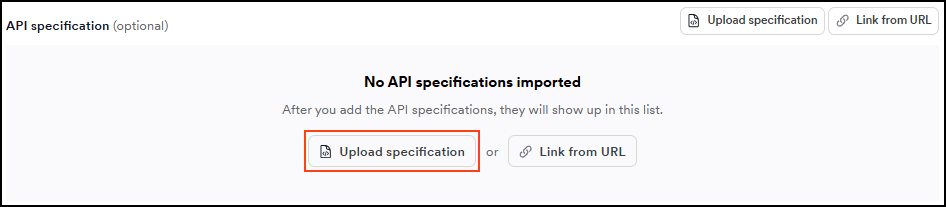
Click Scan Configuration to navigate to the API specification section and click the Upload specification button.
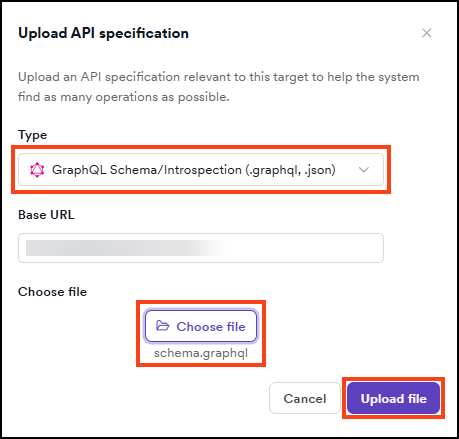
- Select GraphQL Schema/Introspection from the drop-down, choose your file, then click Upload file. The file uploads automatically and appears in the API specification section of the Scan Configuration.
If you want to scan only the imported GraphQL schema and not all the other paths belonging to the target, select Yes next to Restrict scans to imported files and save before starting the scan.
-
The GraphQL schema file is now imported to the target.
-
To initiate a scan at a later time, click Save target configuration. To begin scanning the target now - including the imported file - click Save and scan. Selecting Save and run scan with defaults runs a full scan automatically.
- When the scan is complete, go to the Vulnerabilities tab on the Scan details page for information about detected vulnerabilities in your GraphQL API, which Invicti marks with an API tag next to the severity label.
- Filter the list by Target type > API only to limit the displayed results to vulnerabilities identified in your GraphQL API.
- For more information about viewing scan results and vulnerabilities, refer to the following documents:
Option B: Link to a URL
Linking a URL to a target means you're adding the URL of the hosted location that holds your GraphQL API definitions. This allows Invicti to always scan the latest version of your GraphQL API without the need to provide a new schema each time you update your API.
The engine accesses linked URLs. This means the engine or internal agent (if using one for the target) needs access to any linked URLs.
How to link a URL to a target
-
Select Inventory > Targets from the left-side menu.
-
Click the three-dot menu (⋮) > Edit target by the target to which you link the GraphQL schema. The Configure target page opens.
-
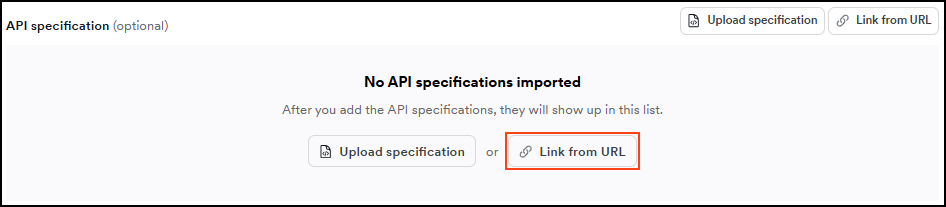
Click Scan Configuration to navigate to the API specification section and click Link from URL.
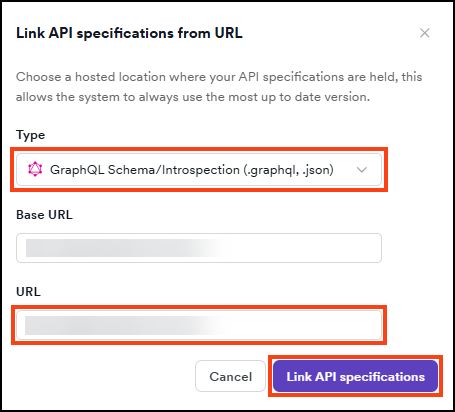
- Select GraphQL Schema/Introspection from the drop-down, enter the URL that hosts your GraphQL API definitions, then click Link API specifications.
- The URL appears in the API specification section of the Scan Configuration.
If you want to scan only the linked API definition and not all the other paths belonging to the target, select Yes next to Restrict scans to imported files and save before starting the scan.
-
The URL is now linked to the target.
-
To initiate a scan at a later time, click Save target configuration. To begin scanning the target now - including the linked specification - click Save and scan. Selecting Save and run scan with defaults runs a full scan automatically.
- When the scan is complete, go to the Vulnerabilities tab on the Scan details page for information about detected vulnerabilities in your GraphQL API, which Invicti marks with an API tag next to the severity label.
- Filter the list by Target type > API only to limit the displayed results to vulnerabilities identified in your GraphQL API.
- For more information about viewing scan results and vulnerabilities, refer to the following documents:
About GraphQL
GraphQL is a query language for APIs developed by Facebook in 2012 and released in 2015. The query language makes it easier and quicker to get data from a server to a client via an API call.
- GraphQL prioritizes giving clients exactly the data they request, which prevents the server from returning large amounts of data.
- It lets you make more complicated queries that reduce the number of API requests you must make.
- GraphQL type-checks all input data against a schema the developer defines, assisting with data validation.
Key concepts in GraphQL
- Schema - a GraphQL schema is at the heart of any GraphQL server implementation. The schema describes the capabilities available to the clients that connect to it.
- Mutation - a GraphQL operation that creates, modifies, or destroys data.
- Introspection - a special query that enables clients and tools to fetch a GraphQL server's complete schema.
- Query - a read-only fetch operation to request data from a GraphQL service.
Security issues in GraphQL
There are a number of security issues in GraphQL. This section briefly explains four of them:
Authorization issues
This is one of the most common security issues in GraphQL.
- Implementing authorization can be confusing and tedious.
- Since there are various connections between different types, there can be many routes to the same data. Therefore, if you don't implement the authorization checks consistently or in a central place, you can run into issues.
- Also, GraphQL doesn't automatically take care of this authorization.
Denial of service
Via stacking queries, you force the server to repeatedly issue requests, write to a log file, or execute other resource-intensive operations.
- This is a simple Denial of Service attack vector and is hard to prevent but easy to abuse.
- There are almost no requirements on the attacker's side to exploit this. Attackers can type the whole payload, for example, into their mobile phones and launch an attack.
Secondary contexts path traversals
It can be dangerous to talk to microservices via your API. This isn't specific to GraphQL but affects GraphQL in the same way that it affects other APIs. Without proper sanitization, you may be able to interfere with the communication with microservices.
Discovery
If a scan doesn't test your API or can't reach a linked specification, refer to Troubleshooting API scans.
If attackers find a GraphQL endpoint without additional content, they may have a hard time understanding what it does and what it accepts. But, there are a few tricks they can use to figure out what input the API expects, such as:
- Auto-correct
- Introspection
Need help?
Invicti Support team is ready to provide you with technical help. Go to Help Center