Deployment: Invicti Platform on-demand, Invicti Platform on-premises
DAST scan schedules
This document provides an overview of the Scan schedules page in Invicti Platform.
Scan schedules
To access the schedules page select Scans > DAST scan schedules from the left-side menu.
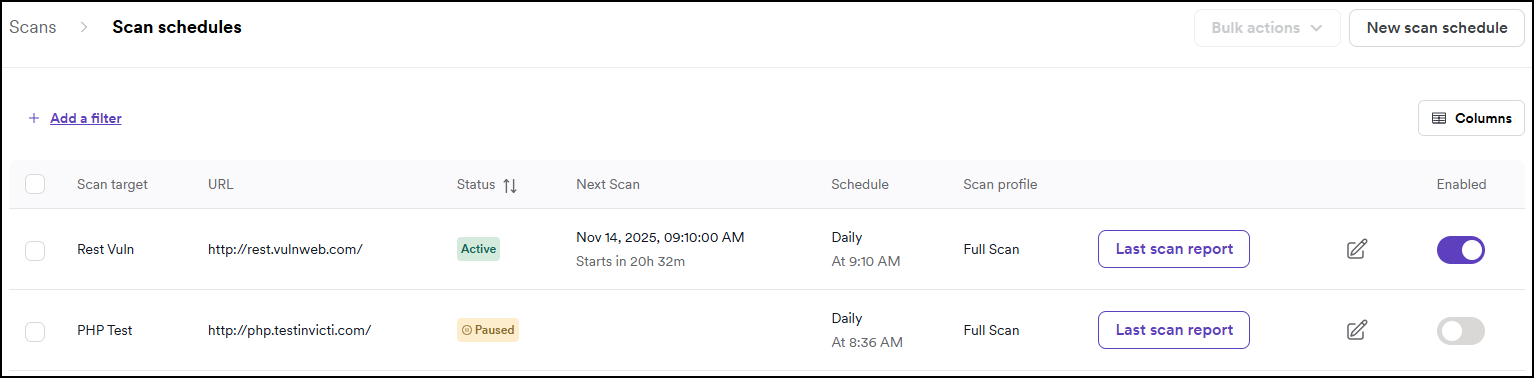
The DAST scan schedules page lists all recurring scheduled scans along with key information:
- Scan target - the target being scanned.
- URL - the URL of the scanned target.
- Name - name of the scheduled scan.
- Agent - agent used for the scan, cloud or internal.
- Vulnerabilities - the number of vulnerabilities detected, broken by severity.
- Status - the status of the schedule (Active, Paused, or Suspended).
- Next scan - the time of the upcoming scan time.
- Tags - any tags applied to the scan schedule for categorization or filtering purposes.
- Schedule - the frequency and the time of the scheduled scan (for example Daily, Weekly).
- Scan profile - the type of scan profile used (for example Full Scan, Critical/High Risk).
- Last report - scan details page for the specified scans.
- Edit schedule - the schedule's settings page.
- Enabled toggle.
You can change the view of the preceding information by clicking the Columns button.
When your organization's scanning is suspended, all schedules show a Suspended status badge. The enable toggle and the Resume selected scans bulk action are unavailable until an administrator lifts the suspension.
To create a scan schedule, click the New scan schedule button. For more information, refer to the Recurring scans document.
Schedule frequency
The following steps apply to scheduled and recurring scans.
- Specify the Start date.
- Specify the Frequency. The options are daily, weekly, monthly, quarterly, yearly, and custom.
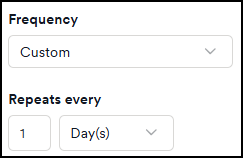
- If you selected custom, create your own custom schedule using the Repeats every fields. Read more about custom scan schedule example in the following section.
- When opening the scan details, you're notified that the scan has been scheduled for a certain date and time.

- All your scheduled scans are listed on the DAST scan schedules page.

Don't configure all scheduled scans to start at the exact same time. Stagger start times across scanners. Simultaneous scan starts increase the likelihood of scheduler scan issues.
Monthly and yearly day options
When you select Monthly or Yearly as the frequency - or a Custom frequency that repeats in months or years - you choose which day the scan runs on. Two options are available:
- On day
[number]of the month - the scan runs on a fixed calendar day, from 1 to 31. If a month is shorter than the day you pick (for example, day 31 in February), the scan runs on that month's last day instead. - On the
[position][weekday]of the month - the scan runs on an ordinal weekday, such as the first Monday or the second Thursday. The available positions are 1st, 2nd, 3rd, and 4th.
For Yearly schedules, you also select the month the scan runs in.
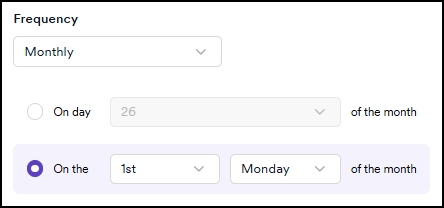
Use the ordinal weekday option to keep scans on a consistent business day - for example, the first Monday of every month - rather than a fixed date that can land on a weekend.
Custom scan schedule example
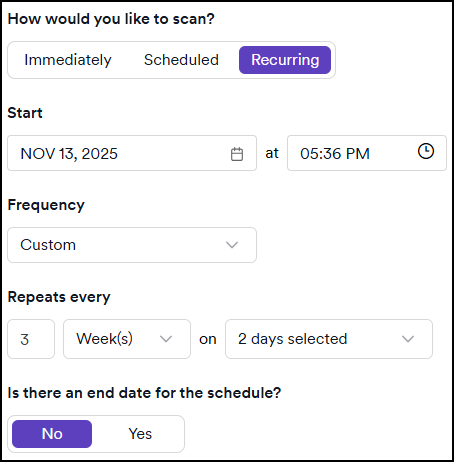
The custom option under Frequency enables you to tailor the scanning schedule according to your specific requirements.
For example, if you wish to conduct a scan every two weeks on two specific days, such as Mondays and Fridays, you can utilize the custom settings to define this pattern accurately.
You can alter this to have a scan run every week, twice a week, every 3 months, or every 5 years.
Bulk actions
Enable the checkboxes by scan targets to access the following bulk actions:
- Pause selected scans.
- Resume selected scans.
- Add tags to selected scans.
Turn a schedule back on
When Invicti automatically turns off a schedule due to the scan schedule failure limit, a Disabled status tag appears on the DAST scan schedules page. You must turn the schedule back on manually.
Running Scan again from a failed scan doesn't re-enable the schedule or affect the failure count. Use the toggle or bulk action to turn the schedule back on.
Using the toggle:
- Select Scans > DAST scan schedules from the left-side menu.
- Find the affected schedule and click the Enabled toggle to turn it back on.
Using bulk actions:
- Select Scans > DAST scan schedules from the left-side menu.
- Enable the checkbox next to the affected schedule.
- Click Bulk actions to open the dropdown.
- Click Resume selected scans.
When you turn a schedule back on, Invicti recalculates the next run date based on the original recurrence settings. The previous failure count isn't retained - the schedule starts fresh from the next planned run.
Need help?
Invicti Support team is ready to provide you with technical help. Go to Help Center