Deployment: Invicti Platform on-demand, Invicti Platform on-premises
Package: Invicti API Security Standalone or Bundle
Access requirements: access to API Security in Invicti Platform requires either an Administrator, Owner, Security Analyst, Security Manager role, or a custom role with the API Security permission.
Unlink APIs from targets
When APIs are linked to targets in your API catalog, they are automatically scanned when the associated target is scanned. This document explains how to remove the association between APIs and targets in the API catalog, which is going to prevent the APIs from being included in future target scans.
Steps to unlink an API from a target
- Select Inventory > API catalog from the left-side menu.
- Locate the API you want to unlink, click the three-dot menu (⋮) on the right, and select Unlink target.
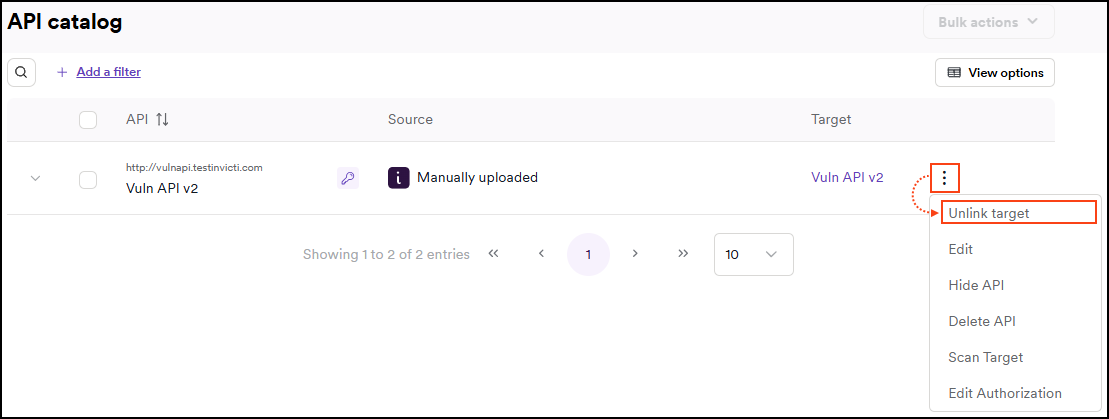
- Click Unlink target to confirm the action.
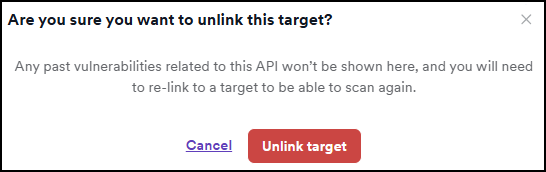
The API is no longer linked to a target and cannot be scanned unless you link it to a target again. Any previously identified vulnerabilities related to the API are no longer shown in the API catalog.
After unlinking an API from a target, the API is going to move back to the API discovery page where it can be linked to a different target or processed using the bulk create targets feature if needed.
Related documentation
- Link discovered APIs to targets
- Create targets from API Discovery
- API catalog overview
- Manage your API catalog
Need help?
The Support team is ready to provide you with technical help. Go to Help Center