Package: Invicti API Security Standalone or Bundle
Access requirements: Access to API Security in Invicti Platform requires either an Administrator, Owner, Security Analyst, Security Manager role, or a custom role with the API Security permission.
Link discovered APIs to targets
Associating your discovered APIs with targets enables you to scan those APIs for vulnerabilities. Whenever the target is scanned, the linked API is also scanned automatically. This document explains how to link individual APIs from API Discovery to existing targets.
If you need to create targets for discovered APIs instead of linking to existing ones, refer to Create targets from API Discovery which covers both single and bulk target creation.
Steps to link an API to a target
Once you have APIs in your API Discovery, you can link each API to an existing target if the API base URL is already set up as a target in Invicti Platform.
When linking an API to a target, the API base URL must be a subset of the target URL.
- For example, if
www.example.comis the target URL you are linking to, then the base URL for the API needs to bewww.example.com/api/v1. - When the API base URL is different from the target URL, a new target needs to be added.
- For example, if the API base URL is
api.example.comand your target URL iswww.example.com, then you would need to add a new target forapi.example.com.
To link an API from your API Discovery to an existing target, follow these steps:
- Select Discovery > API Discovery from the left-side menu.
- Locate the API you want to link and select Link.
- Click Link to open the Link target dialog.
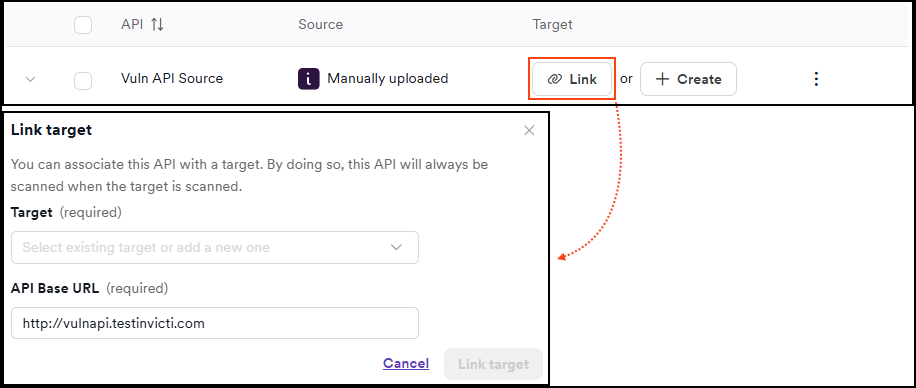
- Using the dropdown menus, select the target and API base URL, then click Link target.
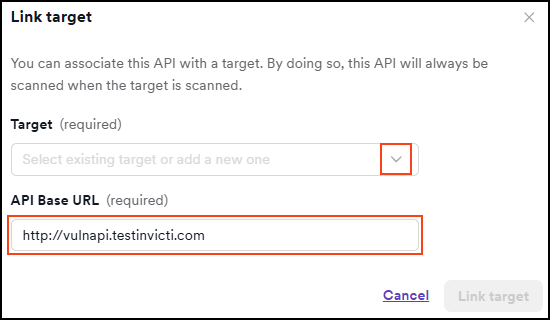
The name of the linked target is now displayed in the Target column of the API Discovery. The next time the linked target is scanned, the associated API specification is also scanned automatically.
After scanning a target that is linked to an API, the Vulnerabilities tab on the Scans > All scans > Scan details page indicates which vulnerabilities are from the scanned API by placing an "API" tag next to the vulnerability name.
After linking
Once an API is linked to a target:
- The API moves from API Discovery to the API Catalog
- The API will be automatically included in scans of the linked target
- You can manage the linked API from Inventory > API catalog
- You can unlink the API from the target if needed using the unlink process
Related documentation
- Create targets from API Discovery
- API discovery overview
- Unlink APIs from targets
- API catalog overview
Need help?
Invicti Support team is ready to provide you with technical help. Go to Help Center