Encrypt the agent token on Windows
Encrypting the Agent Token is a fundamental security measure you can take to safeguard sensitive information and enhance the integrity of your system. By encrypting the Agent Token, you can mitigate the risk of unauthorized access or tampering with critical data transmitted between the Invicti Agent and its corresponding components.
This document provides step-by-step instructions for manually encrypting your agent token and securely storing it in the appsettings.json file.
Steps to encrypt the agent token
- Select Agents > Manage Agents from the left-side menu.
- Click + Configure New Agent.
- Locate the Agent Token and click the Copy to clipboard icon.
- Open Terminal and execute the following command, replacing
<Agent Token>with the genuine Agent Token you copied from the Invicti Enterprise user interface in the previous step.Netsparker.Cloud.Agent.exe -e <Agent Token> - Terminal is going to return the encrypted token. Copy this token.
- Locate the
appsettings.jsonfile for the Invicti Agent (usually under Program Files) and input the encrypted token value into theApiTokenparameter.
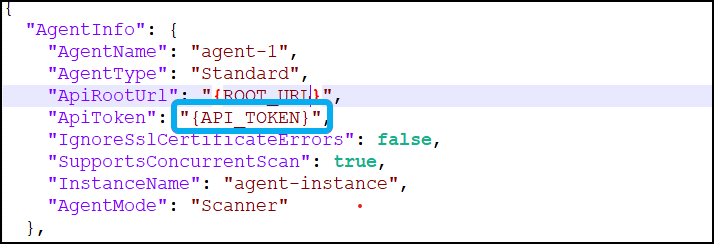
- Save the file.
Your agent token is now encrypted.
Need help?
Invicti Support team is ready to provide you with technical help. Go to Help Center
Was this page useful?