Encrypting proxy authentication credentials
Encrypting Proxy authentication credentials is an important security measure to protect sensitive information and maintain the integrity of your system. By encrypting these credentials, you reduce the risk of unauthorized access or manipulation of authentication data used during communication between the Invicti Agent and the Proxy server.
This document provides step-by-step instructions for manually encrypting your proxy credentials and securely storing them in the appsettings.json file.
Steps to manually encrypt the proxy authentication credentials
- Locate the
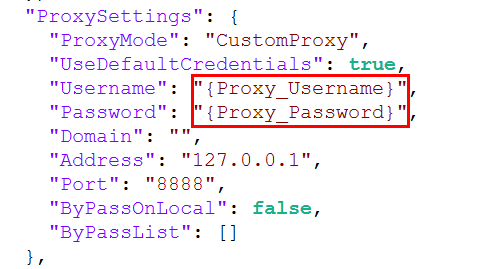
appsettings.jsonfile for the Invicti Agent (usually under Program Files) and take note of theUsernameandPasswordvalues under theProxySettingssection.
- Open Terminal and execute the following command:
ReplaceNetsparker.Cloud.Agent.exe -e <Proxy_Username>Netsparker.Cloud.Agent.exe -e <Proxy_Password>
<Proxy_Username>and<Proxy_Password>with the genuine Proxy Authentication Credentials (Username and Password) you noted in the previous step. - Copy the encrypted credentials the Terminal returned.
- Go back to the
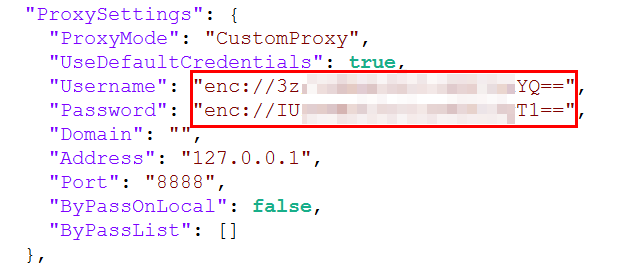
appsettings.jsonfile and input the encrypted credential values into their corresponding parameter. This is an example for your reference:
- Save the file and restart the agent service.
Your agent is now using the encrypted proxy authentication credentials.
Need help?
Invicti Support team is ready to provide you with technical help. Go to Help Center
Was this page useful?