Logging
From Logging in Invicti Standard, you can enable logging and set the default Log Levels. You can also select the categories of activities to be logged.
For further information, see Logs.
Categories
This table lists and describes the logging levels and activity categories.
| Category | Description |
|---|---|
| Enable Logging | Select to enable logging of system activities. It is enabled by default. |
| Performance Analysis | Select to add performance-related logs from selected Categories. |
| Show Attack Possibilities | Select to display the Attack Possibilities node in the Knowledge Base. For further information, see Knowledge Base Nodes. |
| Critical Handled Error | Select to enable the logging of handled exceptions during the scan. |
| Non Critical Handled Errors | Select to enable the logging of handled non-critical exceptions during the scan. |
| Critical Exception Message | Select to enable the logging of critical exception messages that need attention. |
| Crawling Request Performance | Select to enable the logging of statistical information about request counts and scan duration after Crawling has finished. |
| Attacking Request Performance | Select to enable the logging of statistical information about request counts and scan duration after the Attacking stage has finished. |
| Failed Request | Select to enable the logging of failed requests for different reasons. |
| Information Logs | Select to enable the logging of Information Alerts (non-critical). |
| Added Links | Select to enable the logging of added links, for example when a link is added or when an out-of-scope link is detected. |
| Request | Select to enable logging before and after each request. |
| Response | Select to enable logging when a response is received. |
| Unexpected Issues | Select to enable logging unexpected situations that should not have happened. |
| Attack Log | Select to enable the logging of unexpected situations and errors during the attack phase. |
| Link Not Found | Select to enable the logging of links that have returned a 'not found' response. |
| Link List | Select to enable the logging path and query part of each added link without the host part. |
| Crawling | Select to enable the logging of different events/errors related to Crawling during the Crawling phase. |
How to Configure Logging Levels and Categories in Invicti Standard
- Open Invicti Standard.
- In the Home tab, select Options > Logging.
- Select the Enable Logging checkbox. This will enable the Categories options.
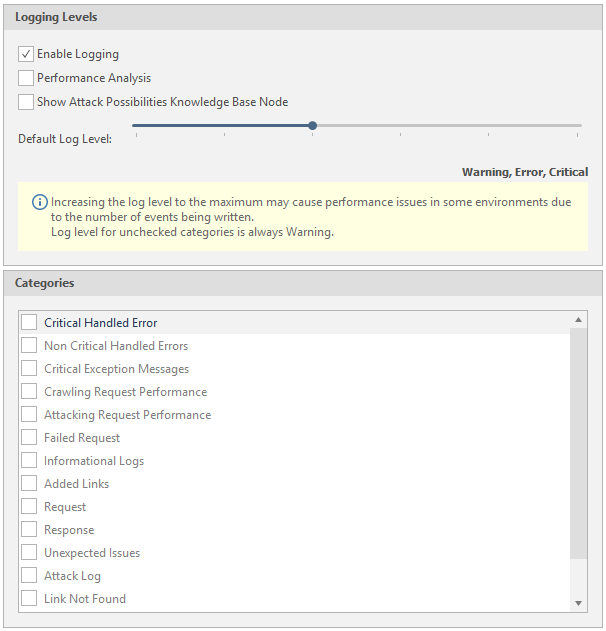
- Enable the other levels and categories as required.
- Select Save.
Need help?
Invicti Support team is ready to provide you with technical help. Go to Help Center
Was this page useful?