Package: Invicti API Security Standalone or Bundle
Access requirements: access to API Security in Invicti Platform requires either an Administrator, Owner, Security Analyst, Security Manager role, or a custom role with the API Security permission.
API discovery overview
API discovery helps build an actual and complete catalog of an organization's internal and external API assets by discovering existing and new APIs. Once discovered, those API specification files can be plugged into Invicti's DAST engine and scanned for vulnerabilities.
This document provides an overview of the API discovery capability in Invicti Platform.
What is API discovery?
API discovery helps AppSec leaders and development teams identify, locate, manage, and keep track of their organization's APIs, including unknown APIs. This is achieved by building an API catalog with the help of fast and easy-to-use tools that also enable you to keep up to date with the latest versions of your APIs and discover new endpoints. When combined with Invicti's powerful web asset scanning capabilities, API discovery helps you overcome the operational challenges of API security through a single platform.
View discovered APIs
- Select Discovery > API discovery from the left-side menu.
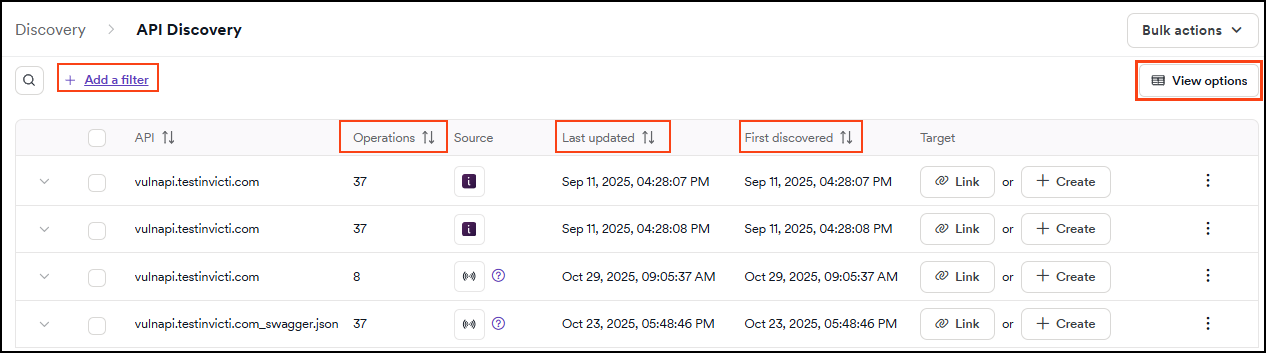
- The table displays all discovered APIs that don't have a target yet, helping you prioritize which APIs to process next.
- Use filters to narrow down your search. For detailed instructions on how to use filters in Invicti Platform, refer to Filtering.
By default, API discovery displays only APIs that haven't been linked to a target yet. This makes API discovery function as a prioritized "to-do list" for AppSec teams to process. Once an API is linked to a target, it moves to the API catalog.
- Each API provides the following information: API, Operations, Source, Last updated, First discovered, and Target.
- API: the name/URL of the discovered API.
- Operations: displays the number of operations an API has.
- Source: how the API was discovered.
- Last updated and First discovered: indicate when the API was last modified and initially discovered.
- Target: provides an option to link to an existing target or create a new target.
- Sorting by the Operations, Last updated, or First discovered columns helps you prioritize APIs with the most operations or the most recent discovery dates for your next steps.
- By default, hidden APIs aren't displayed. To view all APIs, use the View options followed by Show hidden APIs.
Create targets from API discovery
Once you have discovered APIs, you can create targets from them to enable vulnerability scanning. You can create targets individually for specific APIs or use the bulk create feature when you have a large number of discovered APIs (tens, hundreds, or more) to process simultaneously.
For detailed instructions on both single and bulk target creation, refer to Create targets from API Discovery.
How API discovery works
Invicti takes a multi-faceted approach to API discovery by offering three methods that can be combined to identify and fetch API endpoints:
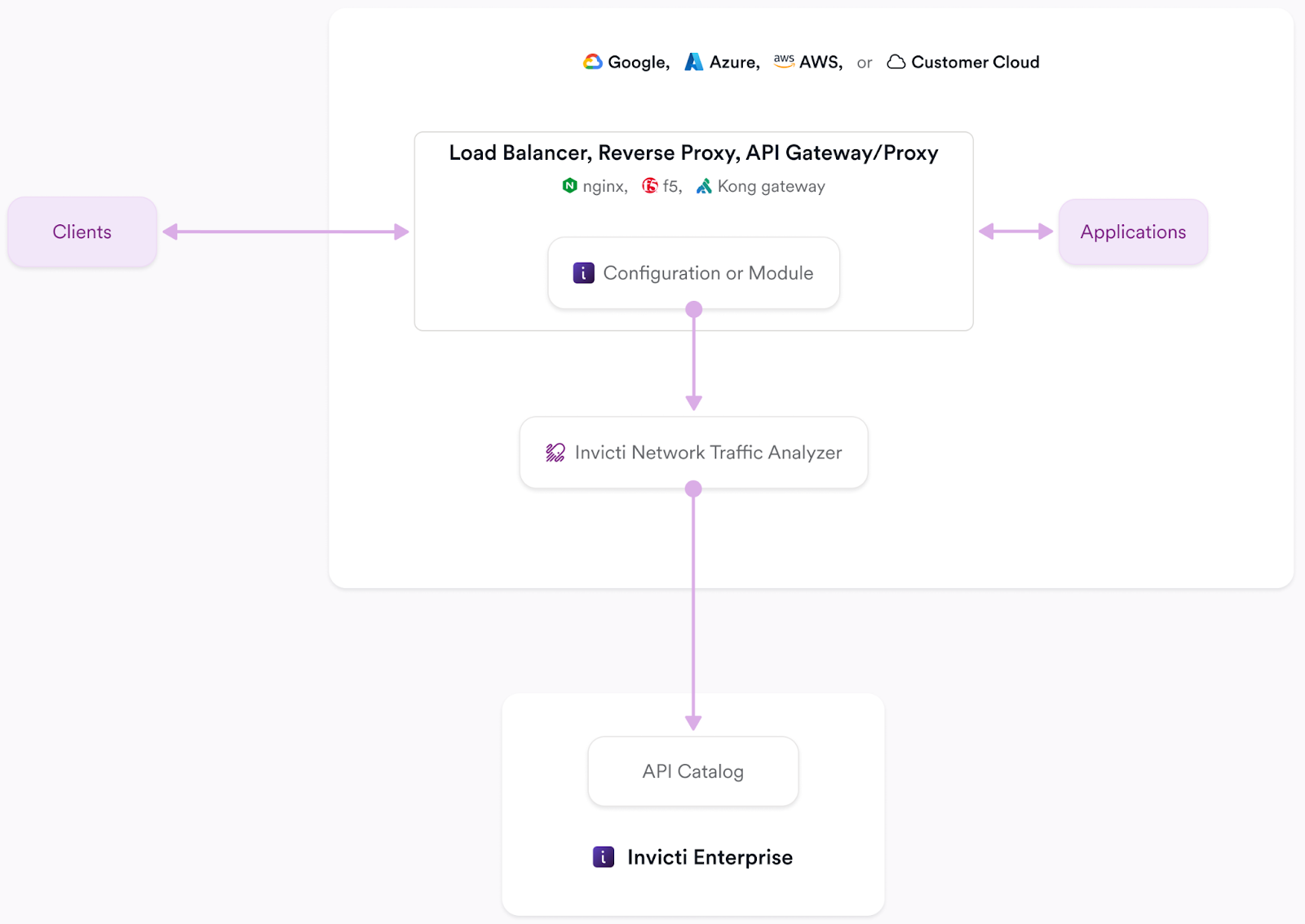
- Network API discovery: the Invicti Network Traffic Analyzer observes the traffic on your network to identify and then reconstruct REST API calls into OpenAPI3 specifications.
- API management integration: Invicti integrates with API management systems to fetch and sync your known Swagger2 and OpenAPI3 specifications.
- Zero configuration API discovery: automatically discovers and processes API specifications during dynamic scans by detecting specification files during crawling, analyzing HTTP responses, and reconstructing API specifications from observed traffic. Refer to Zero configuration API discovery overview.
You can also generate API specifications from your application source code and upload them to Invicti Platform from your CI/CD pipeline. For more information, refer to the Invicti source scan document.
Continue reading to learn more about each of these approaches to API discovery.
Network API discovery
Network API Discovery helps you identify missing and undocumented (shadow) APIs by tapping into and analyzing your organization's available Kubernetes network interfaces. This is achieved by deploying the Invicti Network Traffic Analyzer (NTA) to your Kubernetes cluster. The NTA includes a tap plugin that identifies API-specific unencrypted web traffic, which is converted to telemetry messages and sent to the NTA for reconstruction into OpenAPI3 specs. Those reconstructed OpenAPI3 specs are then pushed to your API Catalog in Invicti Platform.
The Invicti NTA needs to find at least three endpoints on the same host to reconstruct and push an Open API3 specification file to your API catalog.
For network traffic-based discovery, refer to the following definition and installation documents:
- NTA integrations overview
- NTA with Istio Mesh Service
- NTA with Tap Plugin
- Integrate NTA with Kong overview
- Integrate NTA with Kong API Gateway in Kubernetes
- Integrate NTA with Kong API Gateway in Docker
- Integrate NTA with Kong API Gateway in Linux
- Integrate NTA in Docker with NGINX in Docker
- Integrate NTA in K8s with NGINX in K8s
- Integrate NTA with F5 BIG IP iRule
- Integrate NTA with Cloudflare Worker
API management integration
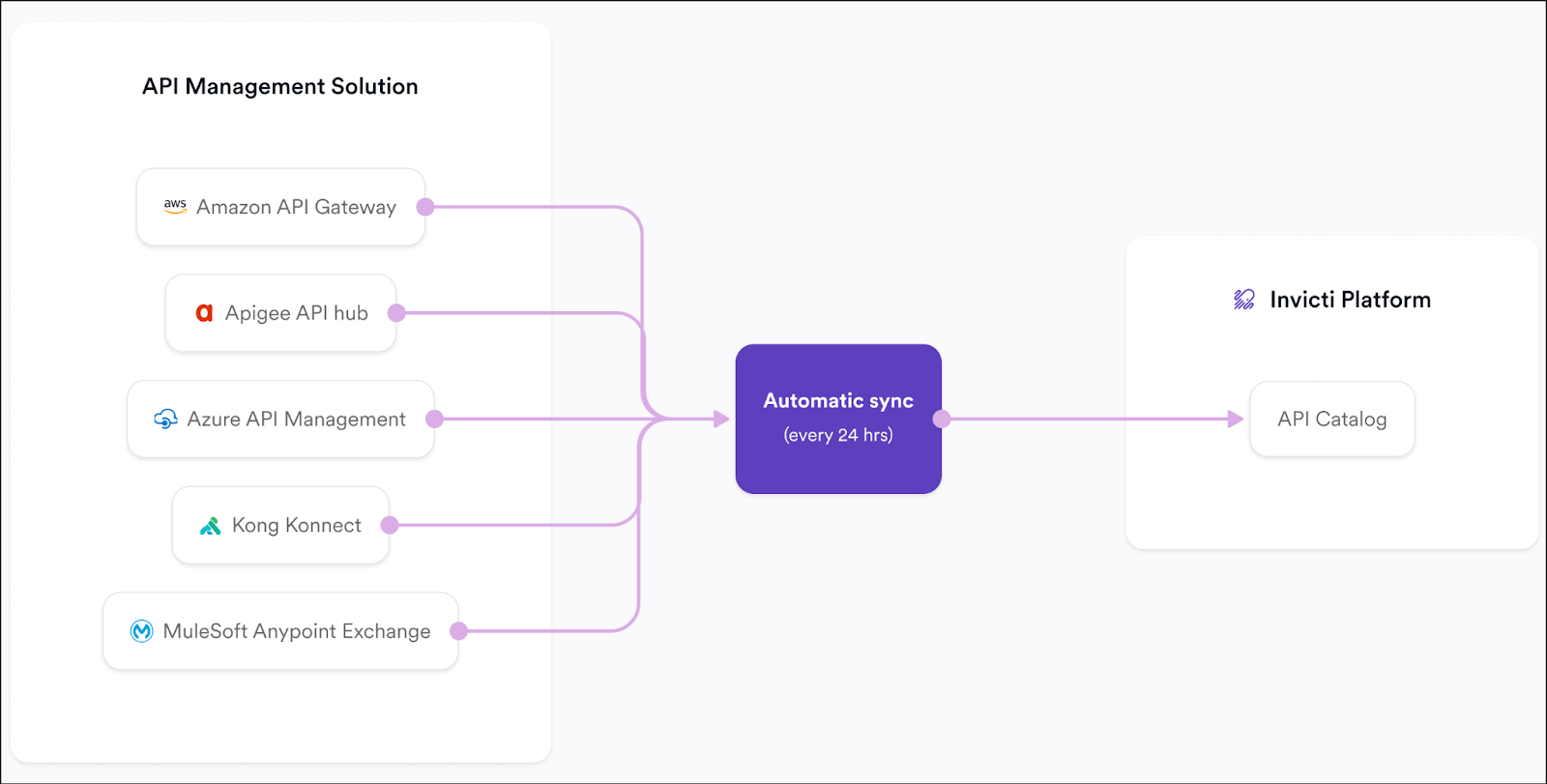
The Invicti Platform integrates with leading API management solutions—including Amazon API Gateway, Apigee API hub, Azure API Management, Kong Konnect, and MuleSoft Anypoint Exchange—to automatically retrieve and import your organization's Swagger 2.0 and OpenAPI 3.0 specifications into the Inventory > Projects. Once configured, these integrations sync every 24 hours to ensure your API catalog reflects the latest specifications.
For information on how to set up an API Management integration, refer to the following documentation:
- Integrating with Amazon API Gateway
- Integrating with Apigee API hub
- Integrating with Azure API Management
- Integrating with Kong Konnect
- Integrating MuleSoft Anypoint Exchange
Zero configuration API discovery
Zero configuration API discovery automatically discovers and processes API specifications during dynamic application security testing (DAST) scans without requiring any additional sensors or agents. This approach ensures that APIs exposed by your web applications are automatically included in security testing.
During a DAST scan, zero configuration discovery works in two ways:
-
Discovering API specifications: The scanner identifies API specification files (such as Swagger or OpenAPI documents) from common locations during crawling, detects them in HTTP responses through content analysis, and can discover GraphQL schemas through introspection requests.
-
Reconstructing API specifications: The scanner monitors HTTP and HTTPS traffic generated during testing, identifies API-like behavior patterns, and reconstructs API specifications based on observed traffic flows.
All discovered and reconstructed API specifications are automatically saved and uploaded to API Discovery, where they can be reviewed, managed, and linked to targets for comprehensive security testing.
For detailed information on configuration and setup, refer to Zero configuration API discovery overview.
What is the API catalog?
The API catalog is the area within Invicti Platform Inventory that contains APIs that have been linked to targets. APIs that haven't yet been linked to a target can be found in API discovery. Once you link an API specification file to an existing or newly created target, it moves from API discovery to the API catalog where it can be scanned for vulnerabilities.
API discovery and API catalog are complementary views. API discovery shows APIs awaiting target assignment, while the API Catalog shows APIs already linked to targets and ready for scanning.
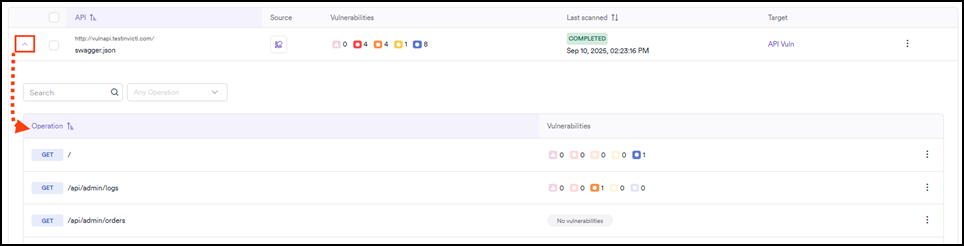
On the Inventory > API catalog page you can view the information in the following columns:
- API: the name/URL of each API.
- Source: how the API was discovered or imported (for example, via an integration or Invicti NTA).
- Target: the target to which the API is linked. (Note: All APIs in the catalog are linked to targets; unlinked APIs appear in API discovery instead.)
- Vulnerabilities: the overall vulnerability count for the API (after it has been scanned) divided by the vulnerability severity.
- Last scanned: the date and time that the API was last scanned by Invicti.

Each API listed in your API catalog can be expanded to show the individual endpoints it contains and their vulnerability count.
For more information, refer to the following documentation:
- API catalog overview
- Manage your API catalog
- Link discovered APIs to targets
- Create targets from API Discovery
Need help?
Invicti Support team is ready to provide you with technical help. Go to Help Center