Profile settings overview
This document is for Invicti Platform
All users can manage their personal settings on the Profile page. This includes changing your email address, the user interface language, time zone, password, API key, two-factor authentication, and email notifications.
This document explains how to access the Profile page.
info
License details are located under Settings. The License Management documentation explains how to view license usage and update the license key.
Access your profile
- Click [Your Name] in the bottom left corner of the page, then select Profile.
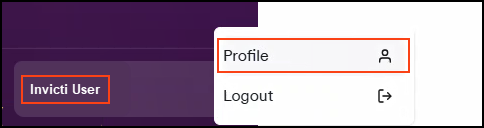
- Your profile settings are now displayed.
Related actions
For guidance on managing specific settings within your profile, refer to the following documents:
- Update your email address
- Set your time zone
- Change your password
- Generate a new API key
- Activate 2FA for your account
- Deactivate 2FA for your account
- Manage email notifications
Need help?
Invicti Support team is ready to provide you with technical help. Go to Help Center
Was this page useful?